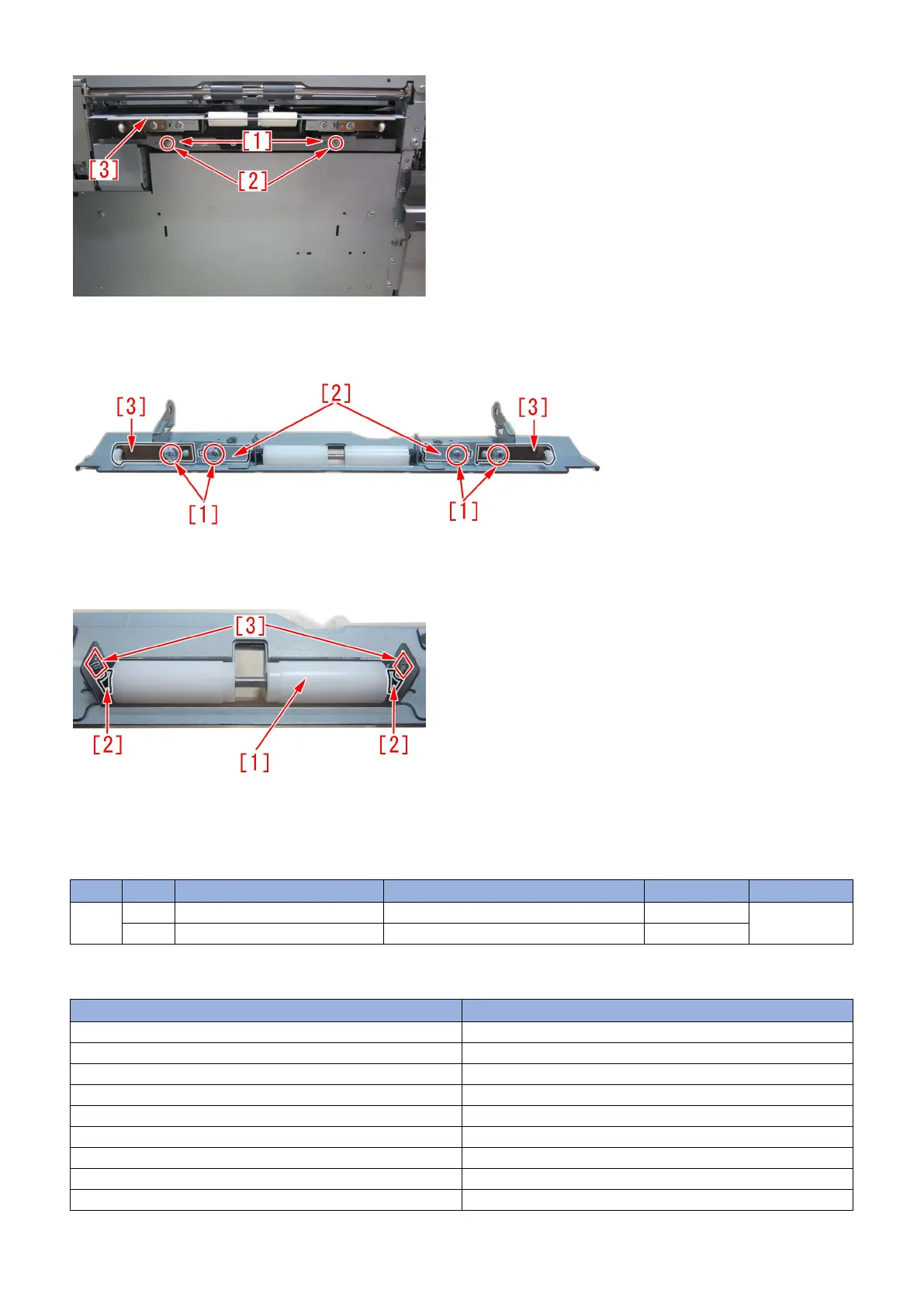
3) Remove the 4 screws [1], and then remove the 2 roller support plates [2] and the 2 brackets [3] from the deck pull-out roller
feed guide.
4) Remove the roller [1], 2 bushings [2] and 2 compression springs [3] from the deck pull-out roller feed guide.
5) Replace the feed guide with the lower feed guide (FL0-2918-000).
6) Attach the pars by reversing the steps from 4) .
[Service parts]
No. Part Number Description Q'ty Fig.No.
1 Old F40
New FL0-2918-000 FEED, LOWER 0 -> 1
[Countermeasure cut-in serial numbers in factory]
Model Serial number
POD DECK LITE_B1 UL UWD01058
POD DECK LITE_B1 EU/O UWE02351
POD DECK LITE_B1 CN UWF00049
POD DECK LITE_C1 US SZK01717
POD DECK LITE_C1 EU/O SZL01804
POD DECK LITE_C1 CN SZM00508
PAPER DECK UNIT_E1 A4 SZB02606
PAPER DECK UNIT_E1 LTR SZC04039
PAPER DECK UNIT_F1 LTR WER03181
136











 To Next Page