Measure against failure after system version upgrade (Multi
Function Professional Puncher_A1)
[Symptom/Question]
In the machine earlier than the following countermeasure cut-inserial numbers in factory, the following failures may occur on the
Multi Function Professional Puncher-A1, when the system version upgrade is done for a
main body and an accessory.
- Only LCD light is on, but characters do not appear on an operation panel of Multi Function Professional Puncher-A1.
- E503-0055: Communication Error in the Multi Function Professional Puncher
- E711-0001: IPC communication error (time out error)
[Cause]
For some reason, when power drop or power OFF is caused during the version upgrade process of Multi Function Professional
Puncher-A1, some part of the firmware fails to be written in, causing the above symptom.
[Remedy/Answer]
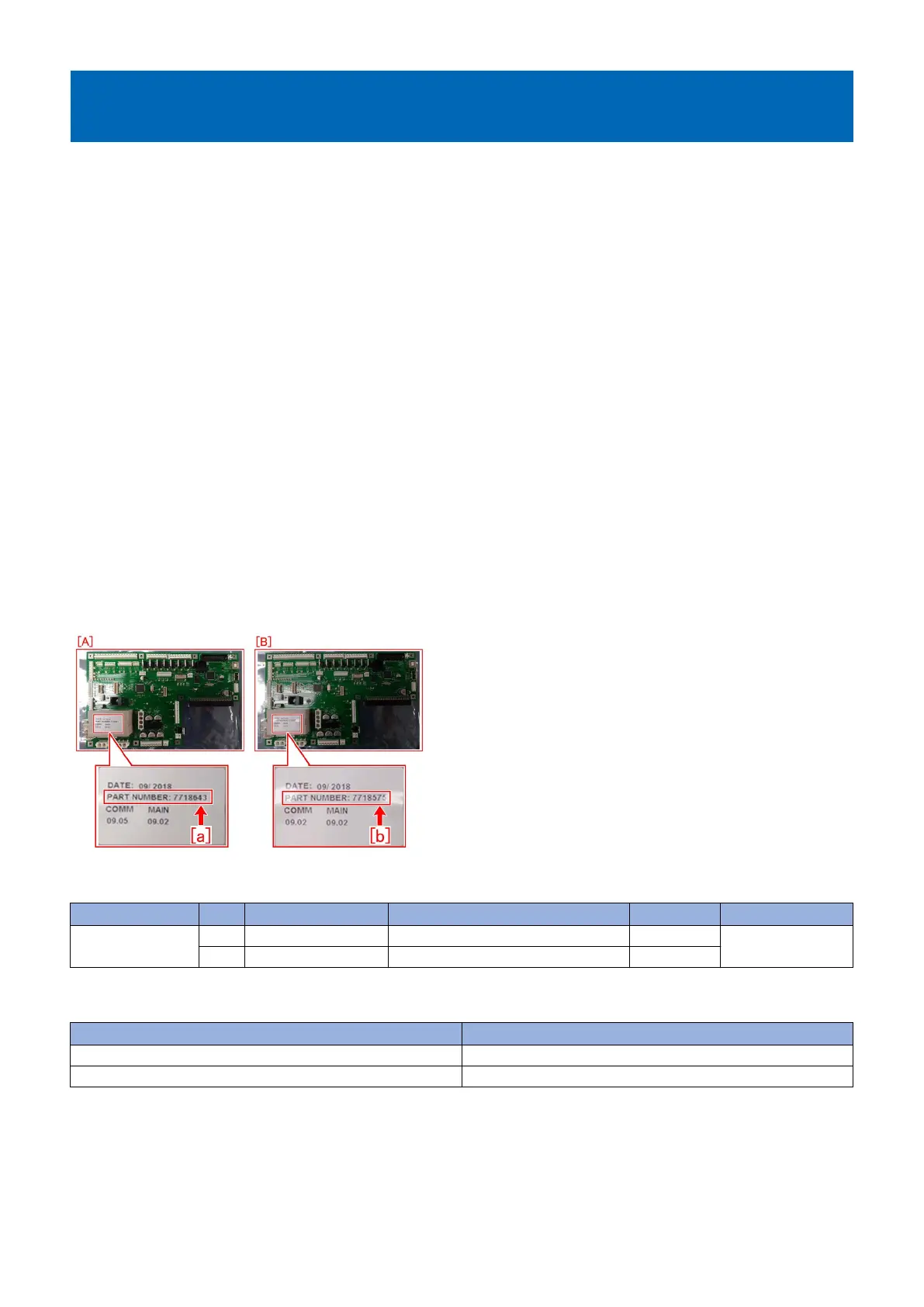
When the above mentioned failure is observed, replace with the new type MAIN CONTROLLER PCB ASS'Y( FC3-7449-000)[A],
which has its Bootloader firmware modified.
In addition, the Bootloader firmware could not be upgraded by SST, thus the MAIN CONTROLLER PCB ASS'Y is needed tobe
replaced. The new type PCB has Main Ver9.02 or later, and COMM Ver9.05 or later in it.
[NOTE]
The new/old type of MAIN CONTROLLER PCB ASS'Y could be identified by the PART NUMBER [a] [b] printed on a label on a
PCB.
- New type [A]: 7718643[a]
- Old type [B]: 7718575[b]
[Service parts]
No Part Number Description Q'ty Fig. No.
1
Old FC3-6944-000 MAIN CONTROLLER PCB ASS'Y 1 - > 0
Q40
New FC3-7449-000 MAIN CONTROLLER PCB ASS'Y 0 - > 1
[Countermeasure cut-in serial numbers in factory]
Model Serial No.
MFPP-A1 115V SYM01422
MFPP-A1 230V SYN00733
231











 To Next Page