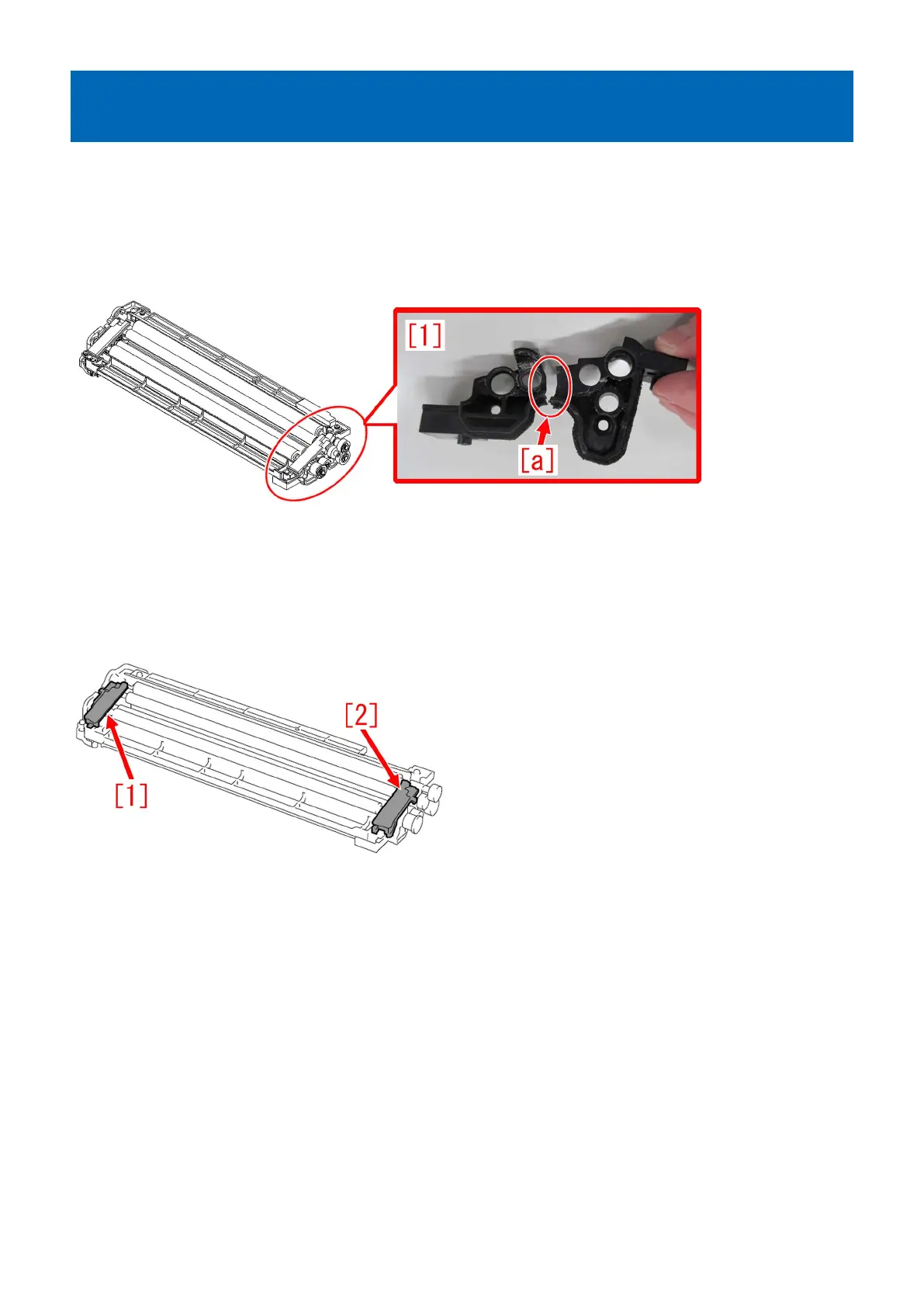
Stain on back of papers attributed to secondary transfer cleaning
failure due to breakage of cleaner front side plate
[Symptom/Question]
Stain on back of papers due to secondary transfer cleaning failure may occur.
[Cause]
As the life of the machine advances, cleaner front side plate [1] of a belt cleaner assembly of a secondary transfer assembly may
break [a]. Such breakage of a cleaner front side plate may cause cleaning failure, resulting in the above-mentioned symptom.
[Remedy/Answer]
When the above-mentioned failure occurs, prepare a newly assigned service part, the cleaner front side plate (FL0-5502-000),
and replace it by following the steps below.
1) Refer to Service manual: "4 Parts Replacement and Cleaning" > "Image Formation System" > "Replacing the Secondary
Transfer Cleaning Unit Edge Seal Bases (Rear and Front)" and remove the Edge Seal Base (Rear) [1] and the Edge Seal Base
(Front) [2].
2) Remove the 4 screws shown below, and remove the lower fur cover [1] and upper fur cover [2].
[Note] Do not remove the screw [a].
76











 To Next Page