Streaks on image due to an erroneous assemblage of the pressure
refresh roller
[Symptom]
The lines on an image may occur.
[Cause]
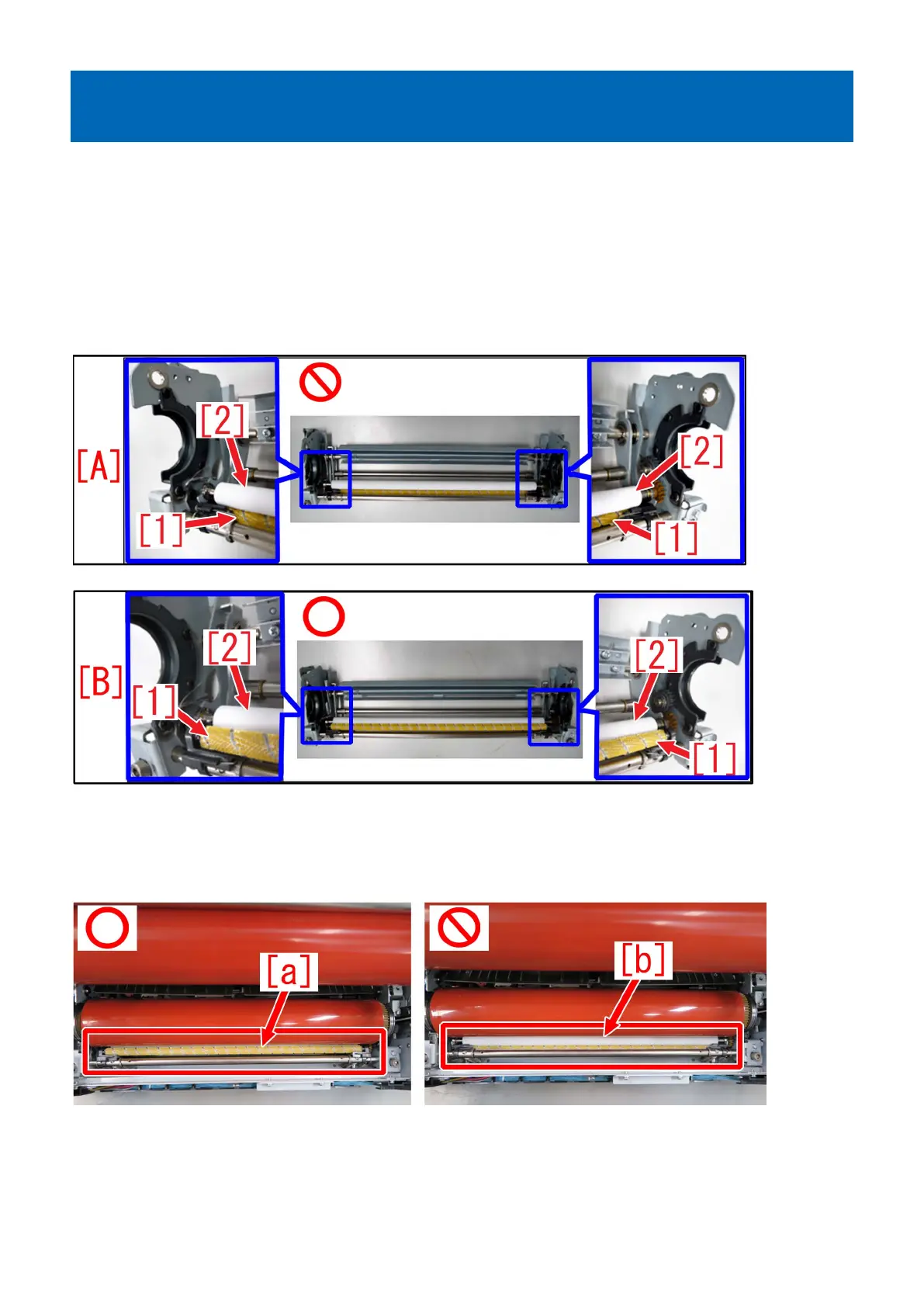
When the pressure refresh roller is replaced, the wrong order of its assembling leads poor rotation or too much contacting pressure
of cleaning brush roller. Also the uneven abrasion of pressure refresh roller occurs and it causes fine scratches on the fixing roller
causing the lines on an image.
The following photos [A] show the state of that the cleaning brush roller [1] getting under the pressure refresh roller [2]. The photos
[B] show the proper state.
[Service work]
When the pressure refresh roller is replaced, assemble the parts in proper order referring Service Manual. After the assembling,
make sure that the cleaning brush roller is placed at proper position [a]. If the pressure refresh roller [b] can be seen, it has been
assembled in a wrong way. Please assemble them again.
26











 To Next Page