E842-0051/0052 due to shift in position of the Secondary Fixing
Delivery Lower Separation Claws
[Symptom]
E842-0051 or E842-0052 may occur when turning on the main power of machine after being shipped without cushioning materials.
-E842-0051: An error in engagement operation of the Secondary Fixing Separation Claw was detected during initialization.
-E842-0052: An error in disengagement operation of the Secondary Fixing Separation Claw was detected during initialization.
[ Cause]
When shipping a machine without cushioning materials, the Secondary Fixing Delivery Lower Separation Claws may shift
diagonally due to vibration from shipping. When turning on the main power of the machine, the Secondary Fixing Delivery Lower
Separation Claws cannot perform the engage or disengage motion, resulting in the above symptom.
[ Service Work]
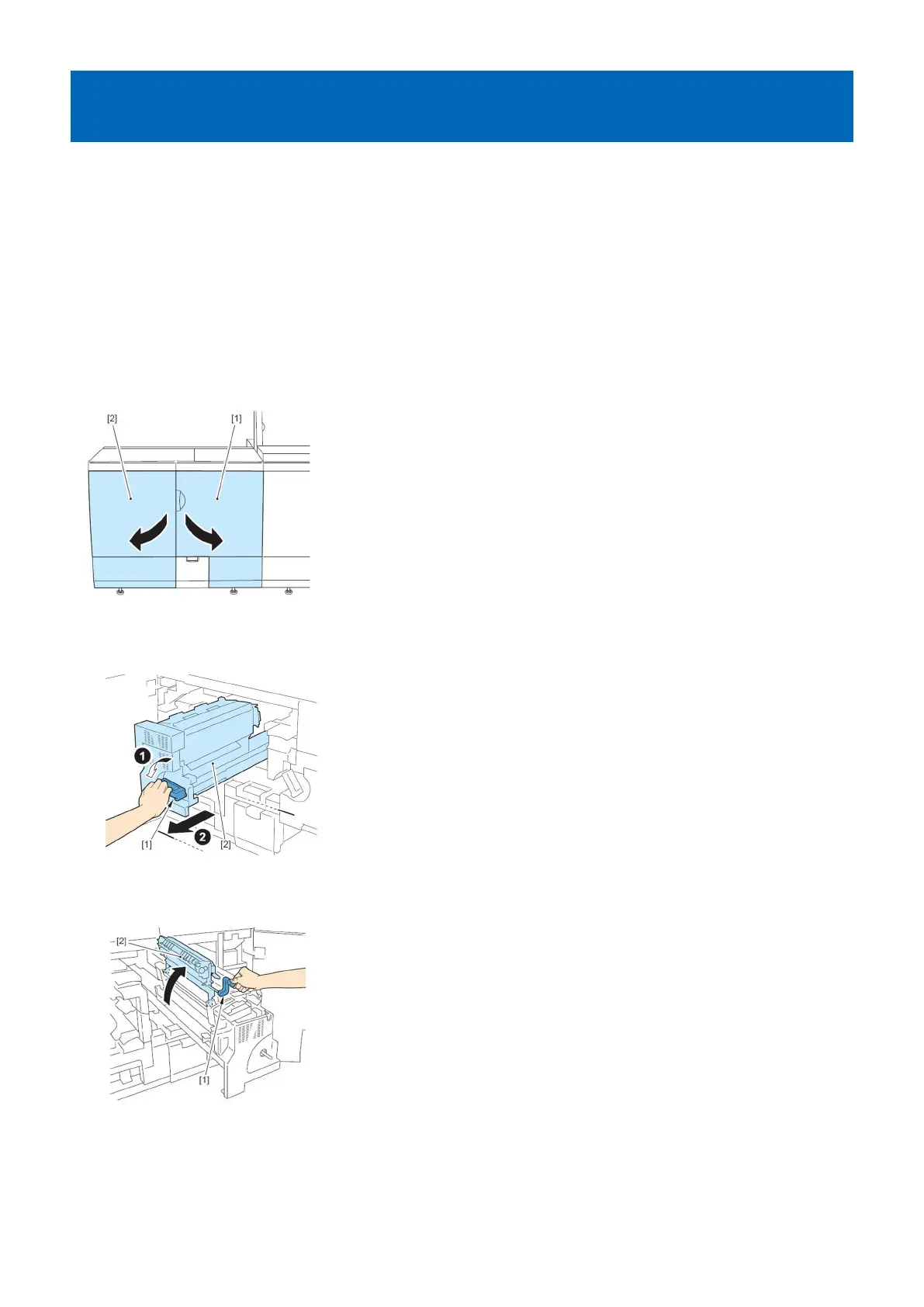
1) Open the Sub Station Front Right Cover[1]and the Sub Station Front Left Cover[2].
2) Unlock the lever(C-B4)[1], and pull out the Secondary Fixing Assembly [2].
3) Lift up the lever(C-B5) [1], and open the Secondary Fixing Inner Delivery Unit [2].
4) Reposition the separation claw of the inner delivery unit straight by moving the fixing claw mounting screw [a].
194











 To Next Page