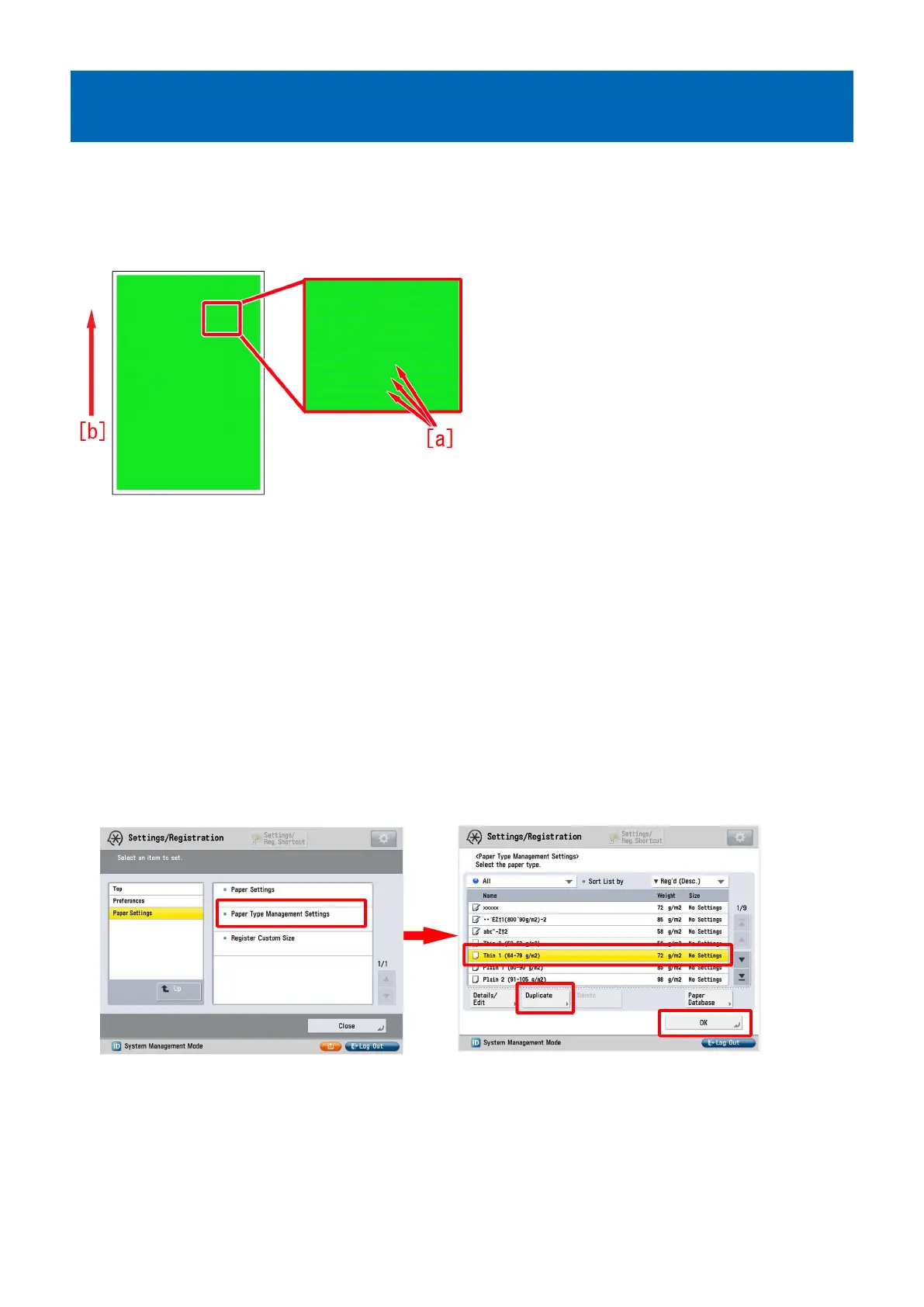
Horizontal white streaks with 2mm intervals on a high density
green image
[Symptom]
In a usage under a low humidity environment, horizontal white streaks [a] with 2mm intervals may occur on a high density green
image
The arrow [b] indicates the direction of feeding.
[Cause]
Being affected by the influence of toner or ITB, the electric current may become uneven even if a constant primary transfer voltage
is applied.
If an electrical discharge phenomenon is generated on a part where has more current after the transfer, the electric charge amount
varies among the toner on the paper.
When the electric charge amount varies, the amount of toner that was once transferred to paper and to be attracted to the drum
(retransfer) at the next station changes, so that the toner amount on the paper becomes uneven and results in the above
mentioned symptom.
A low humidity environment is likely to have this symptom as the primary transfer voltage is large.
[Service work]
1) Have the customer log in from System Management Mode in user mode.
2) Go to Select Settings/Registration > Paper Settings > Paper Type Management Settings, select an appropriate paper type
from among the list, press "Duplicate" button and then "OK" button.
3) Enter any name as the duplicated paper type and press "OK" button.
5











 To Next Page