110F Jam code due to meshing failure of the timing belt (Staple-
W1/Booklet-W1/Saddle-AN2/Finisher-AN1)
[Symptom]
110F Jam may occur during print using finisher.
-110F: Lower delivery sensor (PS6) Stationary jam
[Cause]
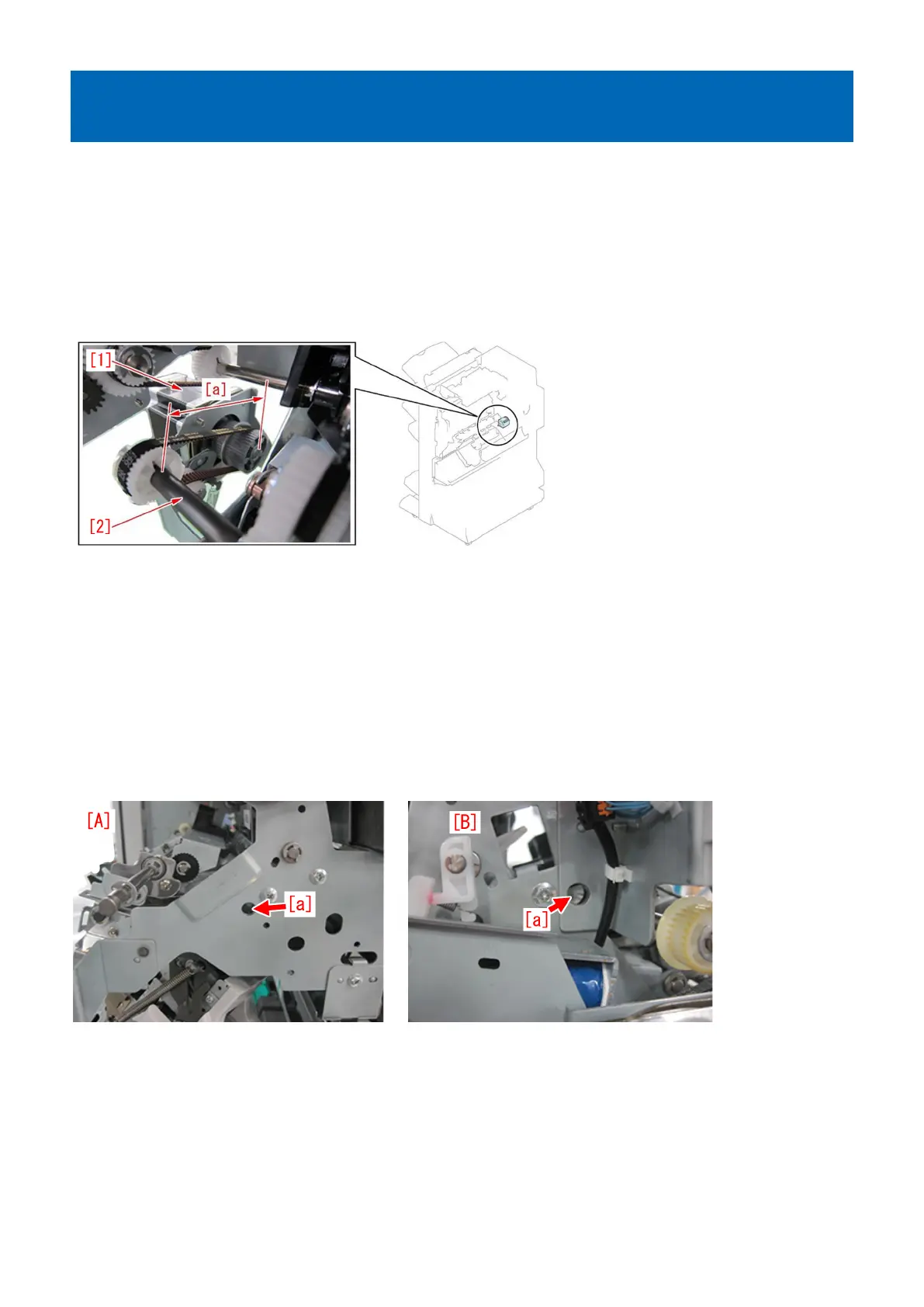
When the belt roller [2] of the process upper guide tilts to the processing feed motor (M26) [1] side, the distance between the
shafts [a] becomes smaller and makes it easier for the timing belt to get loose. When the timing belt gets loose, a meshing failure
occurs between the timing belt and the gears, resulting in the above symptom.
[Service work]
When the above symptom occurs, remove the paper delivery drive assembly (L) by following the procedure below. Then align
the connecting holes of the upper dispose guide and the front plate/rear plate, and reattach the operation feed motor (M26) so
that the distance between shafts of the belt roller in the upper dispose guide and the operation feed motor (M26) is appropriate.
The following procedure starts from after the finisher being removed from the engine.
1) Refer to "Removing the front cover" and "Removing the rear cover" in Service Manual and remove both covers.
2) Be sure that the connecting holes [a] of the upper dispose guide and the front plate/rear plate are aligned.
The photo [A] shows the front plate and the photo [B] shows the rear plate.
- If the connecting holes [a] of the upper dispose guide and the front plate/rear plate are aligned, the step 3) is not required, so
proceed to the step 4).
- If the connecting holes [a] of the upper dispose guide and the front plate/rear plate are not aligned, proceed to the next step.
3) Adjustment method
3-1) Loosen the 2 screws [1] on the front plate and the 2 screws [1] on the rear plate. Insert a round stick with 8mm diameter into
the positioning hole [a] that aligns with the upper dispose guide. The photo [A] shows the rear plate side and the photo [B] shows
the front plate side.
156











 To Next Page