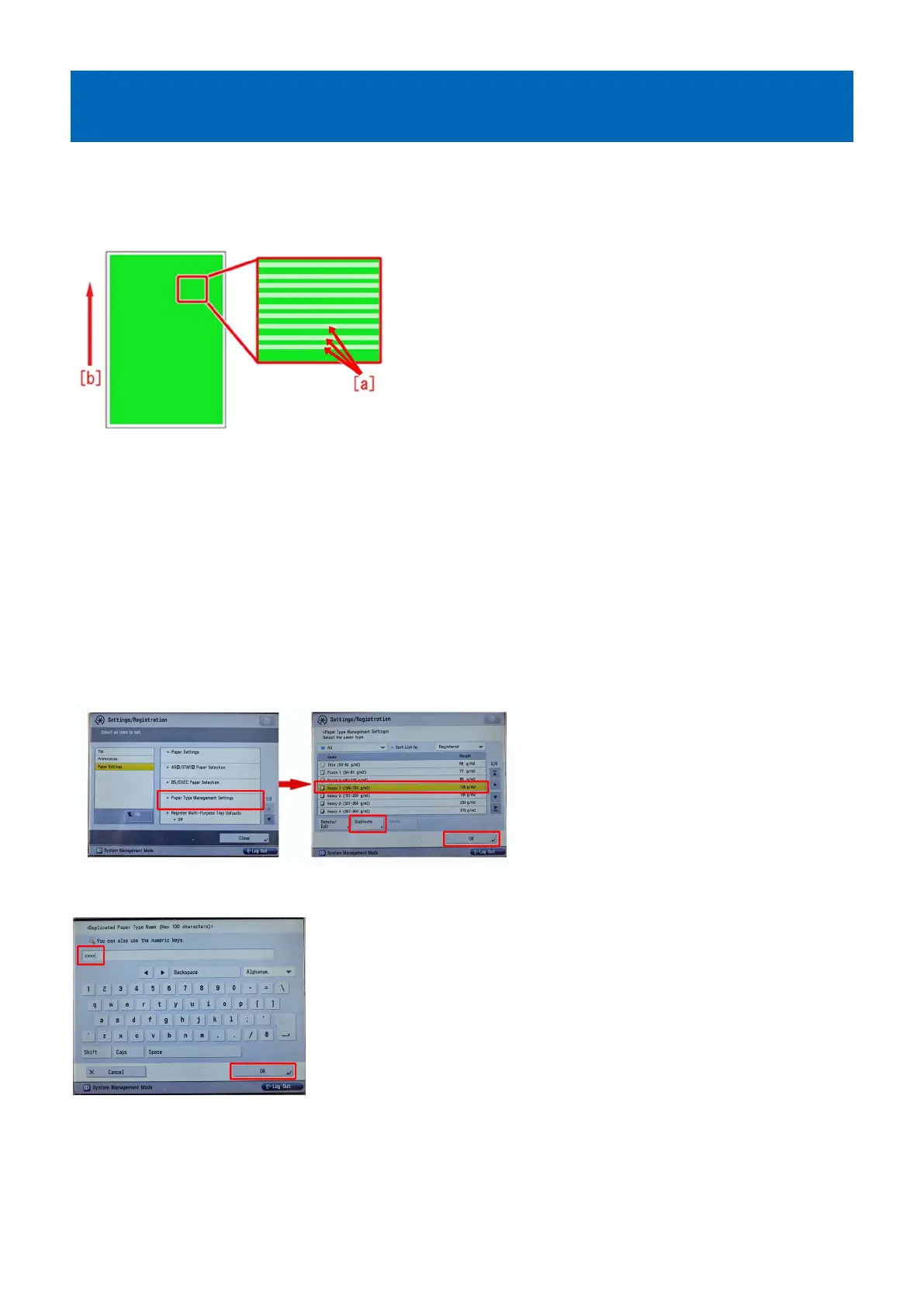
White horizontal lines at intervals of 2mm on green high-density
image caused by uneven charge amount of the ITB
[Symptom]
If used in the environment of the low humidity, white horizontal lines [a] may occur at intervals of 2mm on green high-density
image. The arrow [b] shows the feed direction.
[Cause]
Even if the fixed amount of the primary transfer voltage is applied, uneven charge amount may occur caused by the toner or ITB.
It gives a difference in the toner charging amount on the paper and the transferred toner is returned back to the drum (retransfer),
which causes the above-mentioned symptom.
Especially, in the environment of the low humidity, the symptom is more likely to occur due to the high primary transfer voltage.
[Service work]
In order to lower the primary transfer voltage and avoid the above-mentioned symptom, implement the settings by following the
steps below:
1) Press [Settings/Registration] and log in as an administrator, and go to Settings/Registration > Preferences > Paper Settings
> Paper Type Management Settings > select the paper type with which the symptom occurs from the list, and then press
[Duplicate] button and [OK] button.
2) Enter arbitrary name into the duplicated paper type and press [OK] button.
3) Select the paper type duplicated in the step 2) and press [Details/Edit].
29











 To Next Page