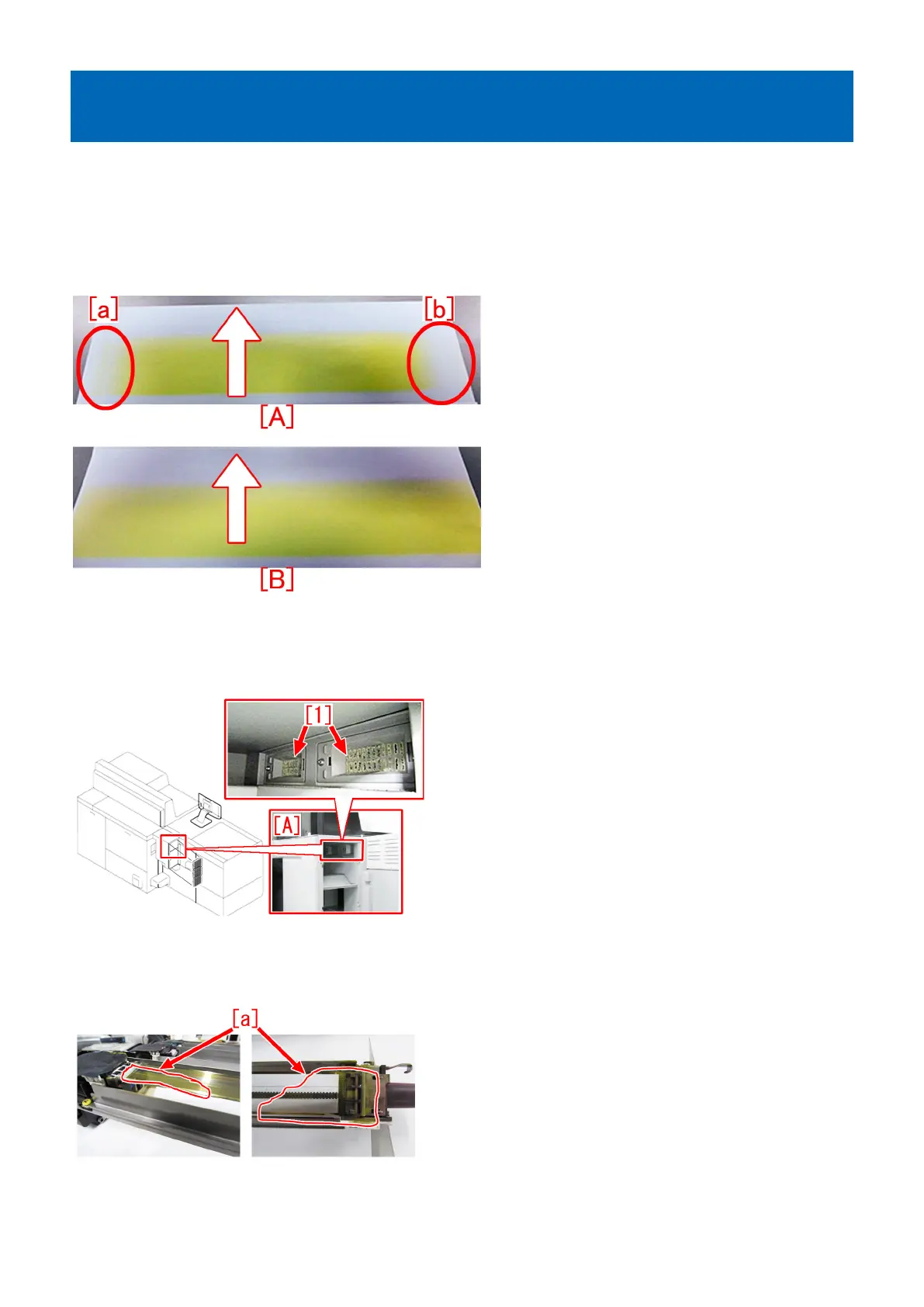
Measures against poor image density on the ends of the front and
rear sides of the image
[Symptom/Question]
In the machines prior to the Countermeasure cut-in serial number in factory described below poor image density may occur on
both the ends (the end of the front side [a]/the end of the rear side [b]) of the image or on one side of the image with the width of
approx. 20 to 30 mm.
The samples below show the images with the solid yellow images printed. The photo [A] shows the image with poor density, and
the photo [B] shows the normal image. The arrows show the paper feeding direction.
[Cause]
The filter base [1] inside the exhaust duct unit ozone filter [A] of the sub station is clogged, and poor exhaust inside the machine
occurs.
This causes stains to adhere to the etching grid plate (on the end of the front side and on the end of the rear side) of the primary
corona assembly, and charging failure occurs, resulting in poor image density.
The photos below are examples of yellow, which show the stains [a] on the grid plate of the primary corona assembly.
[Note] There is contamination due to toner stains (they will be removed from the grid plate by blowing or wiping) or white adhering
substances (they look like toner stains; however, they are sticky and will not be removed by blowing or wiping).
83











 To Next Page