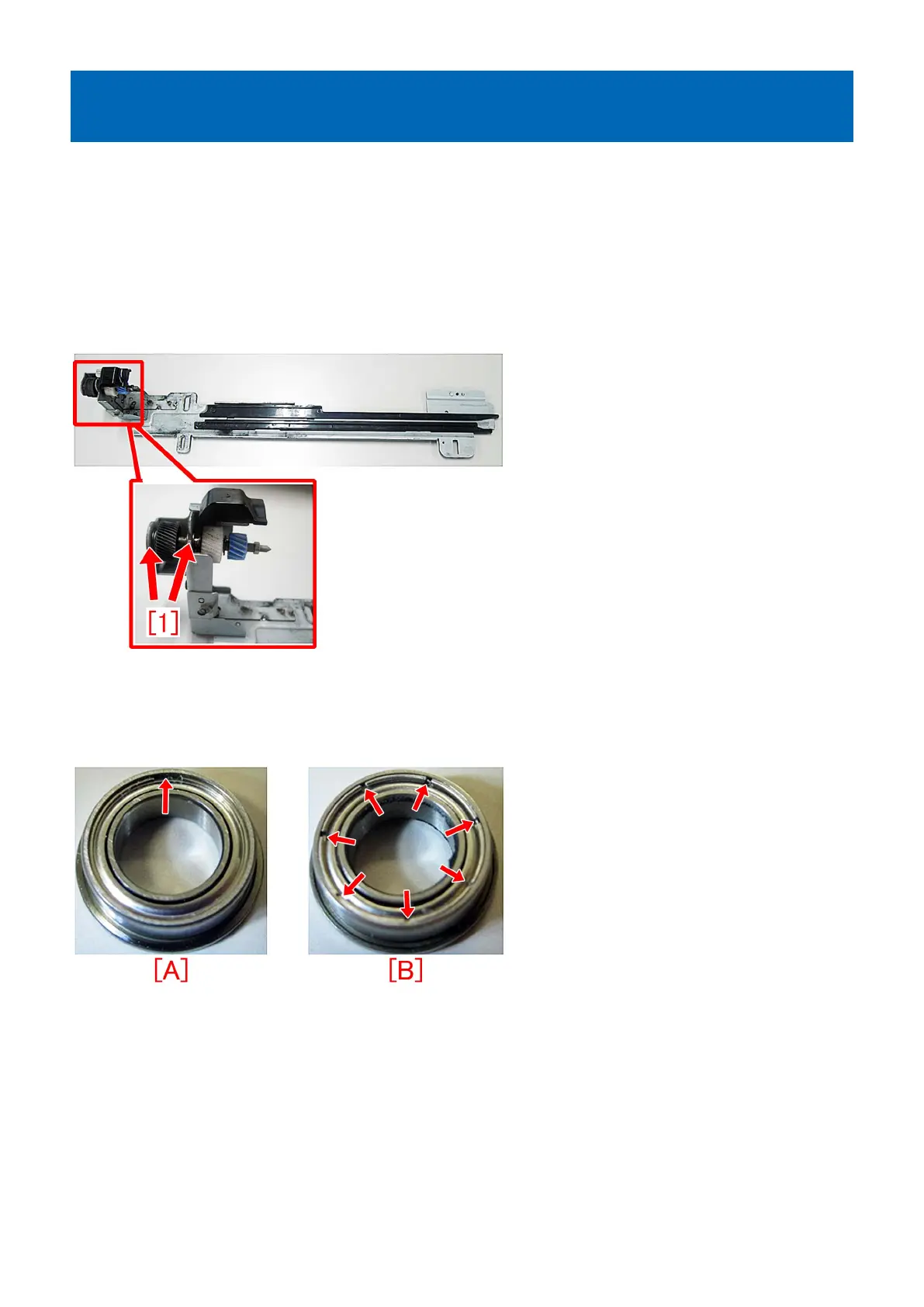
E023-0x00/E025-0x51/a white band due to damaged ball bearings
in the developing drive rail assembly
[Symptom]
E023-0x00, E025-0x51 or a white band in the paper feed direction may occur on a main body whose serial number is earlier than
the following countermeasure cut-in serial numbers in factory.
- E023-0x00 : Developing Motor error (x=1:Y, 2:M, 3:C, 4:Bk)
- E025-0x51 : Hopper Motor error (x=1:Y, 2:M, 3:C, 4:Bk)
[Cause]
When the product has a job with great number of continuous prints and large printing volume, the exhaustion of grease for two
ball bearings [1] in the developing drive rail assembly damages the bearings and that results in the above-mentioned symptom.
[Service work]
When the above-mentioned symptom occurs, prepare two new type ball bearings (XG9-0787-000) and four E-rings
(XD2-1100-502) to replace them following the steps below.
Photo [A] indicates new type ball bearing having one slit and photo [B] indicates a conventional ball bearing having seven slits.
1) Pull out the specified colored process unit from the main body referring the Service Manual.
2) Remove two screws [1] from the rear side of process unit to detach the fixing member [2] for the motor unit and also remove
the ball bearing [3] and the washer [4].
214




 To Next Page