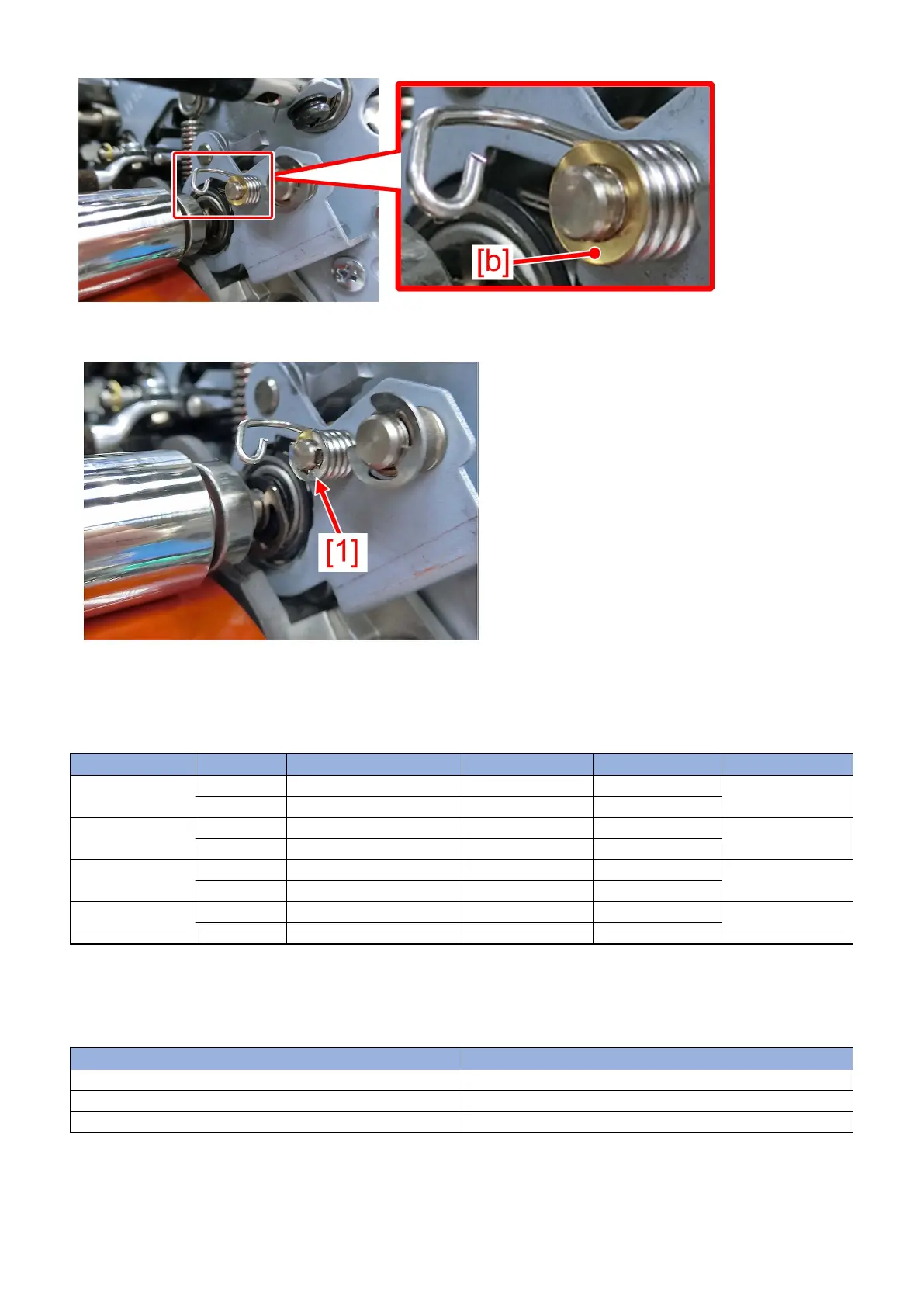
12) Attach the new E-ring [1] onto the washer
13) Move the paper placed in the step 5) to the opposite side (the torsion spring on the rear side) and replace it with the torsion
spring (rear side) (FU2-0420-010) by following the steps in the order of 6) to 12).
14) Return the parts by reversing the procedure form the step 4).
[Service parts]
No. Part Number Description Q'ty Fig. No.
1 Old FU2-0419-000 TORSION SPRING 2 -> 0 815
855
New FU2-0419-010 TORSION SPRING 0 -> 2
2 Old FU2-0420-000 TORSION SPRING 2 -> 0 815
855
New FU2-0420-010 TORSION SPRING 0 -> 2
3 Old 815
855
New XD1-1104-122 WASHER 0 -> 4
4 Old FY9-6037-000 HANARL UD-321 1 -> 1 815
855
New
[Factory Measures]
Change the torsion spring into the new-type torsion spring (front side/rear side) and add the washer and application of the hanarl.
[Countermeasure cut-in serial numbers in factory]
Model Serial No.
imagePRESS C10000VPSR FS US WBE15324
imagePRESS C10000VPSR FS EUO WBF15318
imagePRESS C10000VPSR FS CN WBG15027
70











 To Next Page