Chapter 8
8-30
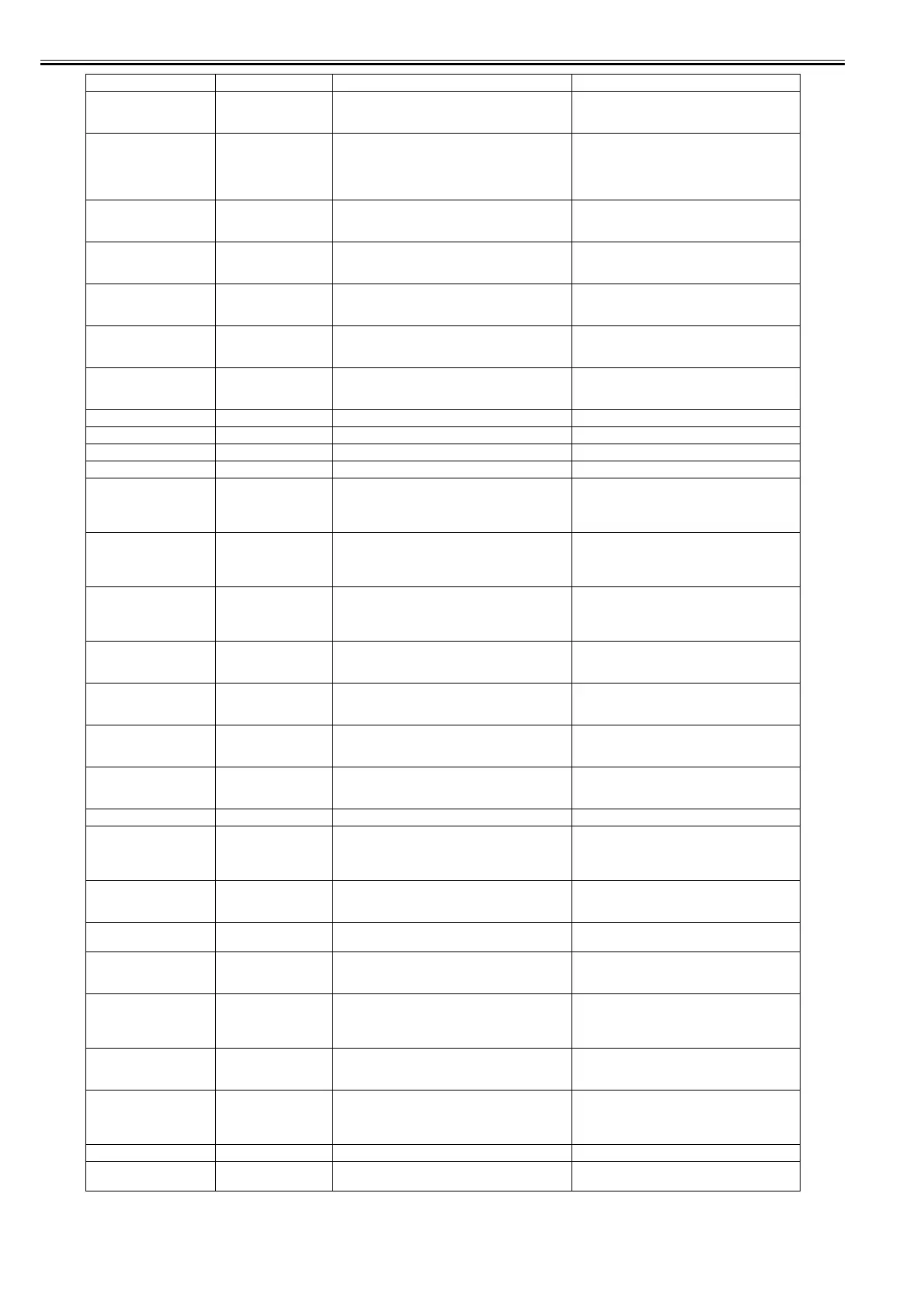
Paper size not detected.
Lift the release lever and
reload the paper.
03010000-200C Unable to detect the leading end of paper Check the leading end of paper.
Reload the paper.
Leading edge detection
error.
Lift the release lever and
align leading edge with
orange line.
03010000-200D Unable to detect the trailing end of cut sheet Check the sheet length.
Check to see if paper has not jammed.
This paper cannot be used.
Check supported paper
sizes.
03010000-200E Undersized paper (cut sheets/roll media) Replace with larger-sized paper.
This paper cannot be used.
Check supported paper
sizes.
03010000-200F Oversized paper (cut sheets/roll media) Replace with smaller-sized paper.
Paper jam.
Manually rewind roll all the
way.
03010000-2016 Cut sheet feed failure Check or replace a cut sheet.
Paper size not detected.
Lift the release lever and
reload the paper.
03010000-2017 Paper (right) edge detection error Check the right edge of paper.
Check the paper type.
Paper size not detected.
Lift the release lever and
reload the paper.
03010000-2018 Paper (left) edge detection error Check the left edge of paper.
Check the paper type.
03010000-201A Paper (right) edge detection error (cut sheet pick-up) Set or replace the media.
03010000-201B Paper (right) edge detection error (roll media pick-up) Set or replace the media.
03010000-201C Paper (left) edge detection error (cut sheet pick-up) Set or replace the media.
03010000-201D Paper (left) edge detection error (roll media pick-up) Set or replace the media.
Cannot print as specified.
Lift the release lever and
replace paper with A4/LTR
(vertical) or larger.
03010000-2E1F Undersized paper loaded for internal printing (A4 or
larger)
Replace with A4/Letter or any larger-sized paper.
Cannot print as specified.
Lift the release lever and
replace paper with A3/
Ledger (vertical) or larger.
03010000-2E1F Undersized paper loaded for internal printing (A3 or
larger)
Replace with A3/11"x17" or any larger-sized paper.
Cannot print as specified.
Lift the release lever and
replace roll with 10 in. wide
or larger roll.
03010000-2E1F Undersized paper loaded for internal printing (roll
media)
Replace with roll media at least 10 inches in width.
Cannot feed paper.
Remove paper and press
Load/Eject.
03010000-2E25 Paper jam while feeding/ejecting/printing Remove the paper jam and reload the paper.
Cannot feed paper.
Lift the release lever and
reload paper.
03010000-2E27 Paper jam during feeding/printing/ejection Reload the paper.
Paper jam.
Manually rewind roll all the
way and press OK.
03010000-2E3A Madia load failure Check the pick-up unit and roll media.
Check to see if paper has not jammed.
Paper jam.
Manually rewind roll all the
way and press OK.
03010000-2E3B Madia load failure (lower roll) Check the pick-up unit and roll media.
Check to see if paper has not jammed.
Error in cutter position. 03010000-2E47 Cutter position error Check the cutter unit and surrounding part.
Hardware error.
03130031-2E29
Turn off printer, wait, then
turn on again.
03010000-2F29 Feed motor timeout (Roll media) Check the roll feed unit.
Check roll media.
Check to see if paper has not jammed in the printer.
Use another paper.
Press Online to clear the
error.
03010000-2F33 Unadjustable because of transparent media Replace with adjustable media.
Paper loaded askew.
Lift the release lever.
03016000-2010 Skew Correct the skew in the paper and reload it.
Ink tank cover is open.
Turn off printer,wait a
while, and turn it on again.
03031000-2E10 Ink tank cover abnormally open Close the ink tank cover and turn on the printer
again.
Rel lever is in wrong
position.
Turn off printer, wait, then
turn on again.
03031000-2F21 Pinch roller open error Check the pinch roller unit and surrounding part.
Top cover is open.
Turn off printer, wait a
while, and turn it on again.
03031000-2F38 Top cover abnormally open Close the top cover and turn on the printer again.
Paper mismatch.
Make sure media type and
paper size match for the
adjustment print.
03060000-2E20 Cut sheet type or size is not match when printing the
printhead registration.
Change the cut sheet.
Sheet printing is selected. 03060100-2E02 Cut sheet is not loaded when printing. Set the cut sheet.
03060100-2E05 Cut sheet is not loaded when receiving the printing
job.
Set the cut sheet.
Display massage Code* Condition detected Action














 To Next Page