3-CONTROLSANDINSTRUMENTS
Radio
SMIL15CEX0753EA1
NOTICE:Ifwatergetsintoaspeakercaseortheradio,itcancauseanunexpectedbreakdown.Donotletwatergeton
orinthem.Inparticular,keepthewindowclosedwhenitrainsandwhenwashingthemachine.Donotusebenzene,
paintthinner,oranyothersolventtocleanthedisplay.Useadryandsoftclothforwiping.Donotdisassemblethe
radio.
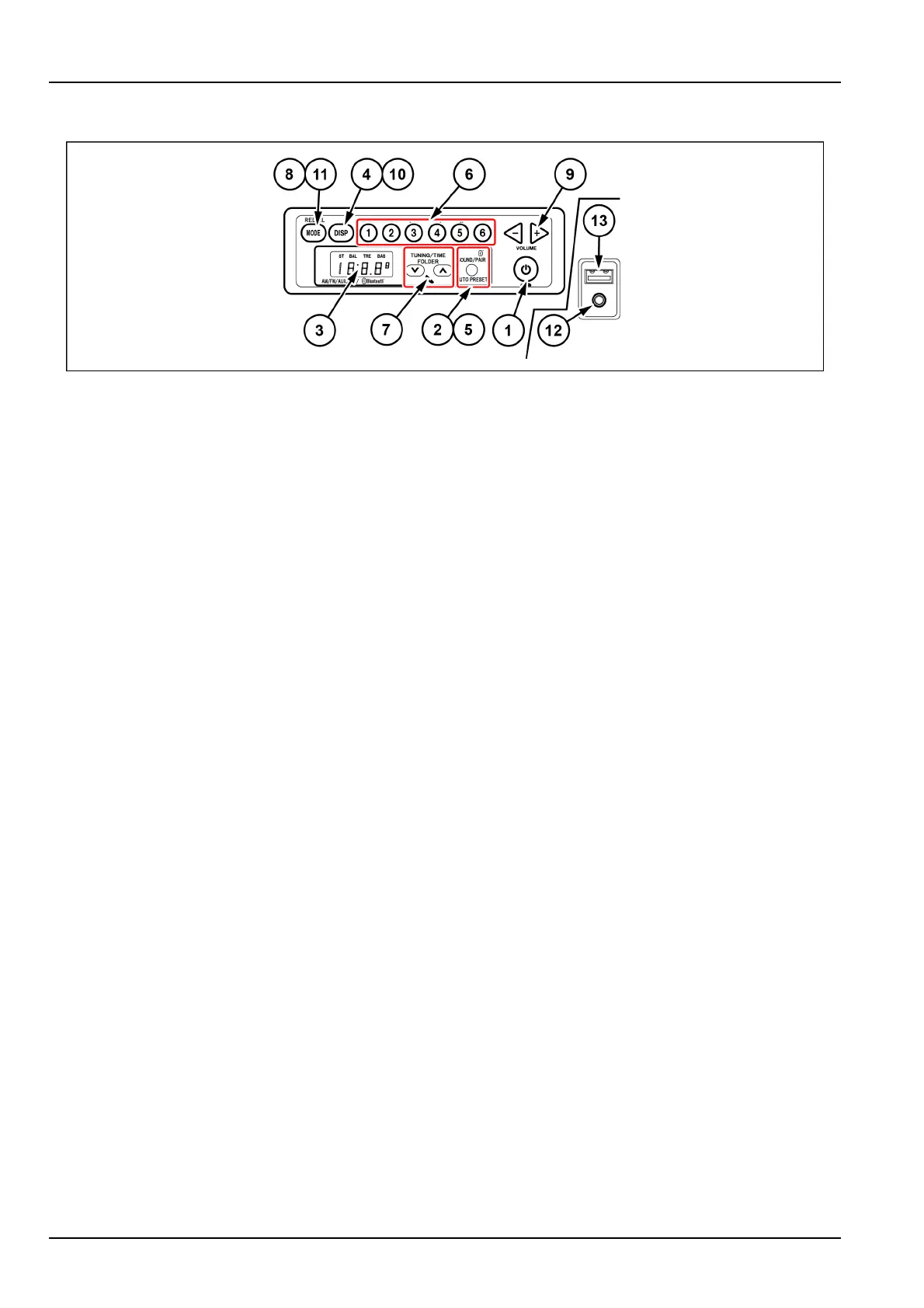
1.Powerbutton:pressPOWERtoturnontheradio.Thebandnameisdisplayedfollowedbythefrequency.Press
POWERagaintoturnofftheradio.Theclockisdisplayed.
2.Soundadjustment:pressSOUNDtoswitchbetweenBAL,TRE.andBAS.
•
PressingthetuningbuttonswithBAL(balance)selectedallowsyoutomakeadjustments.Presstheupbutton(7)
toraisetheoutputleveloftherightspeaker.Pressthedownbutton(7)tolowertheoutputleveloftheleftspeaker.
(Outputlevelsofbothspeakersgoupto7).
•
PressingthetuningbuttonswithTRE(treble)selectedallowsyoutomakeadjustments.Presstheupbutton(7)to
raisethelevelbyonestep.Pressthedownbutton(7)tolowerthelevelbyonestep.(Thelevelsgoupanddown
upto7).
•
PressingthetuningbuttonswithBAS(bass)selectedallowsyoutomakeadjustments.Presstheupbutton(7)to
raisethelevelbyonestep.Pressthedownbutton(7)tolowerthelevelbyonestep.
3.Display:theclock,theradiofrequency,andtheoperationmodearedisplayed.
4.Clock/FrequencybuttonDISP:Pressingthisbuttonswitchesthedisplaytotheclock.Pressingitagaindisplays
theband.Ifyouleavethedisplayalone,itreturnstothefrequencydisplayafter1s.
5.Autopreset(SOUND/AUTOPRESET):Whenthisbuttonishelddownforatleast2s,receivablebroadcaststa-
tionscanbememorizedforpresetbuttons1through6.
6.Presetbuttons1through6:OneFM1,oneFM2,andoneAMstationcanbepresetforeachbutton.Ifyoulong
pushthedesirednumberofthepresetkeys(1to6)withtheradioON,thereceivingfrequencyisregisteredwith
thenumberselected.Thepresetdisplayashes3timesandthenthefrequencydisplaylightsup.
7.Tuningbutton(TUNE)
WhenTUNEbuttonishelddownforatleast1s,theradiobeginstosearchautomaticallyforareceivablestation
andstopswhenitndsastation.T ostopthissearchmidway,pressthisbuttonagain.
Pressingtheupbuttonincreasesthefrequency.Pressingthedownbuttonlowersthefrequency.
Holdingdowneitherbuttonchangesthefrequencycontinuously.
8.Modeselectorbutton(MODE)
PressingthisbuttonswitchesthebandbetweenAM,FM1,FM2,AUX,USB,BT.Thereceptionbandisdisplayed
onthedisplay.
9.Volumeadjustmentbuttons(VOLUME-,VOLUME+)
PressingVOLUME-buttonlowerthevolume.PressingVOLUME+buttonraisesthevolume.
Holdingdowneitherbuttonchangesthevolumecontinuously.
10.Clockadjustment(DISP)
PressingDISPbuttonforatleastonesecondwiththeclockdisplayselectedallowsyoutoadjusttheclock.
PressingtheDISPbuttonswitchesbetweenhoursandminutesadjustments.
Pressingthisbuttonagaincancelstheclockadjustment.
3-52



 To Next Page