3-CONTROLSANDINSTRUMENTS
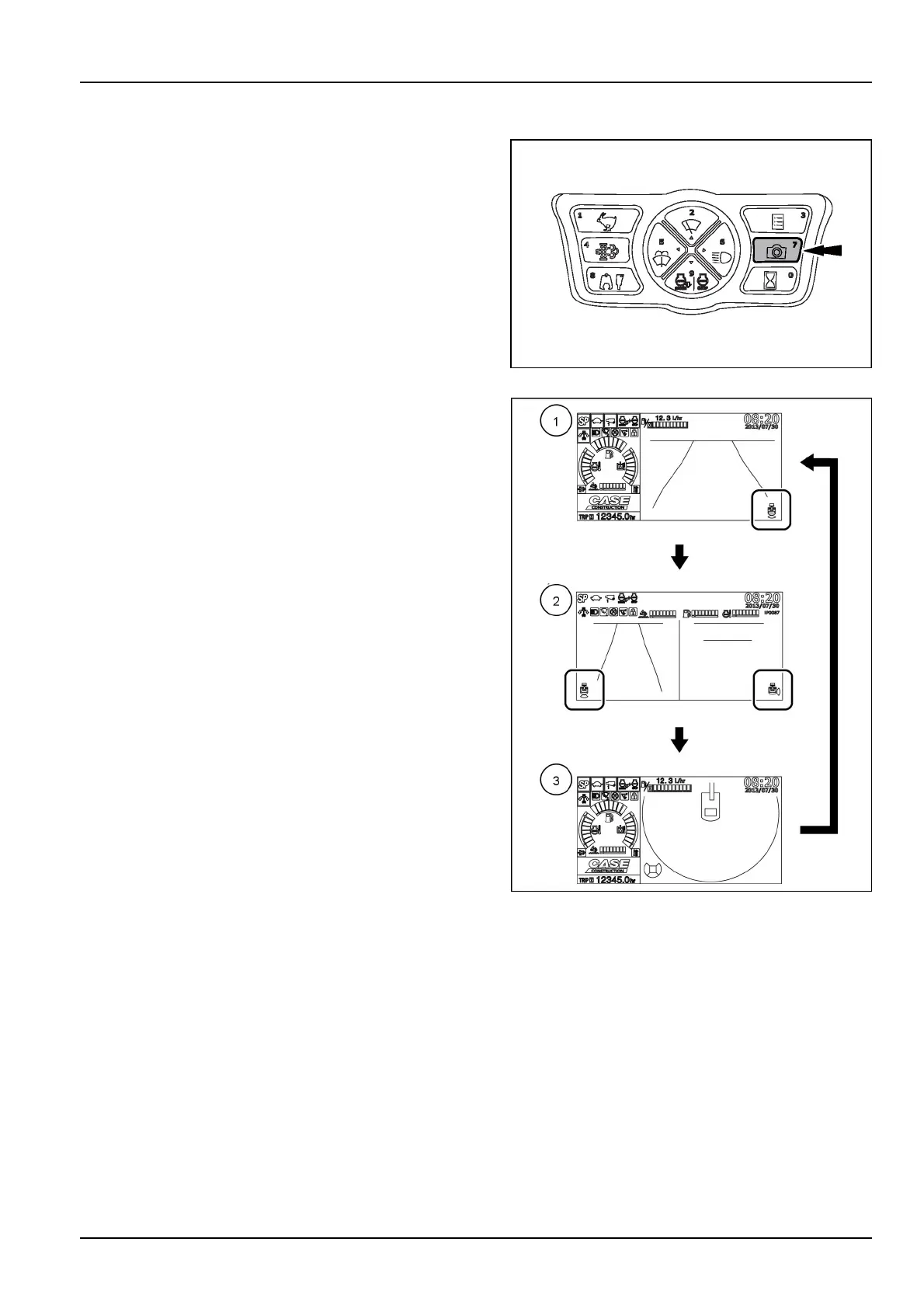
Cameraviewselectorbutton
Theoperatingmodeofthedisplaycyclesasfollowsevery
timethecameraviewselectorbuttonispressed.
SMIL14CEX1729AA18
(1)Rearcameraviewoperatingmode.
(2)Rearcameraviewandright-sidecameraviewoper-
atingmode.
(3)FieldViewMonitorbird'seyeviewoperatingmode.
NOTE:Theoperatingmode(2)canbeselectedonlyif
theoptionalright-sidecameraisequipped.Theoperating
mode(3)canbeselectedonlyiftheoptionalFieldView
Monitorsystemisequipped.
NOTE:Thedefaultsequenceoftheoperatingmodesof
thedisplaystartsfromtheoperatingmode(1).Consult
theCASECONSTRUCTIONDealerforsettingadifferent
sequenceoftheoperatingmodesofthedisplay.
NOTICE:Duringmachineoperation,makesuretoselect
eitheroneoperatingmodeofthedisplayinordertoensure
propervisibilityaroundthemachine.
SMIL17CEX3235BA19
3-39



 To Next Page