DeviceMaster Installation and Configuration Guide: 2000594 Rev. F Initial Configuration - 37
Installing PortVision DX
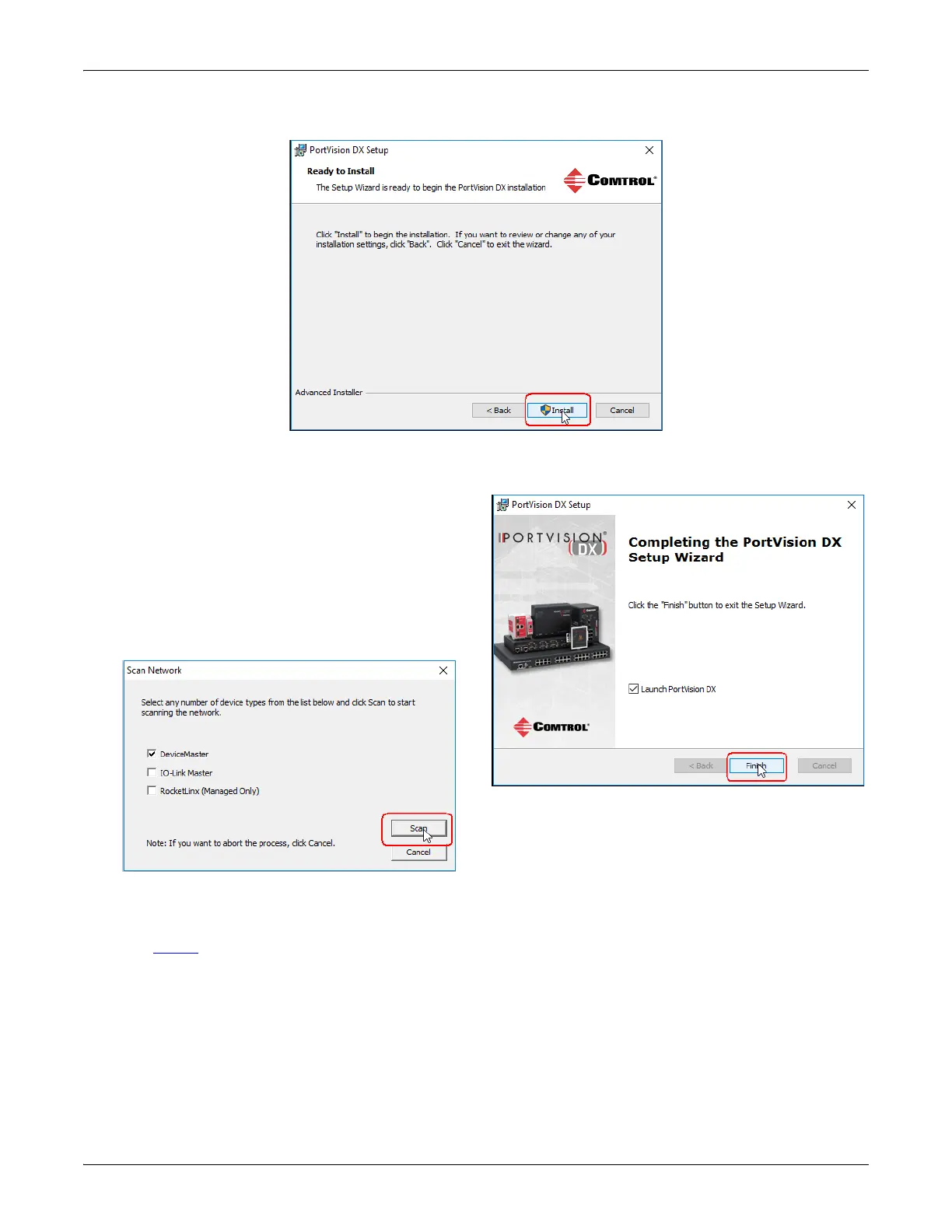
8. Click Install.
9. Depending on the operating system, you may need to click Yes to the Do you want to allow the following
program to install software on this computer? query.
10. Click Launch PortVision DX and Finish in the last
installation screen.
11. Depending on the operating system, you may need
to click Yes to the Do you want to allow the
following program to make changes to this
computer? query.
12. Select the Comtrol Ethernet attached products
that you want to locate and then click Scan.
Note: If the Comtrol Ethernet attached product is not on the local segment and it has been programmed
with an IP address, it will be necessary to manually add the Comtrol Ethernet attached product to
PortVision DX.
13. Go to Step 6
in the next section, Configuring the Network Settings, to program the DeviceMaster network
settings.
If you need additional information about PortVision DX, refer to the Help system.
Save time, only scan for DeviceMasters.



 To Next Page