Secon 5 - Engineer’s Program
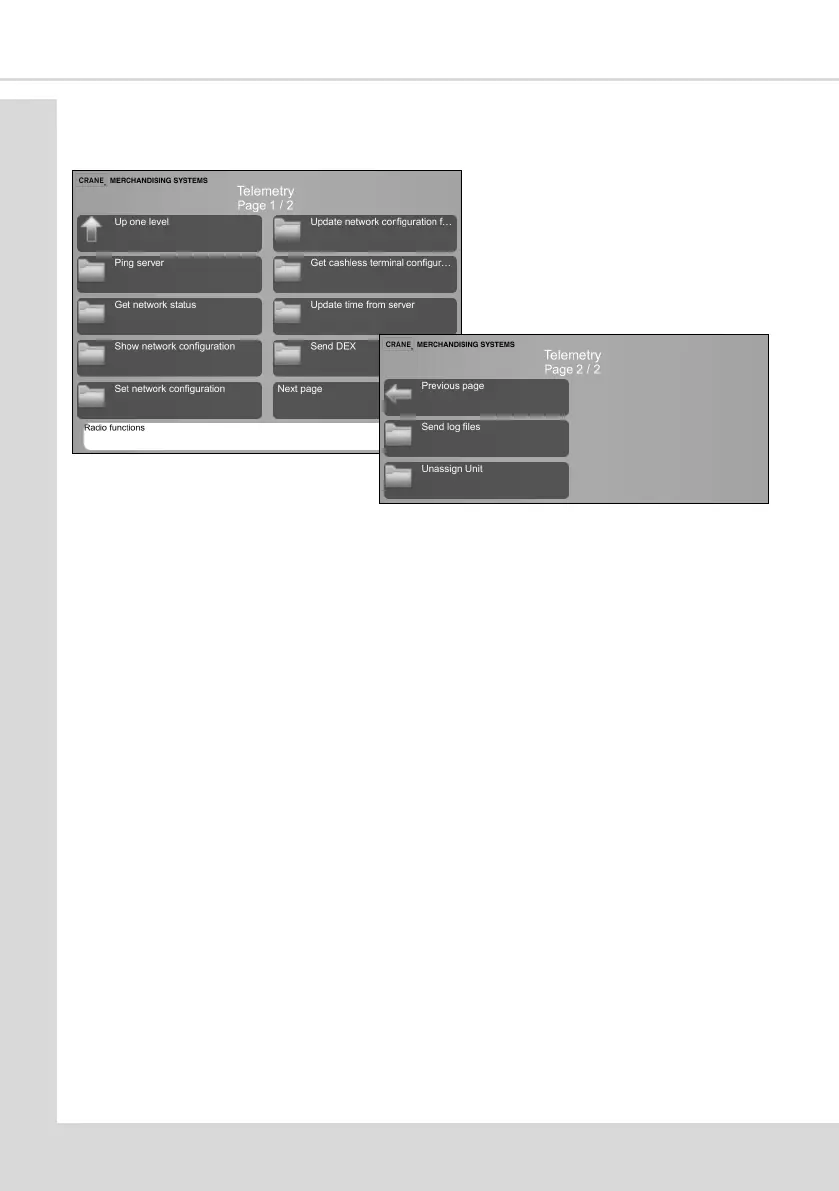
5.14.2 Assigned unit menu
Once a machine has been assigned addional menu opons will become available.
5.14.2.1 Ping Server - allows communicaon with server to be tested.
5.14.2.2 Get network status - will show various sengs including GPRS SSI, IP Address,
URL and ESN informaon.
5.14.2.3 Show network conguraon - GSM APN, User, Password and Zigbee
informaon.
5.14.2.4 Set network conguraon - will show GSM sengs.
5.14.2.5 Update network conguraon from server - Enables the network
conguraon to be updated OTA (over the air).
5.14.2.6 Get cashless terminal conguraon from server - Enables the terminal
conguraon to be updated OTA.
5.14.2.7 Update me from server - will ensure that the me is synchronised with the
server.
5.14.2.8 Send DEX - will send a DEX report to the server.
5.14.2.9 Send log les - allows various log les to be sent to the server.
5.14.2.10 Unassign Unit - allows the machine to be unassigned from the server.
5.15 Leave Service Applicaon
This exits the Engineers Program and returns the machine to standby mode. Alternavely
the machine door can be closed to exit the program and standby mode.
5.16 Machine Reboot
Aer you conrm you wish to do so this iniates a reboot of the machine.



 To Next Page