View or configure the Brightness level setting.
View or configure the Brightness time setting.
10.7.2 View or configure the brightness level setting
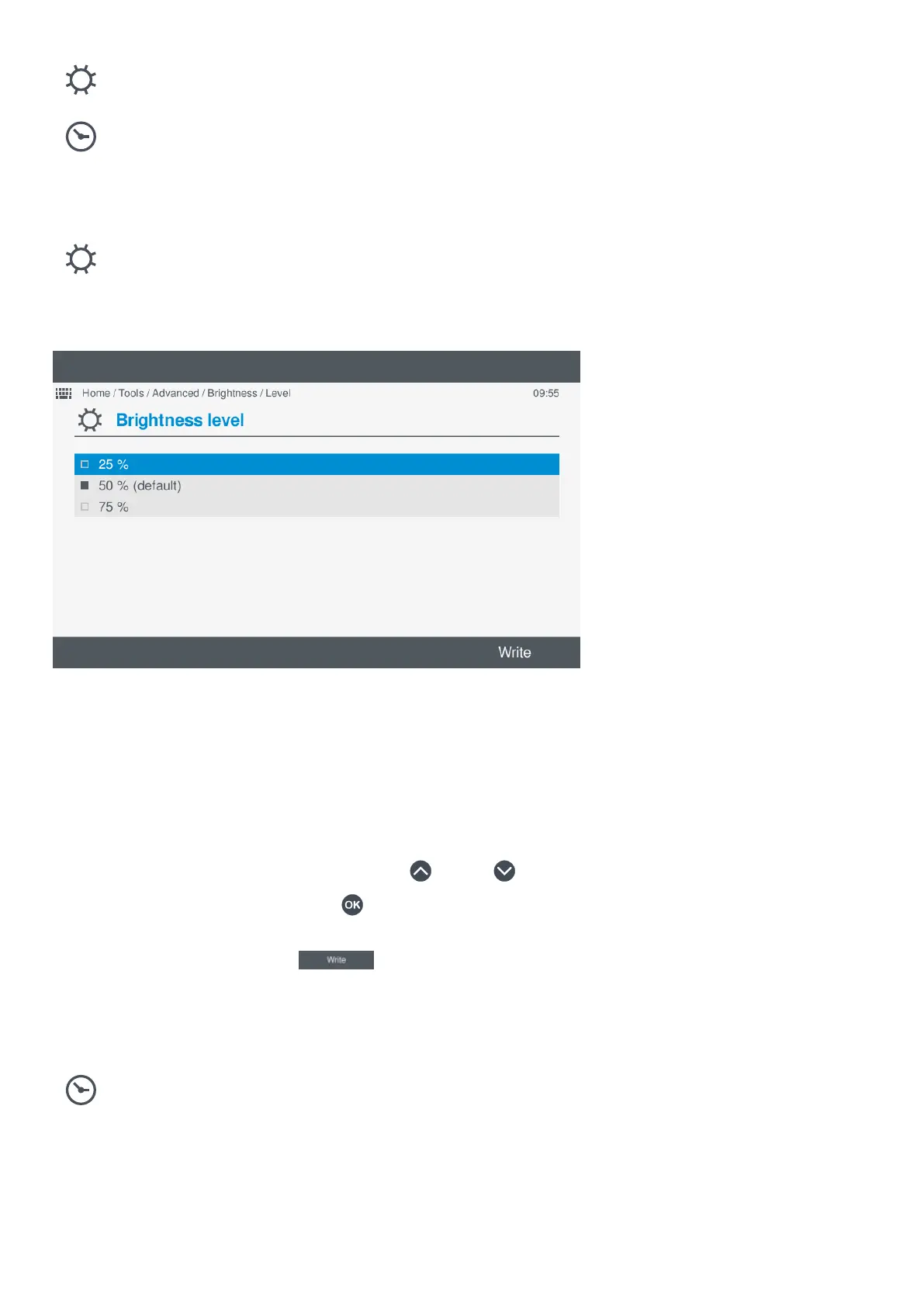
View or configure the Brightness level setting under Tools > Advanced > Brightness > Brightness level.
Figure 10.5 Example brightness level screen
Changing brightness level setting
To change the brightness level setting, perform the following steps:
1. Select Tools, from the Home menu.
2. Select Advanced, from the Tools menu.
3. Select Brightness, from the Advanced menu.
4. Select Brightness level, from the Brightness menu.
• The currently configured brightness level is shown with a solid box.
5. Highlight the required brightness level by pressing Up
or Down .
6. Select the brightness level by pressing OK .
• The selected brightness level is shown with a solid box.
7. To confirm the change, select Write
.
• The setting is saved to the display unit.
10.7.3 View or configure the brightness time setting
View or configure the
Brightness time setting under Tools > Advanced > Brightness > Brightness time.
OPERATOR'S MANUAL 4189341099G UK Page 115 of 130



 To Next Page