User Manual for DEVO-12 Page 25 of 238
4) Setting for training function channels
Trainee is available to get full or part of flight control power to the aircraft model via
setting the training function channel in the trainer’s DEVO-12. Below is the setting
method:
Touch the shortcut icon
to enter Function Menu, and then touch
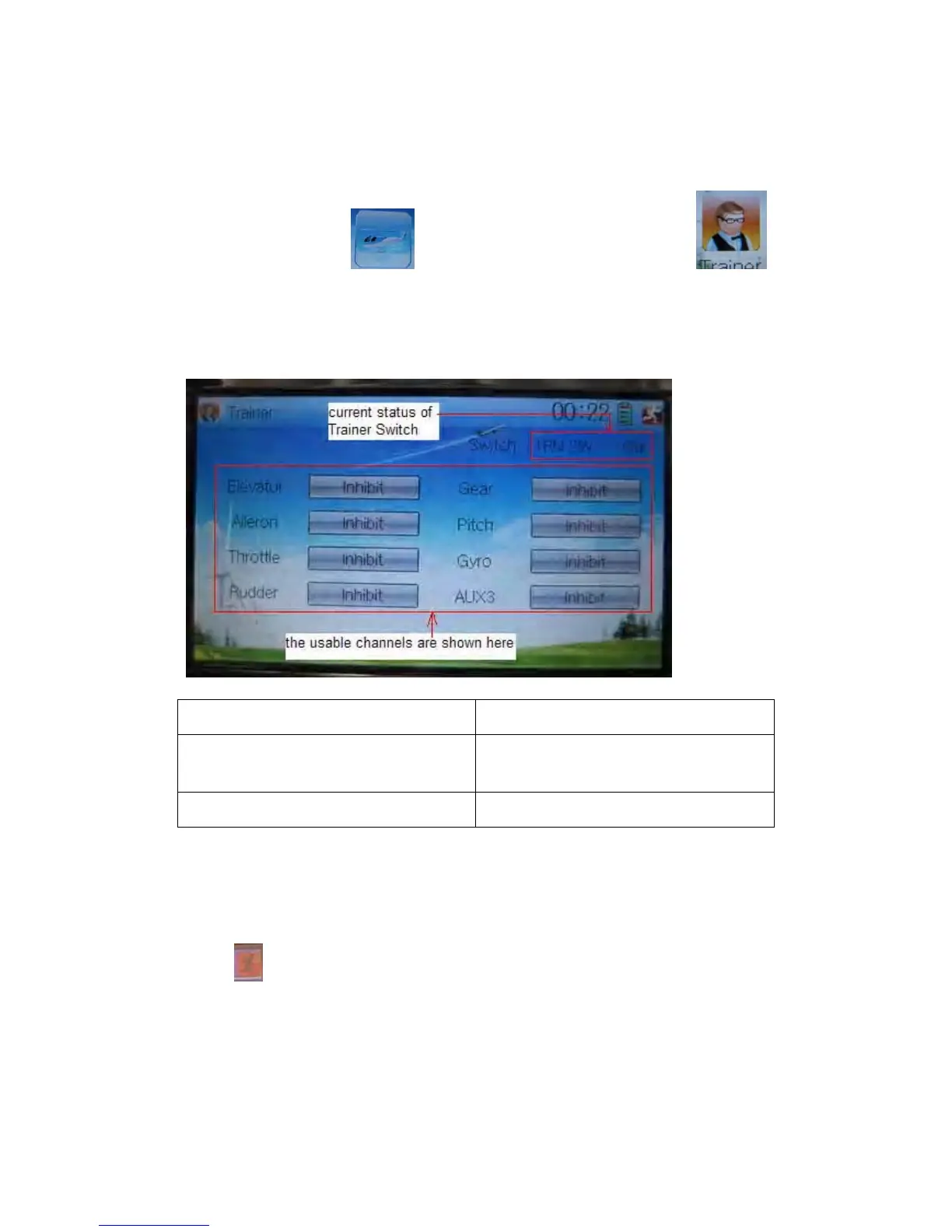
in Function Menu to get access to Trainer screen. The available channels are shown
below, and the current status of trainer switch TRN is also shown.
English Your language
Current status of Trainer Switch (TRN
SW)
The usable channels are shown here
Touch the channel(s) which you desire to grant to trainee. The channel(s) you have
touched will be activated as “Active”. The channels which are not granted to trainee
will be kept inhibited. The default setting is “Inhibit”.
Touch
to save and exit after finished.
10.0 Customized fixed ID
This setting will bind DEVO-12 and its receiver in a unique corresponding relationship.
It will greatly speed up the time of automatic binding when DEVO-12 powered on.



 To Next Page