Vigor2925 Series User’s Guide
158
3
3
.
.
1
1
6
6
.
.
2
2
C
C
o
o
n
n
f
f
i
i
g
g
u
u
r
r
e
e
S
S
e
e
t
t
t
t
i
i
n
n
g
g
s
s
o
o
n
n
C
C
P
P
E
E
1. In the end of the CPE (here, Vigor2860 is used), access into the web user interface of the
CPE. Open a web browser (for example, IE, Mozilla Firefox or Netscape) and type
http://192.168.1.1.
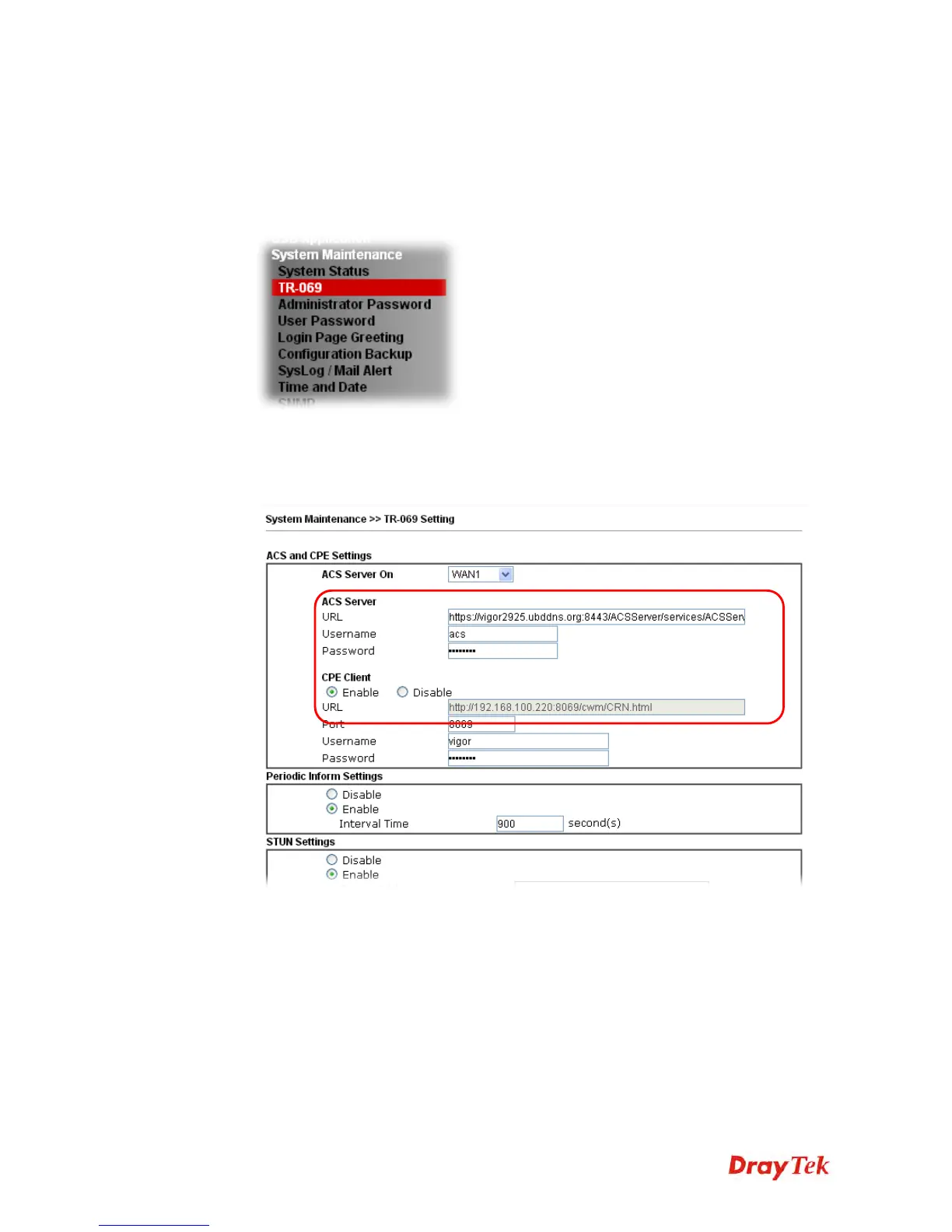
2. Open System Maintenance >> TR-069.
3. In the field of ACS Server, type the URL (IP address with port number) of Vigor2925
series and type the same Username and Password defined on the page of Central VPN
Management>>General Setup in Vigor2925 series. Then, click Enable for CPE Client
and then click OK to save the settings.
4. Open System Maintenance>>Management Setup.












 To Next Page