5-12 Image Optimization
M Soften
Description This feature is used to process the scan lines of M images to reject noise,
making the image details to be clearer.
Operation Adjust through the [M Soften] item in the menu;
The system provides 14 levels of M Soften adjustment, the bigger the value the
stronger the effect.
5.5 Image Preset
5.5.1 Image Preset
The image preset is used to set image parameters for a specific transducer in a specific exam
type. The setting methods are similar although parameter items are different in each image
mode.
1. Press <Setup> on the keyboard.
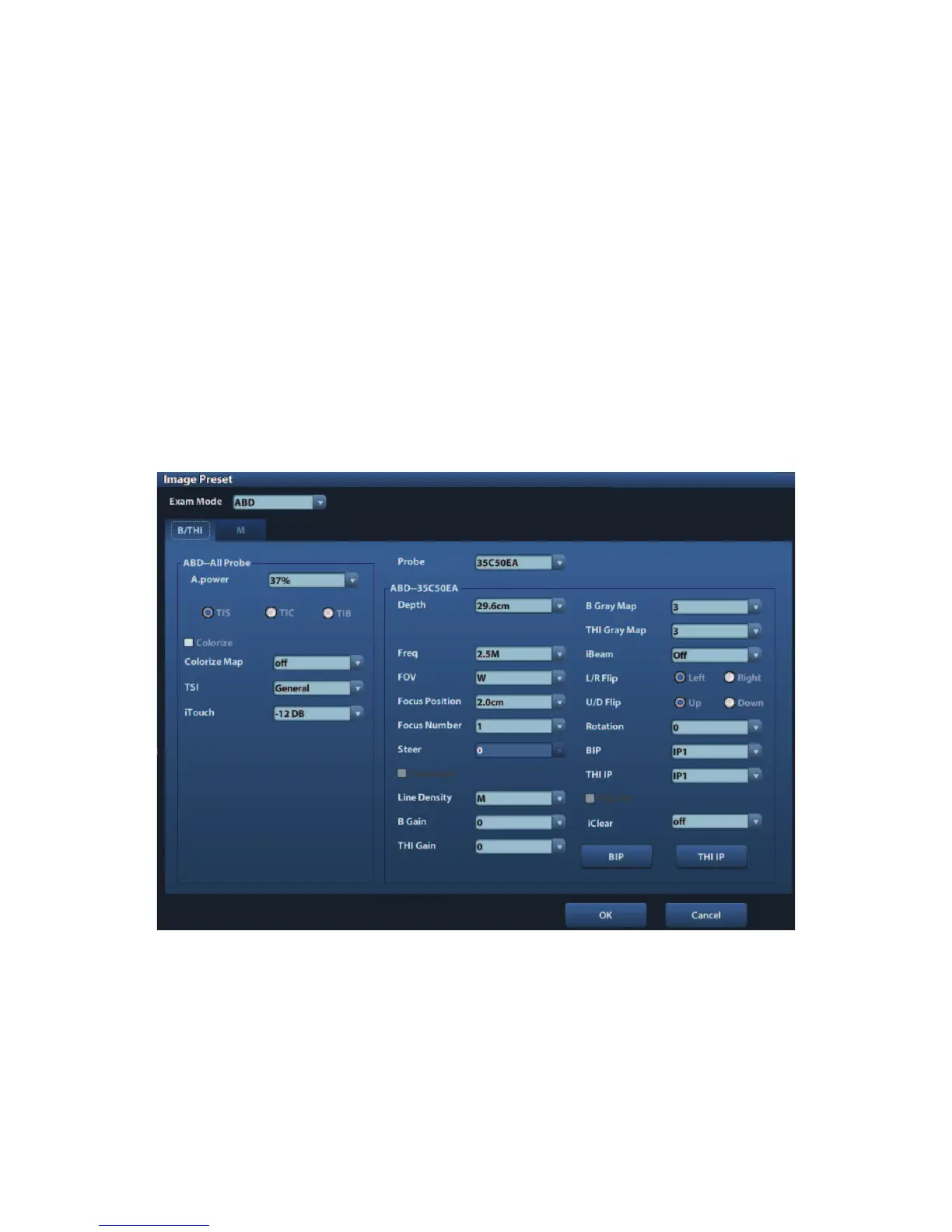
2. Select [Image Preset]Æ[B/THI] to enter the B-mode parameters preset, as shown in the
following figure.
3. Select an exam mode and probe.
z Select !ABD" (Abdomen) from the drop-down list of !Exam Mode".
z Select !35C50EA" (for example) from the drop-down list of !Probe".
4. Image parameter preset
z The [ABD-- All Probe] field on the left side of the screen displays the parameter
preset for all probes in ABD exam mode.


 To Next Page