2-6 Installation
P/N 0013-1027-005 Rev A
Option Card Installation
Option cards should be installed before the PDM is mounted. Ensure that power to the PDM is
OFF before installing.
IQ-2000
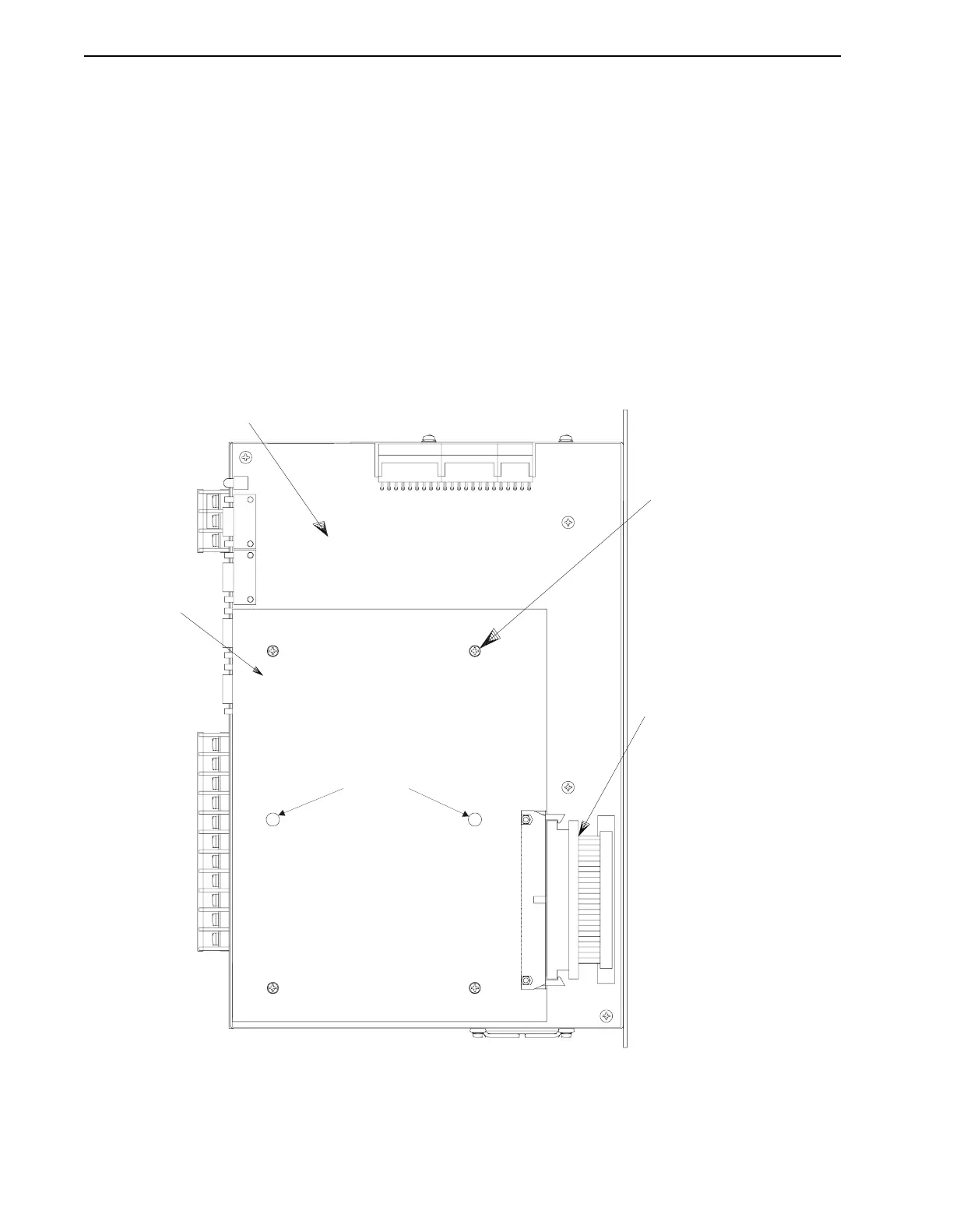
Figure 2.4 illustrates the IQ-2000 option card. Follow these steps to install the card on the PDM
logic board:
1. Remove side cover by loosening the mounting screws and sliding cover off the unit.
2. Install option card
B
on IQ-2000 logic board
C
, using screws
D
. Six screws are provided
for mounting option cards on units built prior to January 1995.
3. Install ribbon cable
E
between logic board and option card.
4. Install side cover back onto unit.
FIGURE 2.4 IQ-2000 Option Card Installation
2
1
P10
111
P9
P8
B
E
not used
NOTE:
Mating connectors are provided with the option card for
customer connections to the option card connectors.


 To Next Page