5-4 Diagnostics/Troubleshooting
P/N 0013-1027-005 Rev A
On some machines you may want the IQ to continue running even after some faults occur. This
is accomplished by setting Disable on Fault to Partial. In this case, the following faults are
disabled: Iavg fault, Motor Overtemperature, Soft Forward Limit, and Soft Reverse Limit. All
faults will cause the Error output to turn ON (if enabled). However, if Disable on Fault is set to
Partial, and a fault listed above occurs, the IQ will remain enabled and execute motion programs
normally. The Error output in this case serves as an alarm, and a programmable logic controller
(PLC) or other controller can then gracefully shut down the machine without damaging the
tooling or work piece. This setting is made in the Parameter menu, System dialog box of
IQ Master, or with the FLTDIS Host Language Command. Refer to the IQ Master Instruction
Manual, Chapter 2, Parameter menu > System or to the IQ Master Instruction Manual, Chapter 6
for more information.
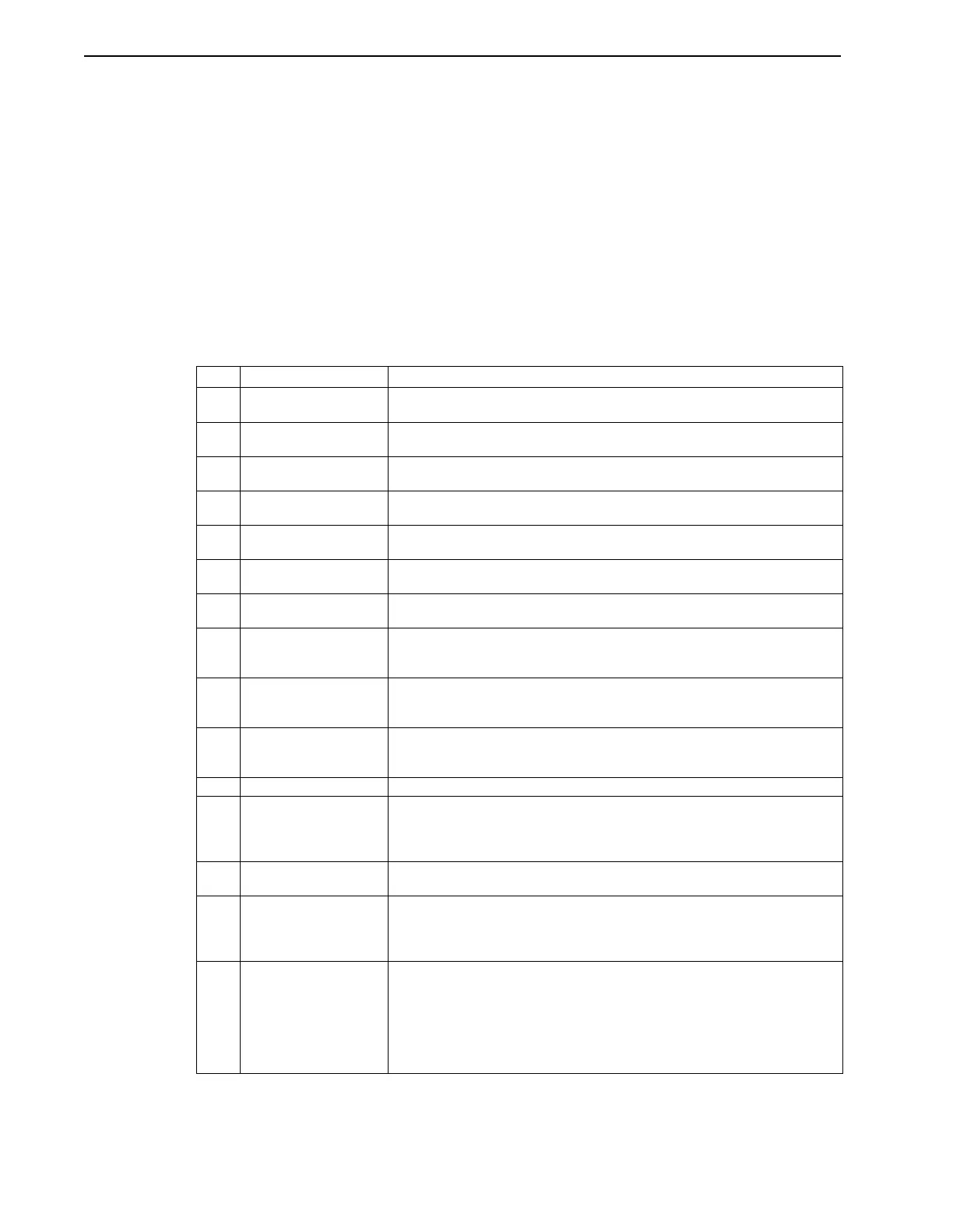
Table 5.3 lists the faults that activate the Error output. The number preceding the fault is the
error number.
TABLE 5.3 Error Messages
No. Error Message Description
3 2ms Reentrancy Fault The system did not finish the required calculations in the previous 2ms position
loop update in time for the next position loop update.
4 Math Overflow A math overflow occurred (a calculation exceeded the internal system limit).
Check the values of the variables used in the program.
5 Divide by Zero A division by zero calculation was attempted. Check the values of the variables
used in the program.
6 LOOP variable range A variable used as the count for a LOOP statement was out of range. The valid
range of a LOOP count is 0 to 65535.
8 PRECISION Out of
Range
Decimal point precision is not within the range of 0 to 4.
9 BCD Input Range A number larger than 9 was read in as a BCD number in a BCD statement in a
program. Check the inputs that are being used for the BCD input.
12 LOOP Count Out of
Range
Loop constant value is not within the range of 0 to 65535.
13 Profile Calculation The move cannot be made based on the parameters for the move: distance,
velocity, acceleration, or time. Possible causes are variable values used for the
move parameters that result in an acceleration or time of 0.
16 Invalid Opcode The PDM tried to execute a program opcode that was not valid (programs are
compiled into opcodes that the PDM executes). Compile the program again to
make sure it compiles correctly.
17 Home Not Defined Home has not been defined when trying to execute a MOVP (absolute) move.
Run the Home program or Define Home and execute the MOVP command
again.
19 Delay Out of Range Time value for a Delay statement is greater than 65,535 seconds.
20
21
22
23
KP Out of Range
KFF Out of Range
KI Out of Range
KPZ Out of Range
The parameter listed has exceeded the internal system limit. The limit is deter-
mined at run time based on the Scale parameter. Check the gain values under
the Parameter menu.
24 Gear Out Of Range The calculated value for the gear ratio denominator is greater than 32,767.
Check that the value is correct.
30
31
32
Calculations:
S-Curve
Accel
Velocity
The calculation listed has exceeded the internal system limit. The limit is deter-
mined at run time based on the Scale parameter. Check the velocity and acceler-
ation values under the Parameter menu.
33 Iavg Fault The average current output of the PDM exceeded safe levels for the motor or
PDM. Check for correct connection of the motor encoder to the PDM or of the
motor leads to the PDM. Other possible causes are motor stall or end of travel
condition, excessive duty cycle, or no DC bus voltage. This can also occur if the
drive is enabled and there is power supplied to the L1 and L2/N AC AUX inputs,
but not to the L1 and L2/N AC main inputs (this provides logic voltage, but no DC
bus voltage).


 To Next Page