Wiring 3-21
IQ 2000/5000 Installation Manual
Networking IQ 2000/5000 Controls
One or more PDM may be installed on an RS-422 multi-drop network or an RS-232C daisy-chain
network. If more than one PDM is on the network, each PDM must have a unique address
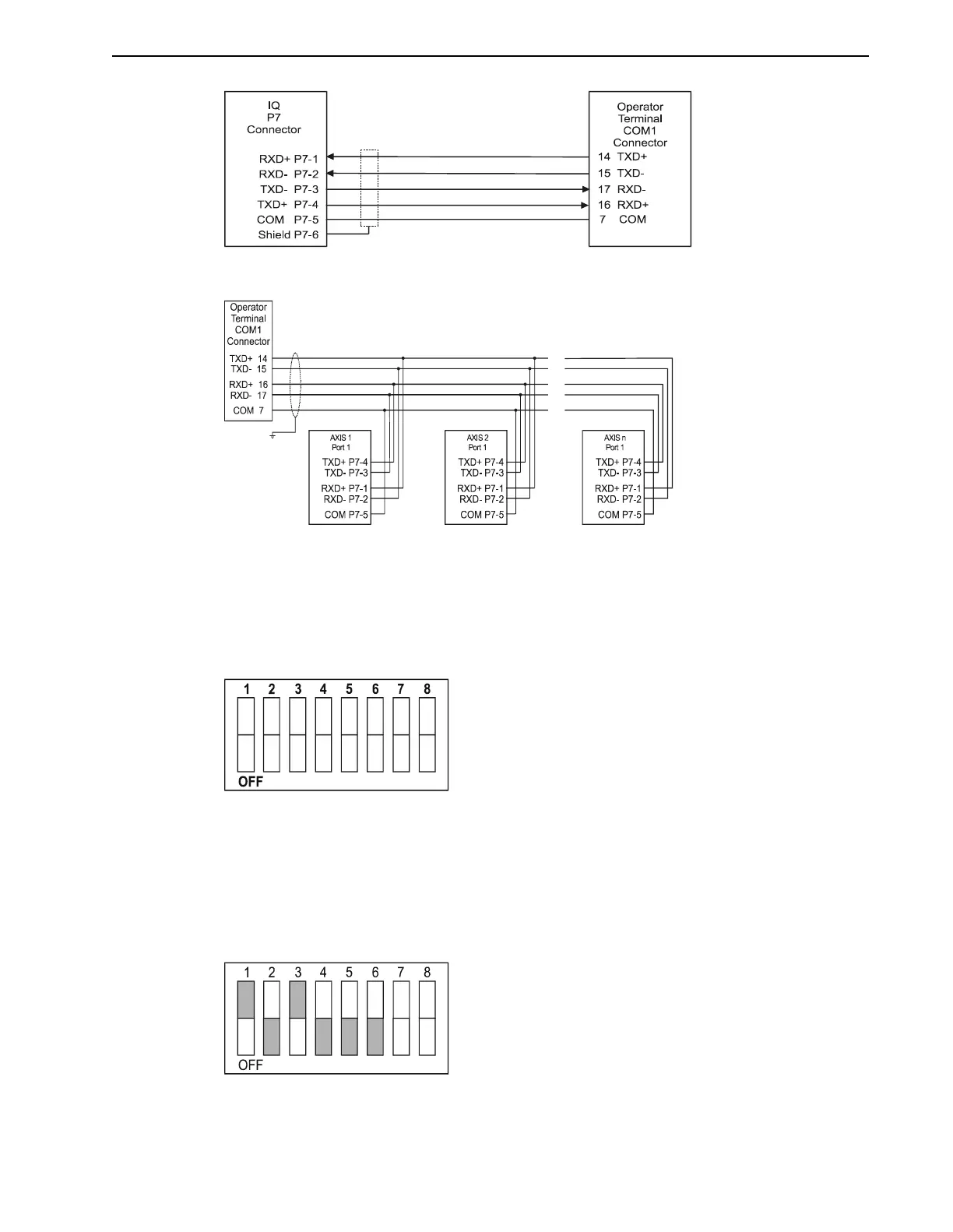
selected on the SW1 DIP switch panel, which is illustrated in Figure 3.20.
Figure 3.21 illustrates the dip switch setting for address 5. Switches SW1-1 through SW1-6 are
used to select the address. Switch SW1-1 is the least significant bit and SW1-6 is the most sig-
nificant bit of the binary address. If the address is set to anything other than 0, the PDM will
not communicate until its address has been selected (use Axis Select under the Communications
menu). Changing the address on the dip switch will not be recognized by the PDM until a Hard
Reset is performed (or power is removed).
FIGURE 3.18 IQ Operator Terminal RS-422 Connections
FIGURE 3.19 IQ Operator Terminal RS-422 Multi-Drop Connections
FIGURE 3.20 Dip Switch SW1
FIGURE 3.21 Dip Switch SW1 Set For Address 5 Example


 To Next Page