144
ELSPEC
G
G
4
4
K
K
F
F
i
i
x
x
e
e
d
d
P
P
o
o
w
w
e
e
r
r
Q
Q
u
u
a
a
l
l
i
i
t
t
y
y
A
A
n
n
a
a
l
l
y
y
z
z
e
e
r
r
U
U
S
S
E
E
R
R
&
&
I
I
N
N
S
S
T
T
A
A
L
L
L
L
A
A
T
T
I
I
O
O
N
N
G
G
U
U
I
I
D
D
E
E
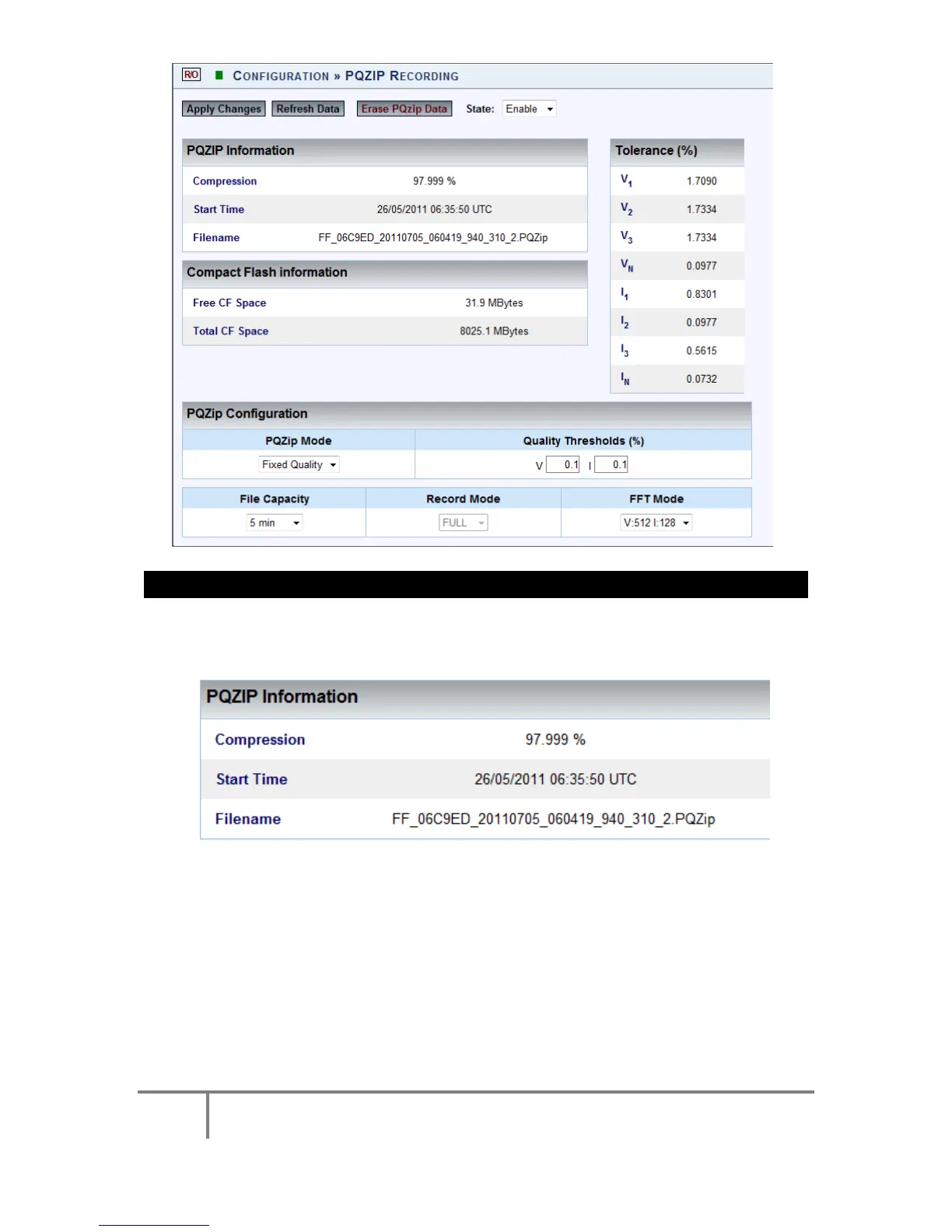
The PQZIP Status & Configuration Window will now open:
STATUS SECTION
The Status Section of the PQZIP Recording Window is divided into three sections:
PQZIP Information:
Compression %: % O f da ta compressed f or c onfigured pe riod on
successful completion of previous compression
Start Time: Time w hen d ata c ompression s tarted ( according t o
configuration)
File Name: Name under which the file for this session will be saved -
this is important for future reference
Compact Flash Information:
www.GlobalTestSupply.com
Find Quality Products Online at: sales@GlobalTestSupply.com



 To Next Page