164
ELSPEC
G
G
4
4
K
K
F
F
i
i
x
x
e
e
d
d
P
P
o
o
w
w
e
e
r
r
Q
Q
u
u
a
a
l
l
i
i
t
t
y
y
A
A
n
n
a
a
l
l
y
y
z
z
e
e
r
r
U
U
S
S
E
E
R
R
&
&
I
I
N
N
S
S
T
T
A
A
L
L
L
L
A
A
T
T
I
I
O
O
N
N
G
G
U
U
I
I
D
D
E
E
Measurement Status
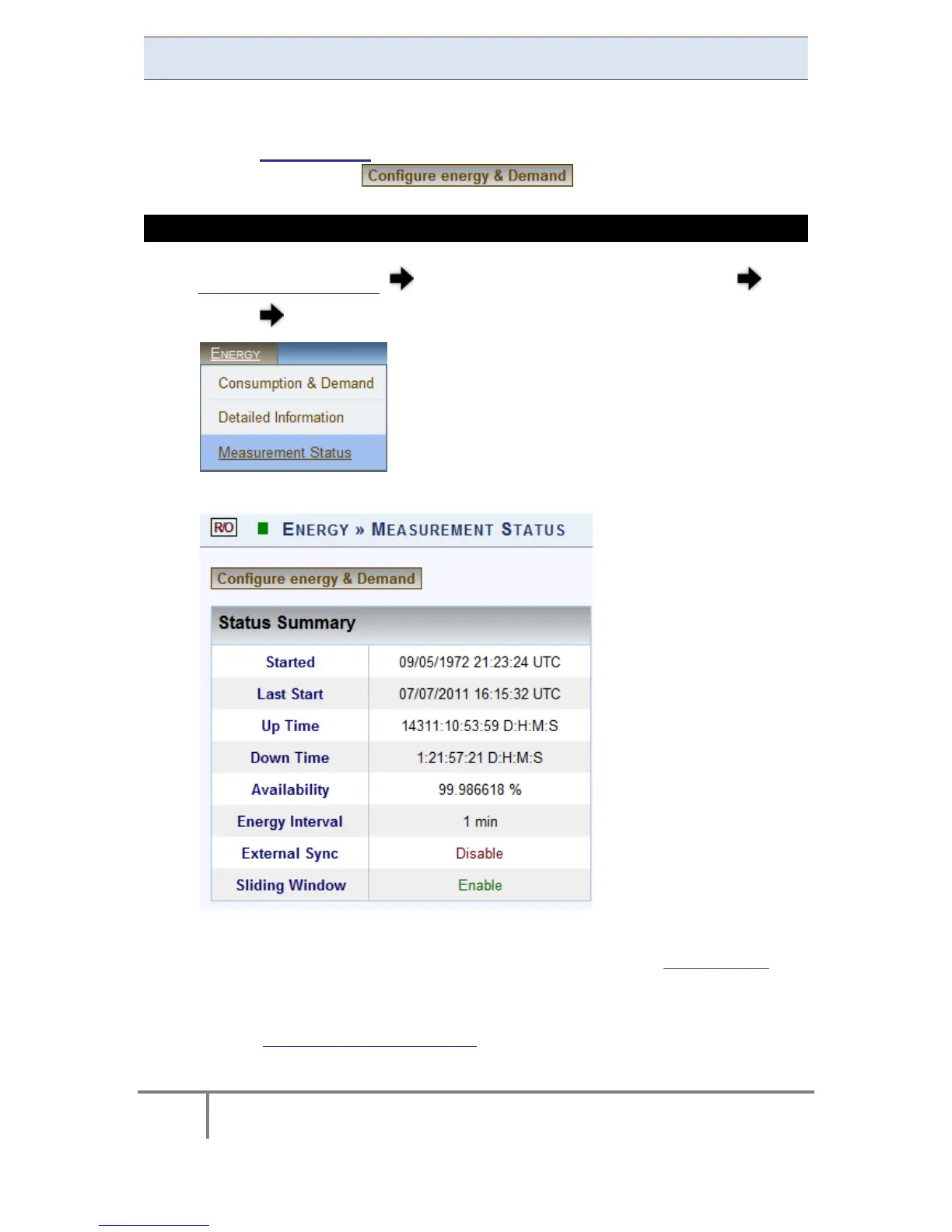
The M easurement S tatus w indow p rovides ad ditional st atistical i nformation &
necessary co ntext on en ergy. T he parameters & c ounters on this w indow ar e
configured i n Energy Meter in the Advanced Settings Section, which is directly
accessible by selecting the button.
ACCESS THE MEASUREMENT STATUS WINDOW
Access y our G 4K U nit log o n a s the Viewer/Administrator under
Energy open the Measurement Status Tab:
The Measurement Status window will now open:
Included in this window are the following terms:
Started: This i s the date & time stamp when t he Energy Meter was
originally activated for the very first time
Last Start: This is the date and time stamp for the last metering reset
- Total Consumption is Reset
www.GlobalTestSupply.com
Find Quality Products Online at: sales@GlobalTestSupply.com



 To Next Page