Voltage & Frequency Configurations
The V oltage & F requency W indow d efines all t he m ajor c onfigurations r egarding
the Voltage & Frequency values, for a more comprehensive procedure see Voltage
& Frequency.
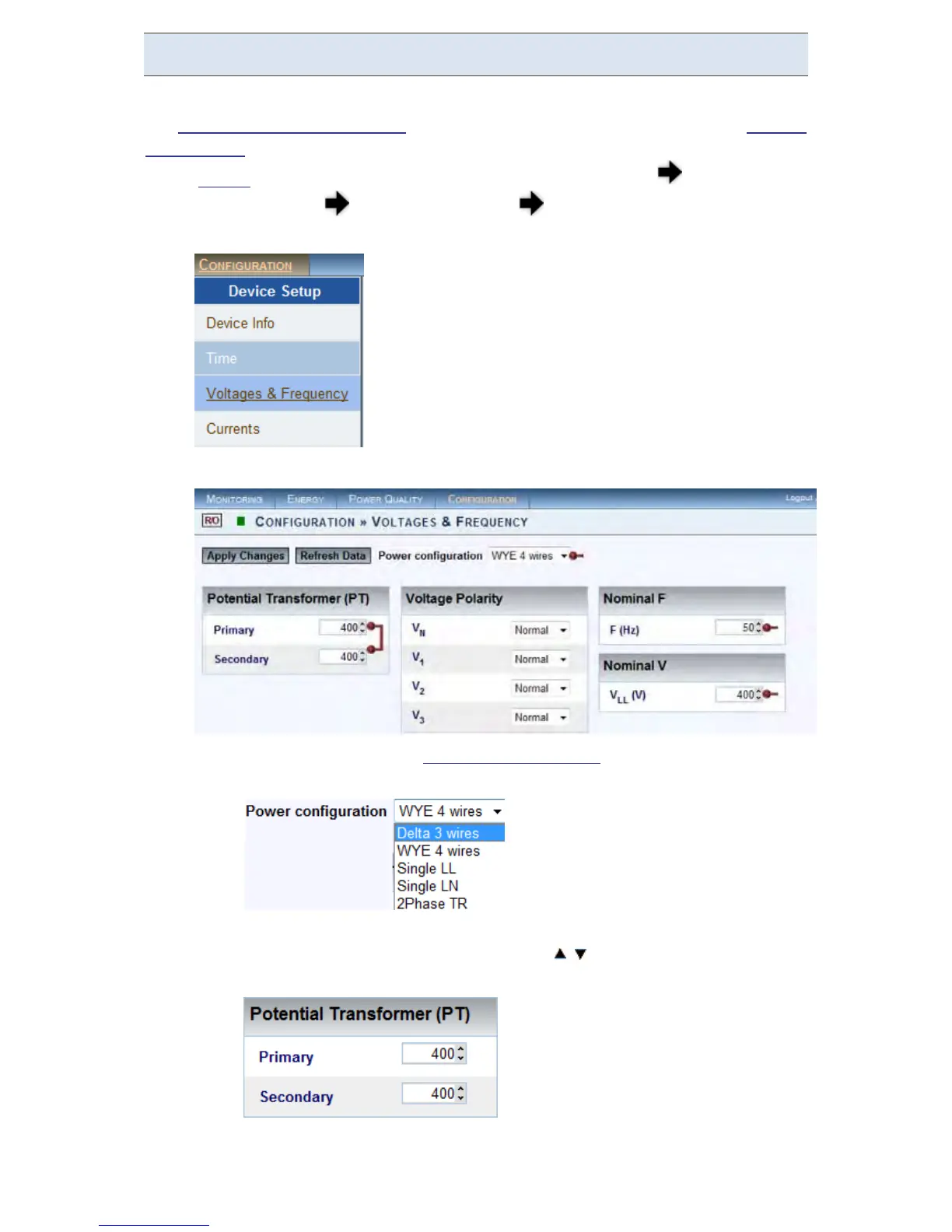
Access your G 4K D evice v ia Elspec's Web Interface log o n a s t he
Administrator under Configuration Device Setup select the Voltage
& Frequency Tab:
In the Voltage & Frequency Window:
Select the applicable Network Type Settings according to your
network type from the drop-down selection:
For M V/HV N etworks ( Voltage M easurements b y P T's) se t the correct
Primary & Secondary Ratio (with / ) – according t o the PT
Manufacturer's Specifications & not just the Ratio:
If the PT Ratio is inapplicable, then set your values to read:
Primary = Secondary = Nominal
www.GlobalTestSupply.com
Find Quality Products Online at: sales@GlobalTestSupply.com



 To Next Page