253
ELSPEC
G
G
4
4
K
K
F
F
i
i
x
x
e
e
d
d
P
P
o
o
w
w
e
e
r
r
Q
Q
u
u
a
a
l
l
i
i
t
t
y
y
A
A
n
n
a
a
l
l
y
y
z
z
e
e
r
r
U
U
S
S
E
E
R
R
&
&
I
I
N
N
S
S
T
T
A
A
L
L
L
L
A
A
T
T
I
I
O
O
N
N
G
G
U
U
I
I
D
D
E
E
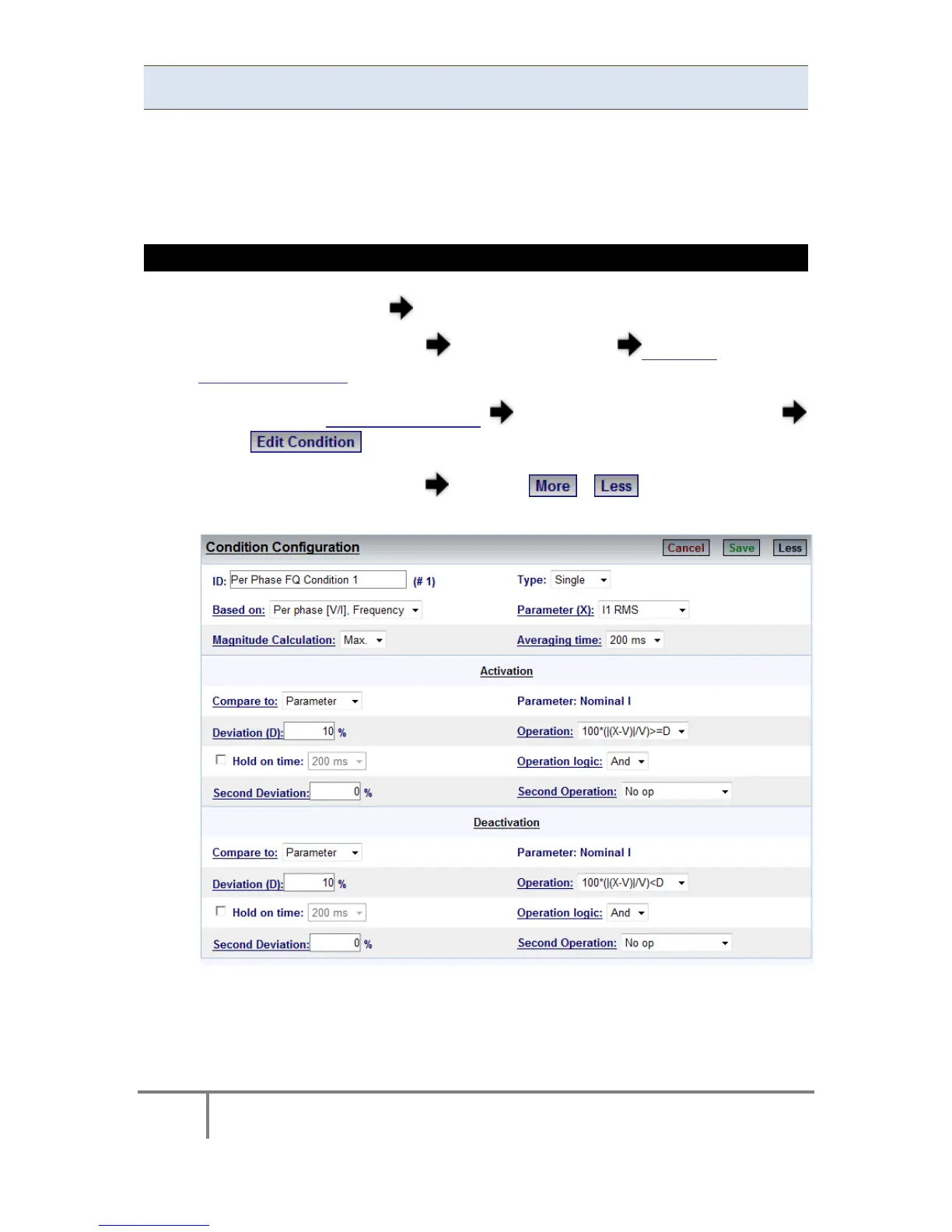
Single Type Conditions
As mentioned previously Single Type Conditions are used to define the result of an
occurrence ( example - voltage d rops b elow t he t hreshold) o r a ch ange o f digital
input & so on. You will need to configure the condition, including the transition of
the condition from the Activated to the Deactivated State.
CONFIGURE SINGLE TYPE CONDITIONS
Access your G4K Device log on as the Administrator (Manufacturer’s
Default Password is: 12345) under Configuration Advanced open the
Custom Events Tab
After s electing Create N ew E vents naming the e vent i n Description
select to open the Condition Window
Select Single for the Type open the / in o rder to v iew the
additional configuration options:
www.GlobalTestSupply.com
Find Quality Products Online at: sales@GlobalTestSupply.com



 To Next Page