280
ELSPEC
G
G
4
4
K
K
F
F
i
i
x
x
e
e
d
d
P
P
o
o
w
w
e
e
r
r
Q
Q
u
u
a
a
l
l
i
i
t
t
y
y
A
A
n
n
a
a
l
l
y
y
z
z
e
e
r
r
U
U
S
S
E
E
R
R
&
&
I
I
N
N
S
S
T
T
A
A
L
L
L
L
A
A
T
T
I
I
O
O
N
N
G
G
U
U
I
I
D
D
E
E
Connect Power Over Ethernet
PoE is a standard f or feeding D C power to the R TU using the network LA N cable
without th e ne ed f or a dditional e xternal p ower. T he G4 K c ontains 2 p orts tha t
support PoE:
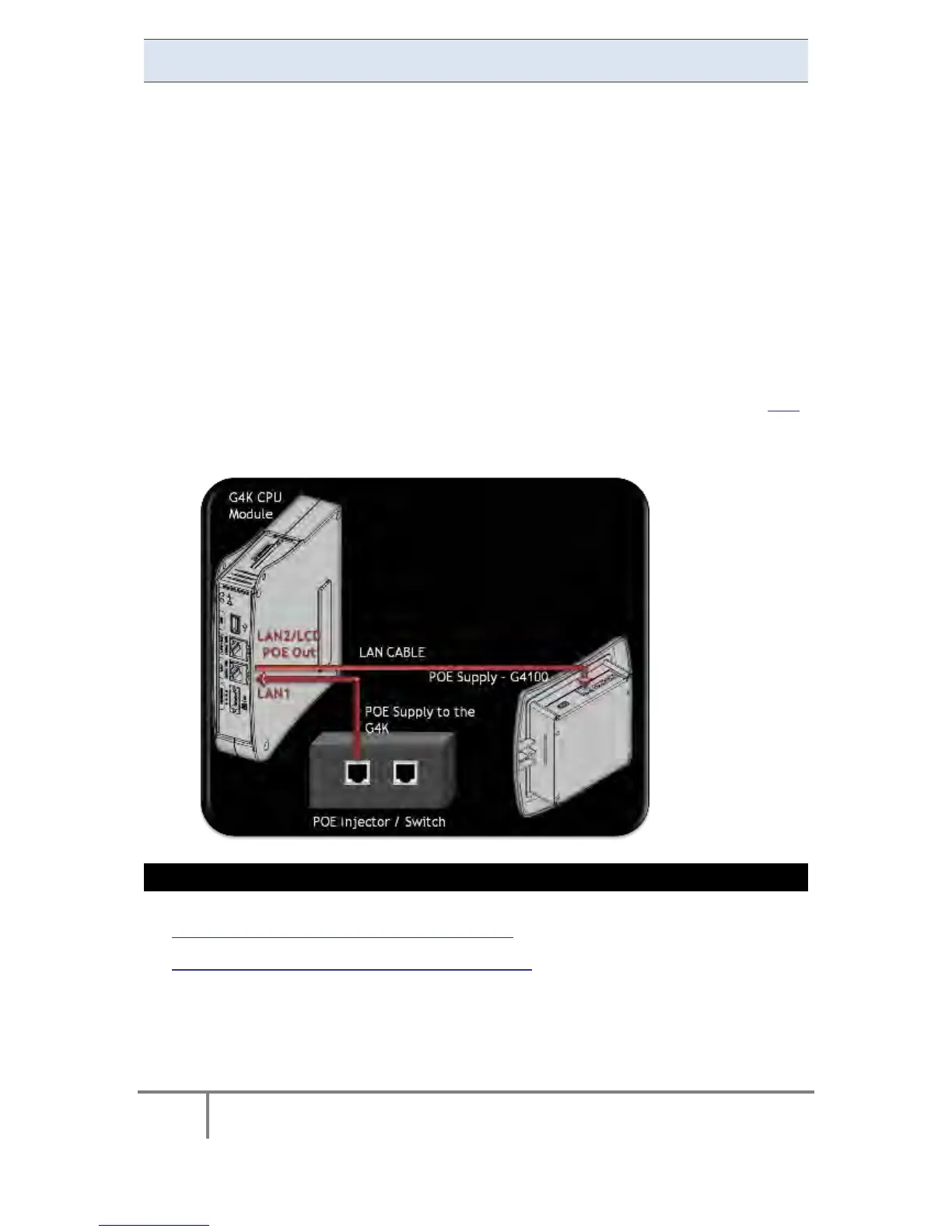
The LAN1 Port can receive PoE supply for the G4K unit from a remote
source, thus enabling the BLACKBOX to operate. I t is suggested that
the LA N1 P oE b e us ed a s an alternative b ackup p ower s ource. T o
activate t his P oE o ption, c onnect a n R J45 j ack w ith PoE to the
marked LAN1 PoE In on the CPU module.
The LAN2/LCD Port has P oE o ut cap ability f or s upplying p ower t o
other de vices. T he L AN2/LCD por t c an s upply pow er f or t he E lspec
G4100 Display unit. To activate this PoE option, connect an RJ45 jack
to t he p ort m arked LA N2/LCD P oE O ut o n the C PU m odule,
connecting th e o ther e nd o f th e R J45 j ack to the G4100 RDU.
Procedure:
Connect a LAN to the indicated ports on the G4K / PoE Injector / G4100:
SEE ALSO
Attach The PT100 Temperature Connection
Detach the Voltage Terminal Block Connector
www.GlobalTestSupply.com
Find Quality Products Online at: sales@GlobalTestSupply.com



 To Next Page