277
ELSPEC
G
G
4
4
K
K
F
F
i
i
x
x
e
e
d
d
P
P
o
o
w
w
e
e
r
r
Q
Q
u
u
a
a
l
l
i
i
t
t
y
y
A
A
n
n
a
a
l
l
y
y
z
z
e
e
r
r
U
U
S
S
E
E
R
R
&
&
I
I
N
N
S
S
T
T
A
A
L
L
L
L
A
A
T
T
I
I
O
O
N
N
G
G
U
U
I
I
D
D
E
E
Local FW Upgrade
Probably, th e s implest w ay o f upgrading y our instrument i s b y using t he Local
Upgrade functionality.
OPEN THE LOCAL UPGRADE FUNCTIONALITY
Access y our G 4K D evice v ia Elspec's Web Interface log o n a s t he
Administrator (Manufacturer’s D efault P assword is : 12345) select t he
Configuration Tab Advanced Firmware Upgrade Tab
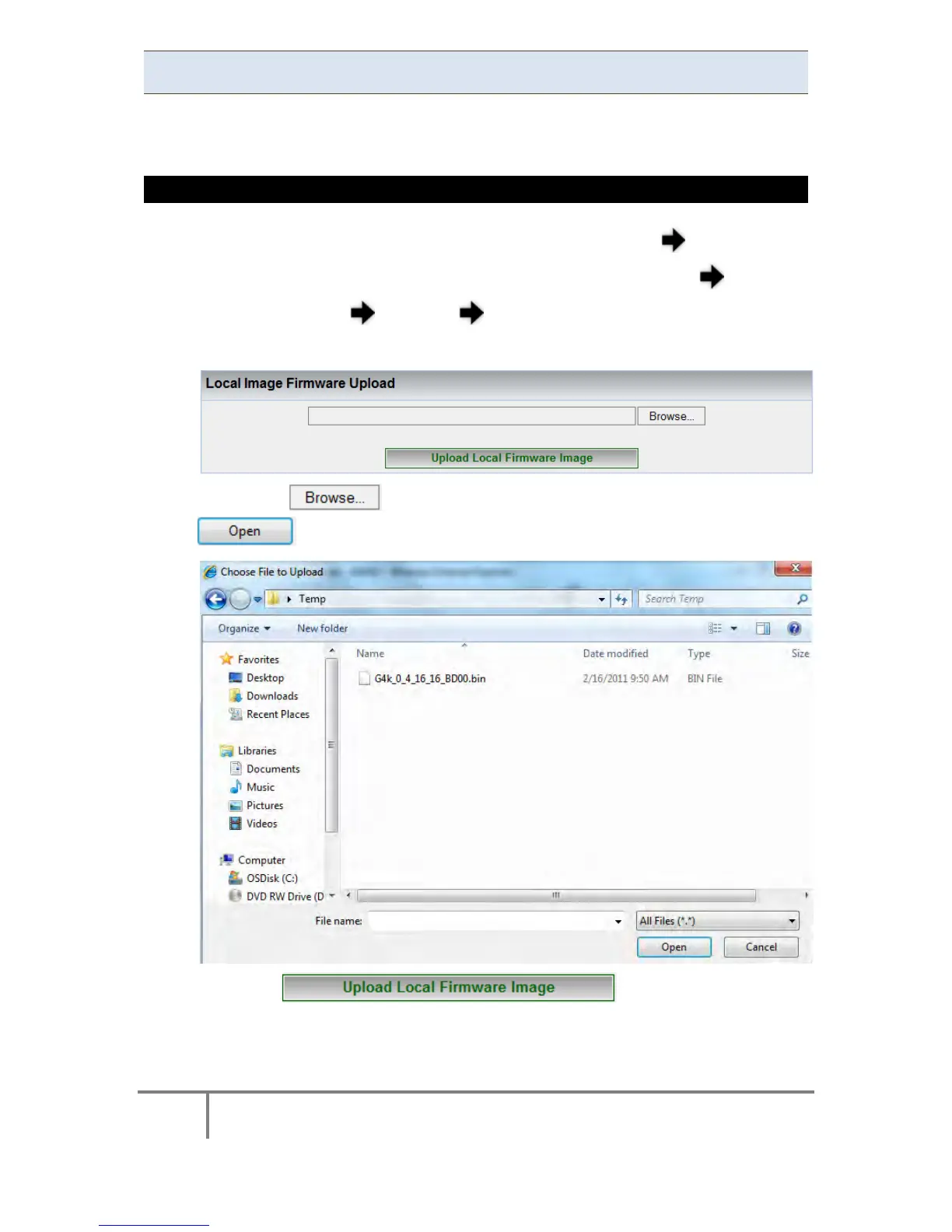
Go to the Local Image Firmware Upload Section:
Select the search f or t he f ile o n y our l ocal co mputer & select
:
Select the button t o i nitiate the
upgrade process:
www.GlobalTestSupply.com
Find Quality Products Online at: sales@GlobalTestSupply.com



 To Next Page