284
ELSPEC
G
G
4
4
K
K
F
F
i
i
x
x
e
e
d
d
P
P
o
o
w
w
e
e
r
r
Q
Q
u
u
a
a
l
l
i
i
t
t
y
y
A
A
n
n
a
a
l
l
y
y
z
z
e
e
r
r
U
U
S
S
E
E
R
R
&
&
I
I
N
N
S
S
T
T
A
A
L
L
L
L
A
A
T
T
I
I
O
O
N
N
G
G
U
U
I
I
D
D
E
E
Use the Elspec's Search Utility
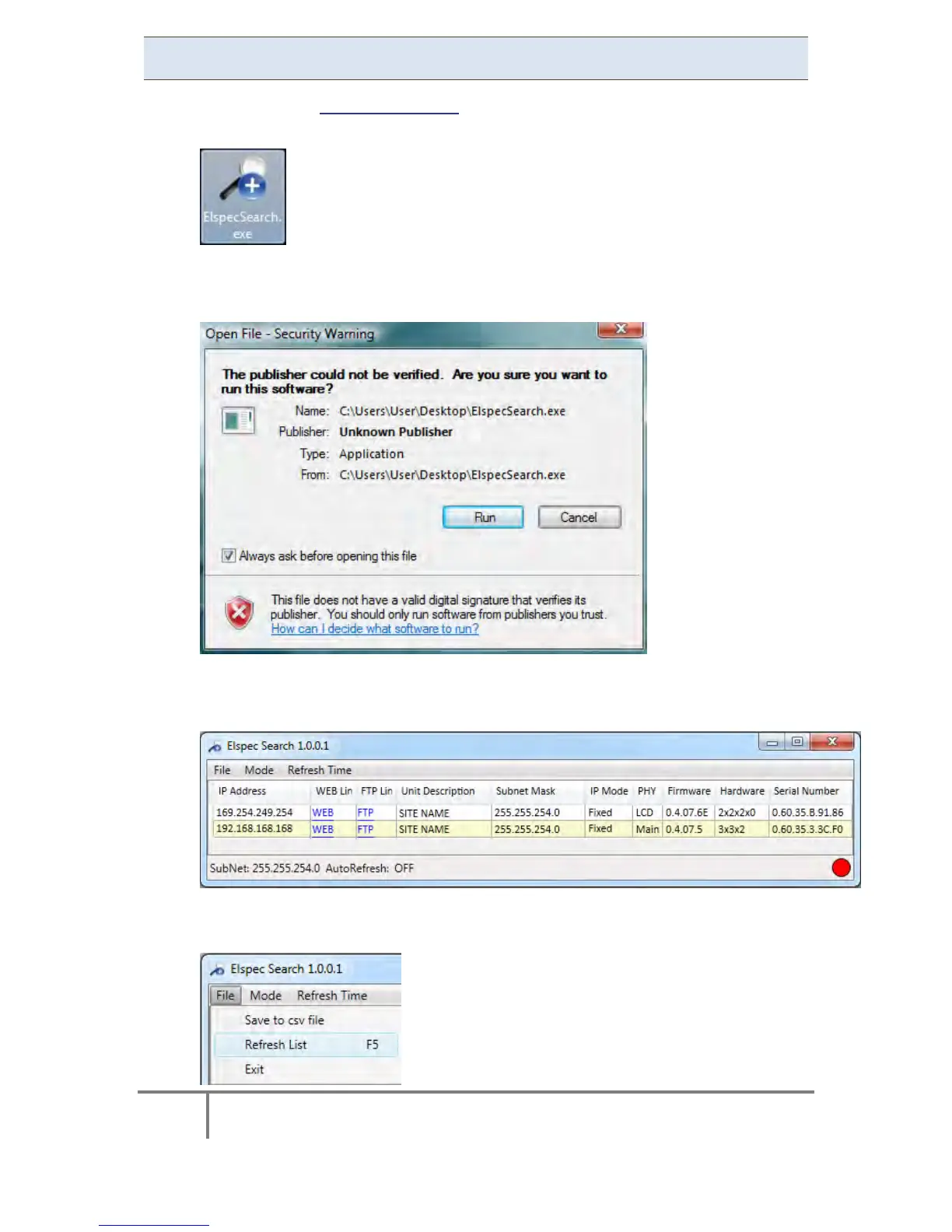
After you have Copied the Utility on your Desktop, access it by clicking on
the Eslpec's Search Icon:
Initially, the program may trigger a verification warning similar to the one
below. You may proceed by clicking Run:
A scan procedure is initiated; the Elspec Search utility appears as a grid
displaying all BLACKBOX devices found on the intranet network:
Once open, the scan procedure can be manually prompted by using the File
Refresh List Menu:
www.GlobalTestSupply.com
Find Quality Products Online at: sales@GlobalTestSupply.com



 To Next Page