174
ELSPEC
G
G
4
4
K
K
F
F
i
i
x
x
e
e
d
d
P
P
o
o
w
w
e
e
r
r
Q
Q
u
u
a
a
l
l
i
i
t
t
y
y
A
A
n
n
a
a
l
l
y
y
z
z
e
e
r
r
U
U
S
S
E
E
R
R
&
&
I
I
N
N
S
S
T
T
A
A
L
L
L
L
A
A
T
T
I
I
O
O
N
N
G
G
U
U
I
I
D
D
E
E
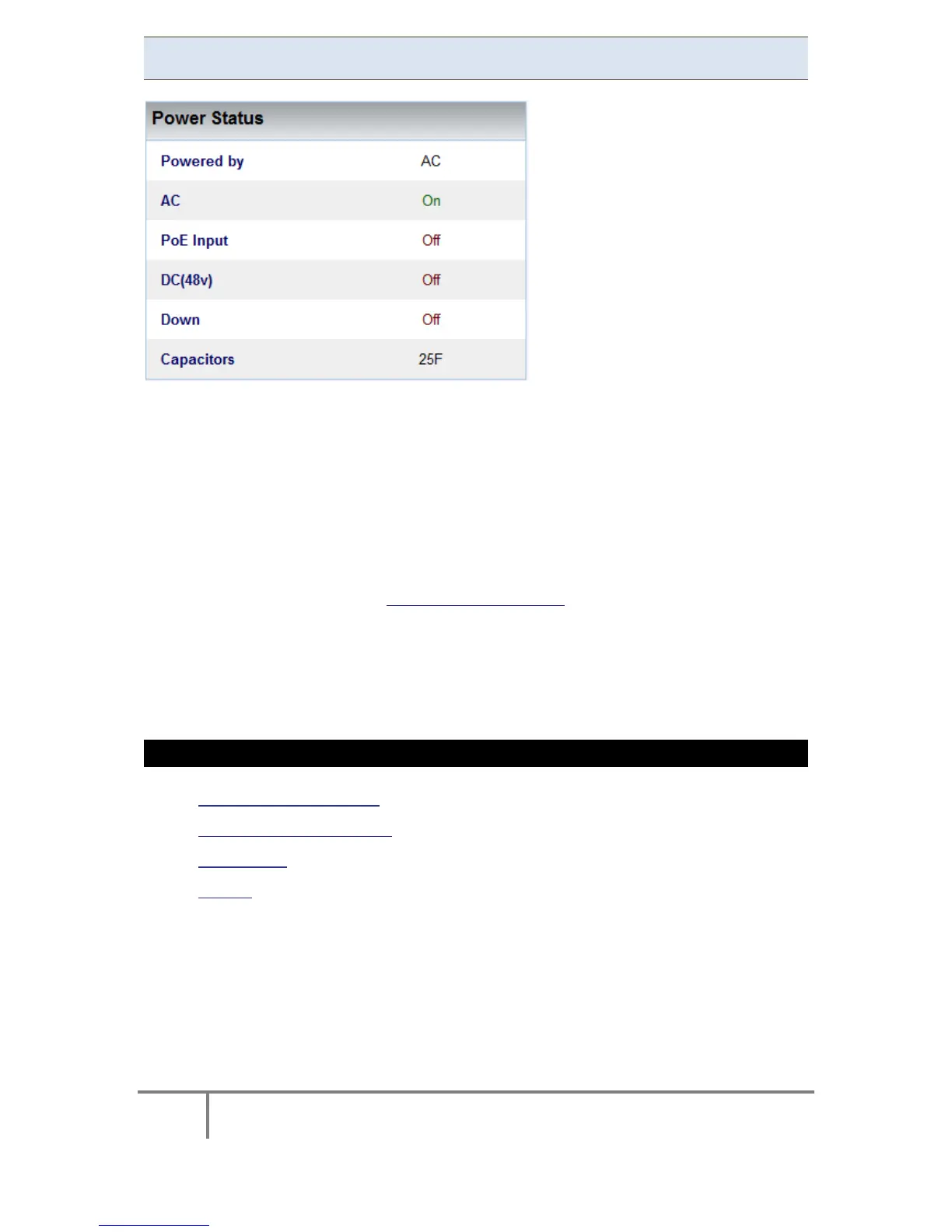
Power Status
In this section you can view all the Power Status:
Powered by: Informs the user as to the type of p ower c urrently s upplying
the instrument
AC: AC status
PoE Input: Status of the PoE on the LAN1 port; an alternate power input for
the instrument
DC (48v): Status of the DC Power Supply Input
Down: Should this f lag i ndicate " ON" it m eans that the G4K ha s no p ower
supply & is on ride through power supplied by the capacitors
Capacitors: Indicates t he si ze o f t he S uper C apacitor su pplying t he r ide
through power
SEE ALSO
G4K Unit Configuration
G4K – Product Attributes
PoE Output
Alarms
www.GlobalTestSupply.com
Find Quality Products Online at: sales@GlobalTestSupply.com



 To Next Page