147
ELSPEC
G
G
4
4
K
K
F
F
i
i
x
x
e
e
d
d
P
P
o
o
w
w
e
e
r
r
Q
Q
u
u
a
a
l
l
i
i
t
t
y
y
A
A
n
n
a
a
l
l
y
y
z
z
e
e
r
r
U
U
S
S
E
E
R
R
&
&
I
I
N
N
S
S
T
T
A
A
L
L
L
L
A
A
T
T
I
I
O
O
N
N
G
G
U
U
I
I
D
D
E
E
Enabling / Disabling PQZIP
As m entioned p reviously, y our G4 K U nit a rrives f rom the f actory w ith P QZIP
recording Disabled. Initiating Enable will pr ompt your G4 K BLA CKBOX t o
commence recording and Disable will cause your device to cease recording.
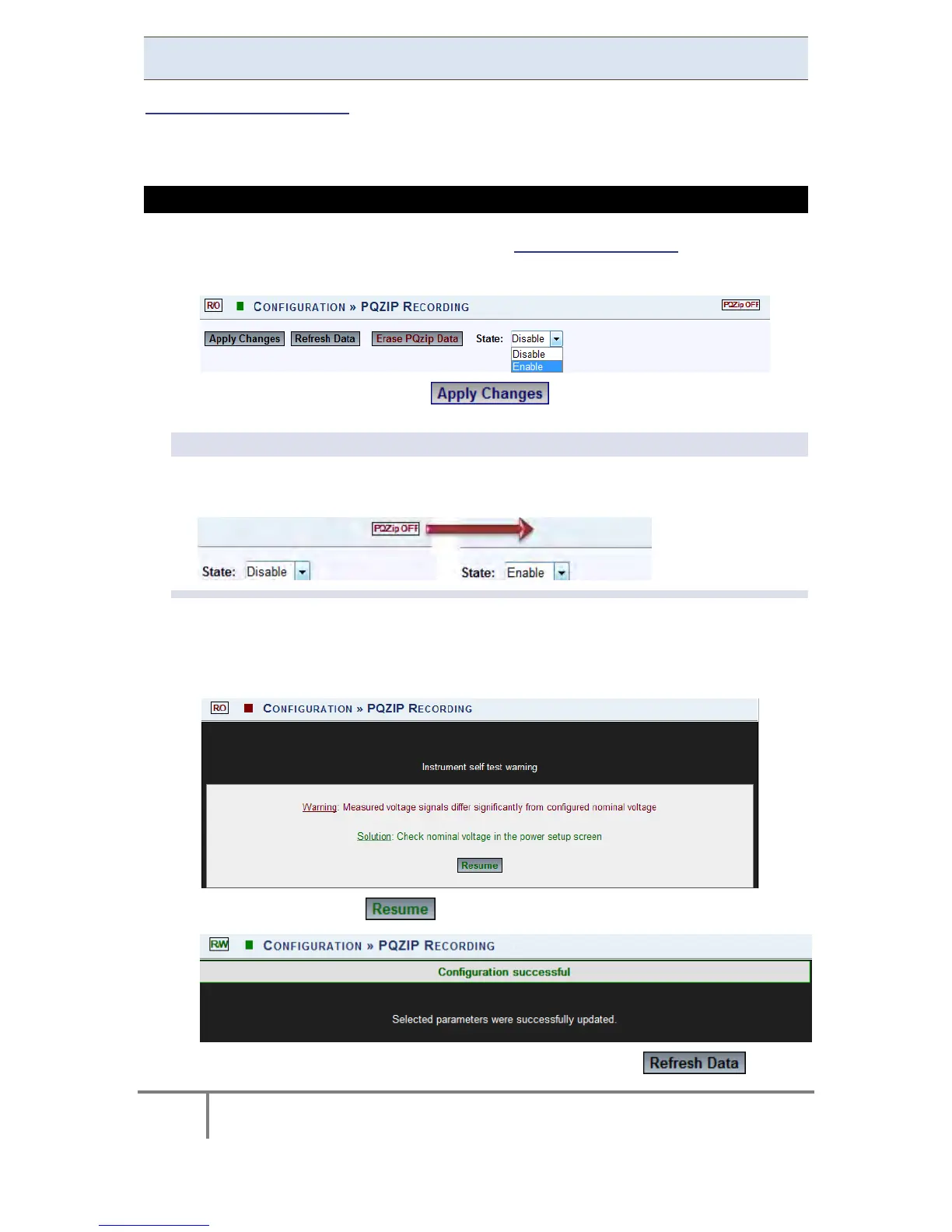
HOW TO ENABLE & DISABLE PQZIP RECORDING
Access G4K PQZIP Configuration via the PQZIP Recording Tab
In the State drop-down selection select Enable:
To apply your changes select
NOTE NOTE NOTE
Once y ou have en abled the P QZIP r ecording, the P QZip OFF Icon w ill n o
longer appear on the right-hand side on this & any other screen:
The f ollowing w arning m ay ap pear if some p arameter r eadings a re
inconsistent w ith t he configuration. I n t his case m ake s ure a ll p arameters
are correct before enabling the PQZIP:
Confirm by selecting & the following success message will appear:
To view your changes (refresh your current view) select
www.GlobalTestSupply.com
Find Quality Products Online at: sales@GlobalTestSupply.com



 To Next Page