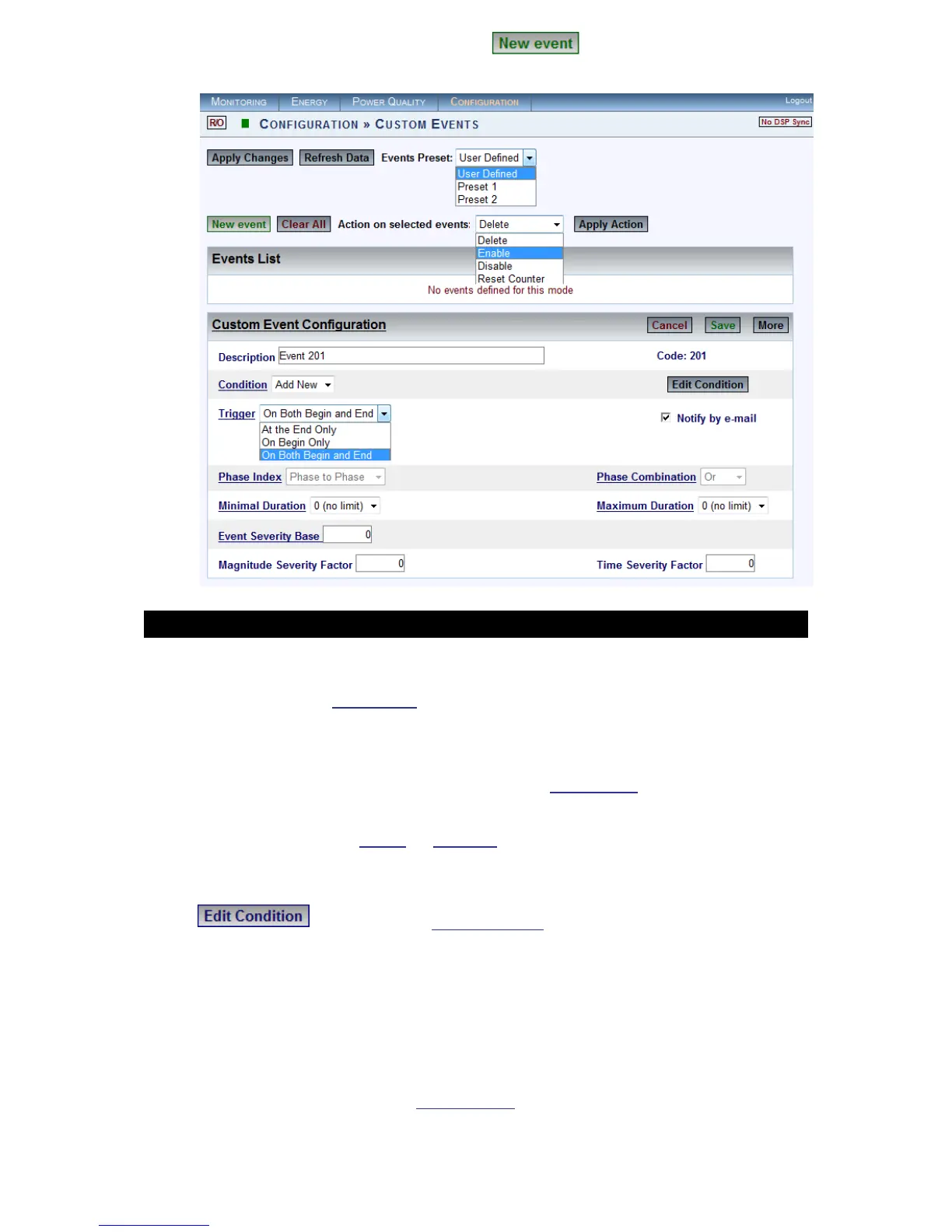
In the Custom Events window select in order to create a New
Event:
CONFIGURATION & DEFINITIONS:
Event Preset: Select User Defined (Preset 1 & 2 used in other applications)
Events List: See Events List for possible configurations
Description: Used to set a meaningful name for the event
Code: Event co de # al located a utomatically b y t he s ystem f rom t he
available user events codes & viewed in the System Log
Condition: An ev ent is b ased o n o ne o r m ore co nditions. T here ar e t wo
types of c onditions Single & Multiple. No m atter what t ype o f co ndition is
linked t o t he ev ent, i ts d ependency is d ictated b y t he condition I D s tring
selected in the Condition selection box
: Will open the Edit Condition window
Trigger: An event is b asically a lo gic si gnal. A nytime a co ndition i s not
active, the event remains in a "0" state. When a condition is met, the event
becomes "1" state (On Begin Only). The event remains on "1" state until the
condition is de-activated (At the End Only). The trigger configuration field
defines what situations will generate an event record. Notification is either
on the beginning state, end state, or at both states (On Both Begin & End)
Notify by E-Mail: Will send E-Mail Alerts as soon as the event is triggered
www.GlobalTestSupply.com
Find Quality Products Online at: sales@GlobalTestSupply.com



 To Next Page