26
ELSPEC
G
G
4
4
K
K
F
F
i
i
x
x
e
e
d
d
P
P
o
o
w
w
e
e
r
r
Q
Q
u
u
a
a
l
l
i
i
t
t
y
y
A
A
n
n
a
a
l
l
y
y
z
z
e
e
r
r
U
U
S
S
E
E
R
R
&
&
I
I
N
N
S
S
T
T
A
A
L
L
L
L
A
A
T
T
I
I
O
O
N
N
G
G
U
U
I
I
D
D
E
E
The G4 K B LACKBOX i s i ntended to b e mounted within an enclosure, or can be
fastened either to a DIN Rail or to a F lat Surface. The physical dimensions of the
G4K are: 17.5 x 23.2 x 13.8cm (6.9 x 9.1 x 5.4”) & it weighs 1.7Kg (3.7lbs).
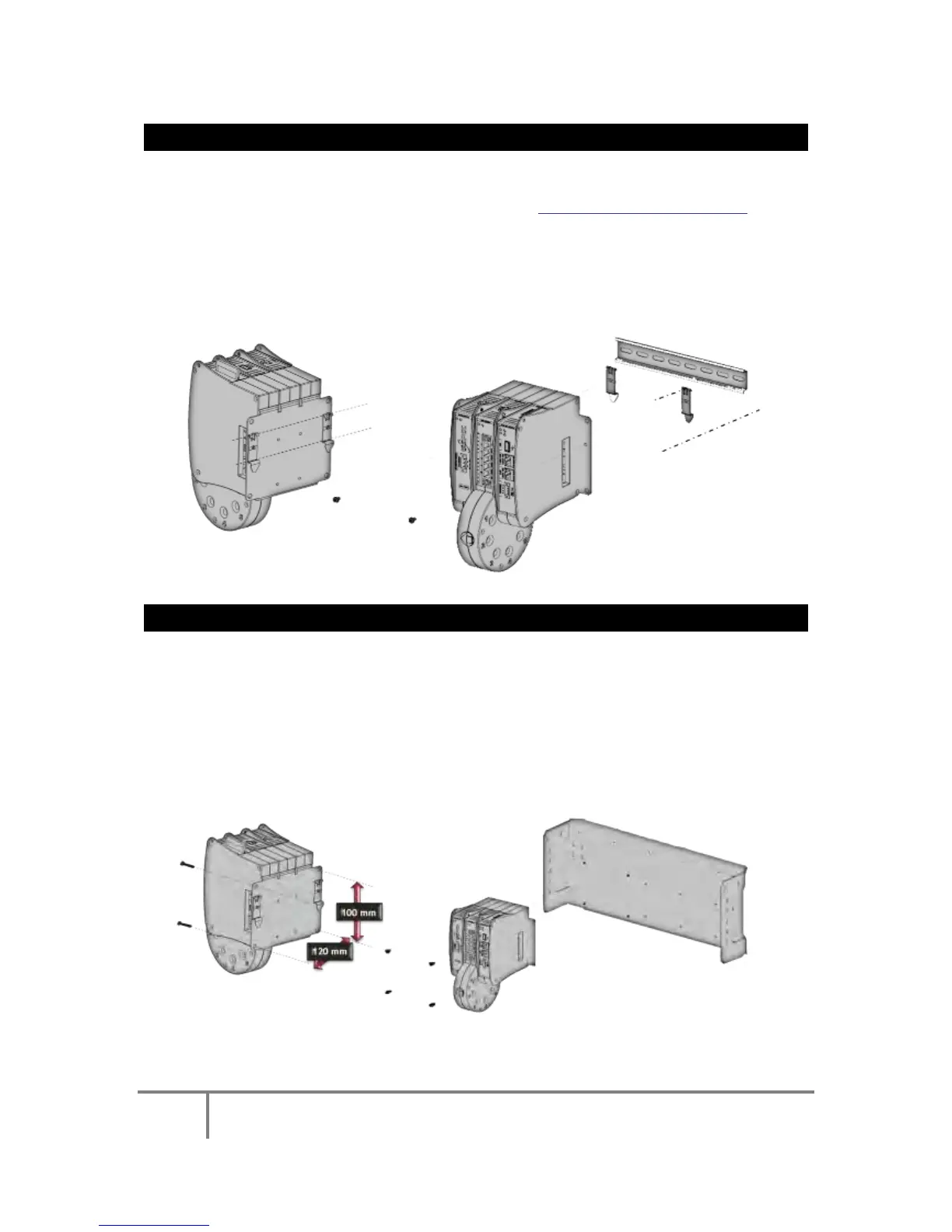
FASTENING THE G4K BLACKBOX TO A DIN RAIL
This i s the m ost c ommon m ounting m ethod & y ou w ill ne ed t he Clamping Yoke
Holders provided with G4K & the unit itself - see Components & Accessories.
Connect the Clamping Yoke Holders to the sides of the back plate of the
G4K using the 2 screws provided,
Attach the entire unit with the holders to the DIN Rail:
FASTENING THE G4K BLACKBOX TO A PLATE
The G4 K BLACKBOX can b e d irectly m ounted t o a plate us ing 4 x s tandard 7 mm
(0.27”) screws.
The distance of the screws on the G4K plate is (H x W) 10 x 12cm (3.9 x
4.7”). Ensure the plate has corresponding holes,
Simply screw the G4K unit onto the plate at the corresponding holes:
Successfully Mounted G4K Unit
www.GlobalTestSupply.com
Find Quality Products Online at: sales@GlobalTestSupply.com



 To Next Page