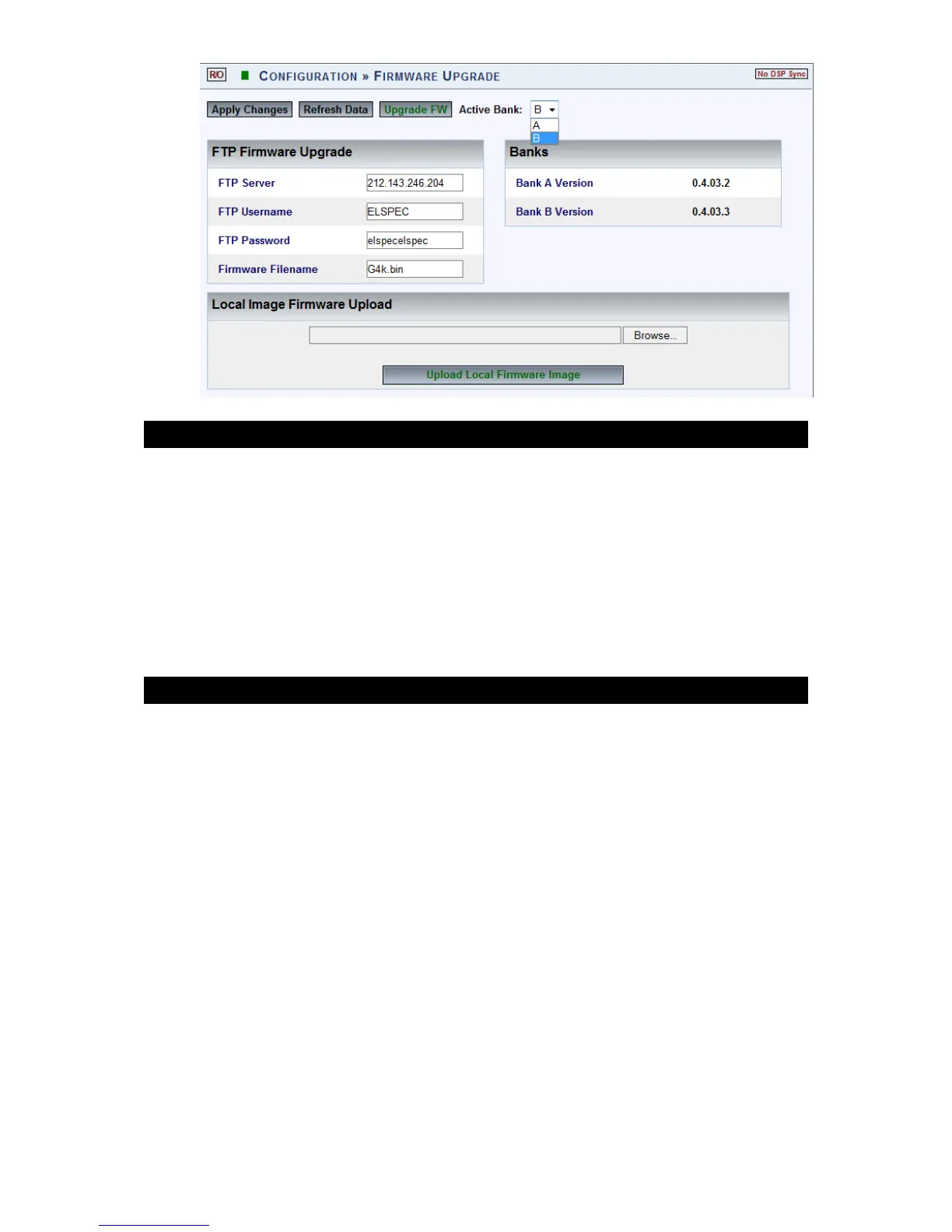
The Firmware Upgrade window will now open:
IN THE BANKS SECTION:
The BL ACKBOX im plements a c omprehensive F irmware m anagement
mechanism designed t o ensure a f ailure-free f ield u pgrading functionality.
The m echanism ensures t hat a t any t ime there ar e t wo F irmware im ages
available, where only one are active (running). The user may select which
one of the two banks is the active bank. When the user initiates a Firmware
upgrade, the newly added Firmware will load into the inactive bank. Once
the p rocess o f u ploading t he n ew Fi rmware i s c ompleted, t he u nit w ill
reboot from the inactive bank, turning it into the active bank.
OPTIONS & DISPLAY
Active Bank: Indicates w hich F irmware B ank is act ually in u se. S elect
the applicable version Bank A/B
Bank A/B Version: Displays a B ank’s Firmware and condition. A numeric
only Firmware name means it’s a valid Firmware, which is ready to use.
In s ome situations t he Firmware co uld b e f urther m arked with a prefix
character t o id entify a F irmware s tatus. T he t able b elow d escribes
status prefixes available:
www.GlobalTestSupply.com
Find Quality Products Online at: sales@GlobalTestSupply.com



 To Next Page