Eyecon 9420 & 9430 Instruction Manual 101
4.5 Practices common to all modes
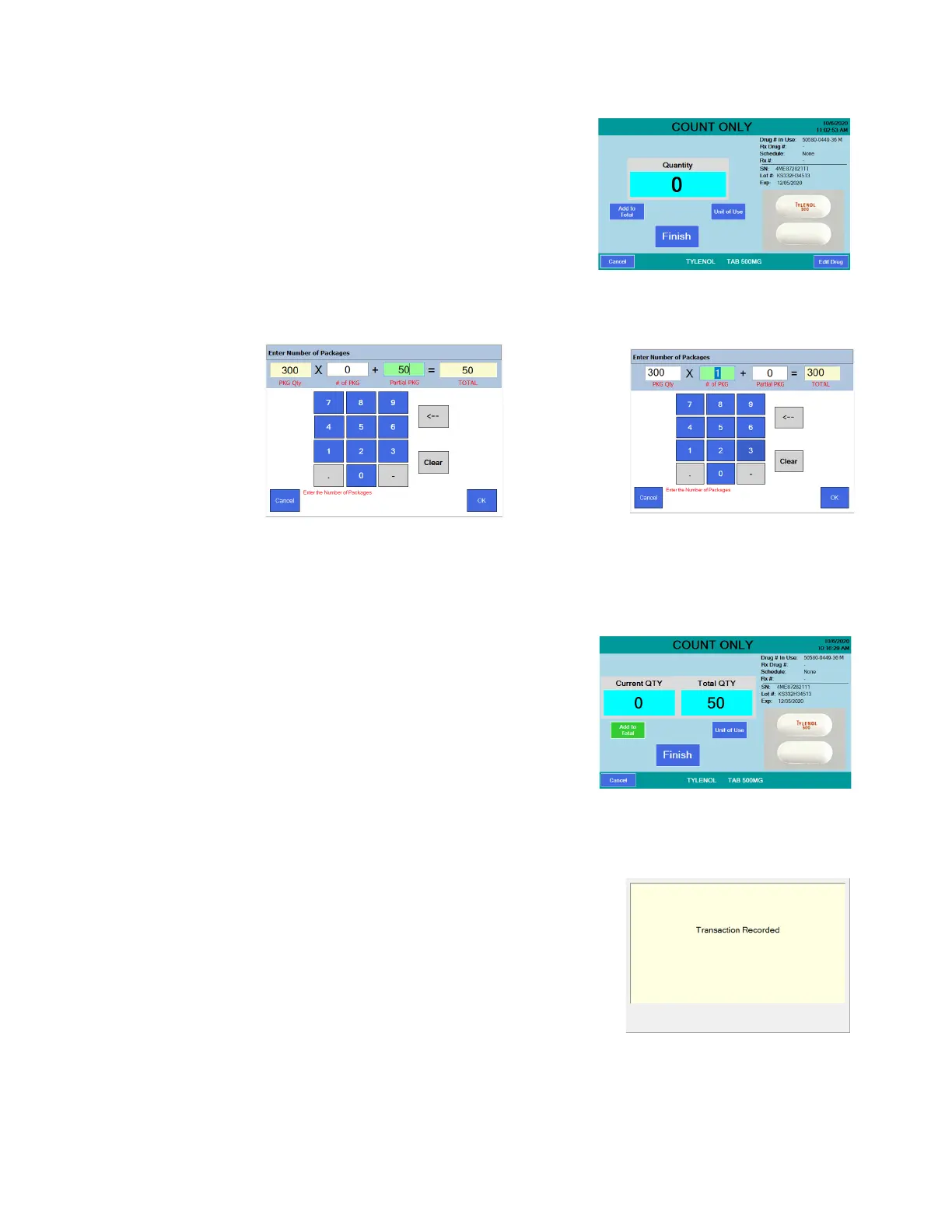
Below is an example of how this is used.
1. Scan a barcode and, with the counting
platter empty, press the Unit of Use
button on the COUNT ONLY screen,
shown at right.
2. A keypad will be displayed. The entry
window is pre-populated with a quantity
of one package. The database knows
this drug has 300 pills in one package
and enters that in the first field
automatically. To change the number of packages, enter a new quantity and
press the OK button to accept.
3. The COUNT ONLY screen is displayed
showing the Total QTY calculated by
the last screen. You can add to the
current quantity by:
• Scanning another bottle and
pour additional pills on the tray to
achieve the desired quantity.
OR
• Press the Unit of Use button to include another full bottle or manually
enter a quantity.
3a. Press the Finish button and the total
quantity dispensed is recorded. See screen
at right.
See Data menu on page 37 for
information regarding recorded data
and pill photo examples.
Unit of Use with partial package Unit of Use with complete package



 To Next Page