104 Eyecon 9420 & 9430 Instruction Manual
Eyecon operation
4.5.10 Dispensing large quantities
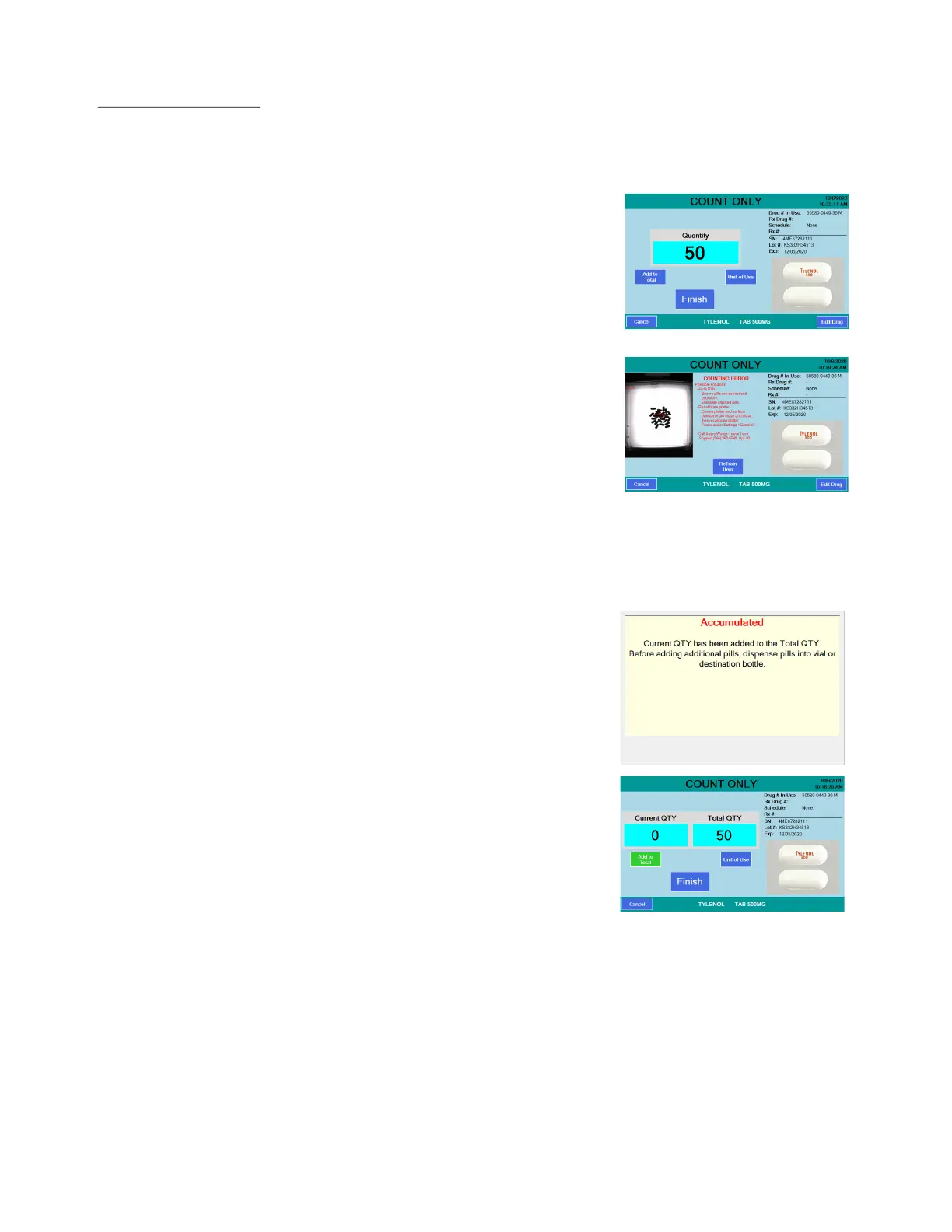
When dispensing more pills than can be comfortably placed on the platter, you can use
the Add to Total key to save the current tray count, then remove the pills to a vial, you
can then count another tray of pills. This can be repeated as necessary.
1. Scan the barcode and pour the pills on the
tray. Don’t fill the tray more than 70-80% or
it may be difficult to get the pills to lie flat or
unstack them.
2. If the pills are stacked on one another the
screen may change, highlighting the
position of the pills that were not able to be
counted.
3. Lift the tray about 1/4” and forcefully
tapping it back down to separate pills from
each other, repeat as needed. For more
severely stacked pills or completely flat
pills, you may need to use the spatula to
help get the pills to a single layer. However, pouring pills in a scattering motion
and not pouring too many, causing over-crowding, will minimize the need to
unstack pills. The COUNT screen will return with the quantity shown.
4. Press the Add to Total button and the
screen at right appears. This message will
remain on the screen until you dump the
pills off the tray. It is recommended that
you do NOT leave the counted pills in the
funnel to avoid invalidating the count in
case some of the pills fall into the funnel
during the next pour from the stock bottle.
5. Dispense the pills on the tray into a vial
using best filling practice and this screen
appears. See Count Only mode on page
80.



 To Next Page