Eyecon 9420 & 9430 Instruction Manual 107
4.5 Practices common to all modes
4.5.12 Double Count (DEA Controlled Substances)
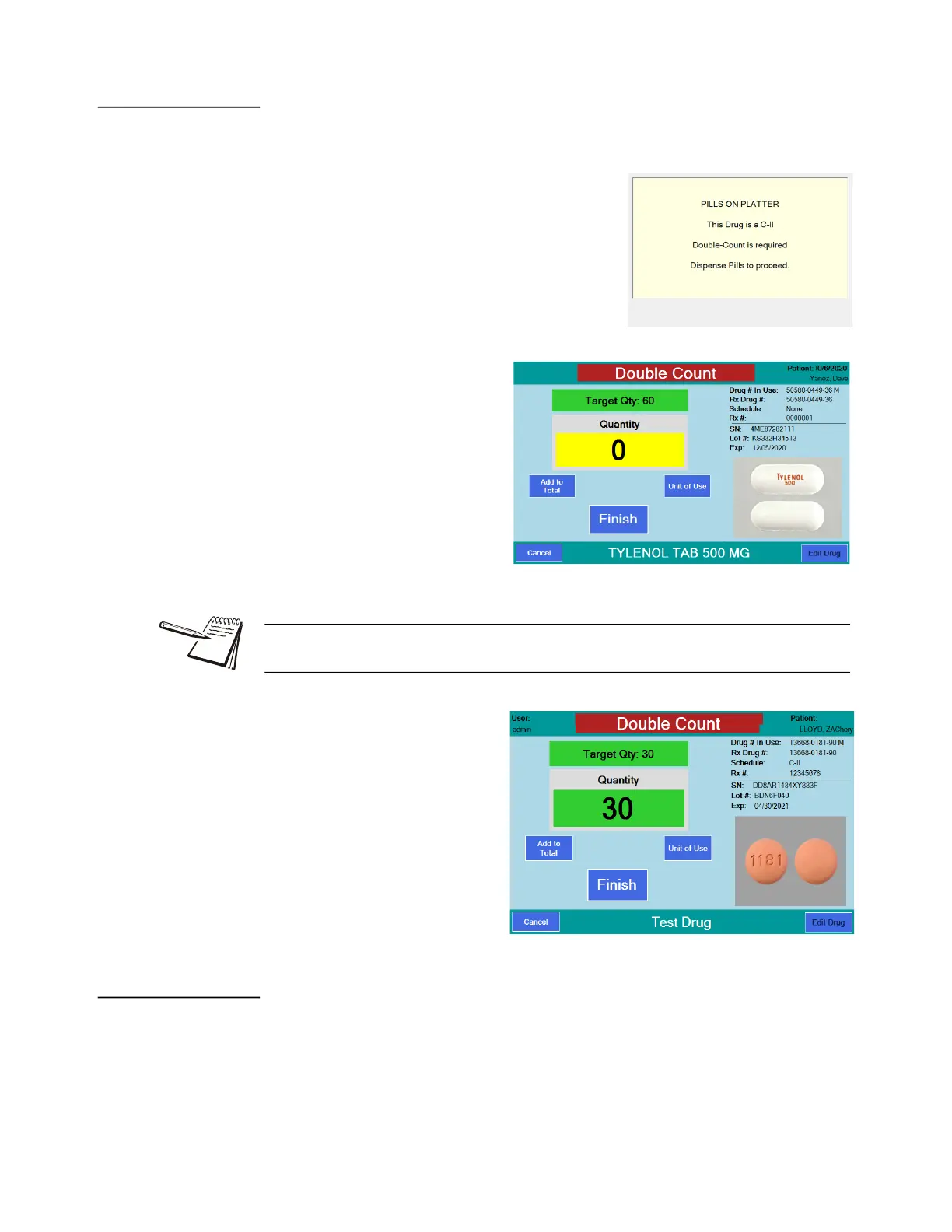
If the Rx being dispensed is a controlled substance, a double count may be necessary
depending on the setting. See Double Check menu on page 48.
1. Begin the counting procedure as usual and
when you press Finish, the transaction is
recorded and, if a double count is required,
the display at right will appear.
2. Remove pills from the
counting platter. The
Double Count screen is
displayed.
3. Re-pour the pills on the
platter and be sure the
Quantity matches the
Target Qty: window. Press
the Finish button to finalize
the double count. The
transaction will be recorded
and a second annotated
tray photo will be saved.
4.5.13 Back Count (DEA Controlled Substances)
The Back Count feature is used to count the remaining pills in the stock bottle after
each dispense based on the Back Count Schedule Code setting. Back Counts must
also be enabled. See Double Check menu on page 48.
When you work with a Scheduled drug, the schedule is listed in the upper right corner
of the screen. In the example above, the schedule is C-II.



 To Next Page