22 Eyecon 9420 & 9430 Instruction Manual
Introduction
2.9.2 Install software updates
1. If your Eyecon is connected to the internet, you can download the latest updates
by using the Auto Updater menu item and choosing Update Now.
If you are not connected to the internet, you can download the latest software
updates from the Eyecon website eyeconvpc.com
to your computer, place
them on a USB memory stick, and transfer the updates to the Eyecon. Be sure
the memory stick does not contain an older version of an update file before
copying the current update file.
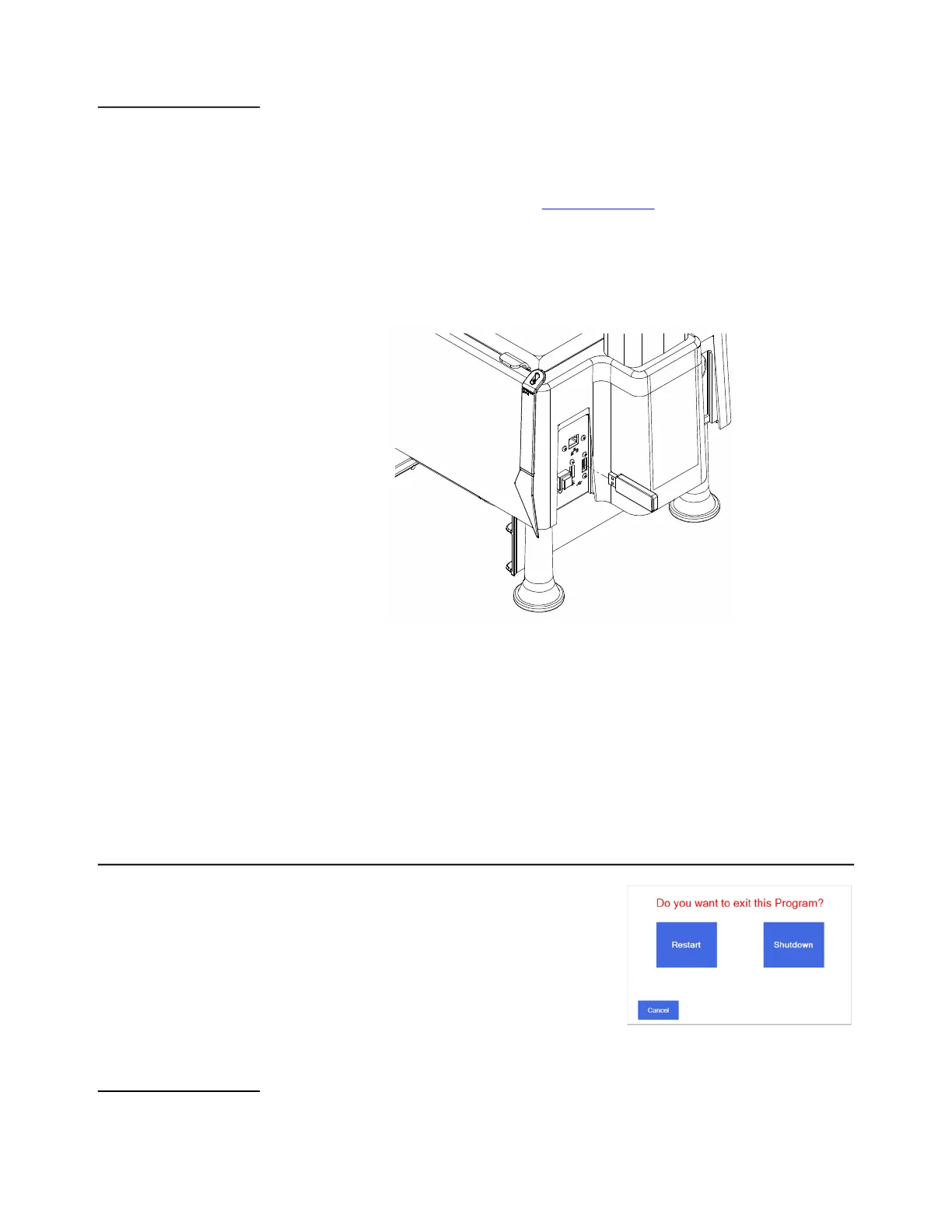
2. Plug the USB memory stick into an unoccupied USB port of the Eyecon. See
Figure 2.6 for USB port location.
Figure 2.6 USB memory stick Installation
3. Follow the prompts displayed on the Eyecon.
If no message appears when the USB memory stick is plugged in, then
follow the instructions below.
If you see a message asking if you want to reboot the Eyecon, click on
NO.
2.10 Turn off the Eyecon (shutdown)
The Shutdown button in the START screen is used
for restarting or turning off the Eyecon. You will see
the display at right. You can choose Restart,
Shutdown or Cancel.
After shutting down the Eyecon, please wait until
the screen goes from dark gray to black before
disconnecting the power cord.
2.10.1 Restart
Press the Restart button to begin a reboot sequence and return to the START screen.



 To Next Page