116 Eyecon 9420 & 9430 Instruction Manual
Audit reports
6.4 Remote Auditor
Remote Auditor is a Windows-based application that can be installed on your
pharmacy PCs. This application provides the same functionality as the Auditor in your
local Eyecon but also allows you to print tray photos as well as specific transaction
information. Because the functionality of the remote auditor is practically identical to the
audit application resident in the Eyecon, this section only covers those parts that are
different.
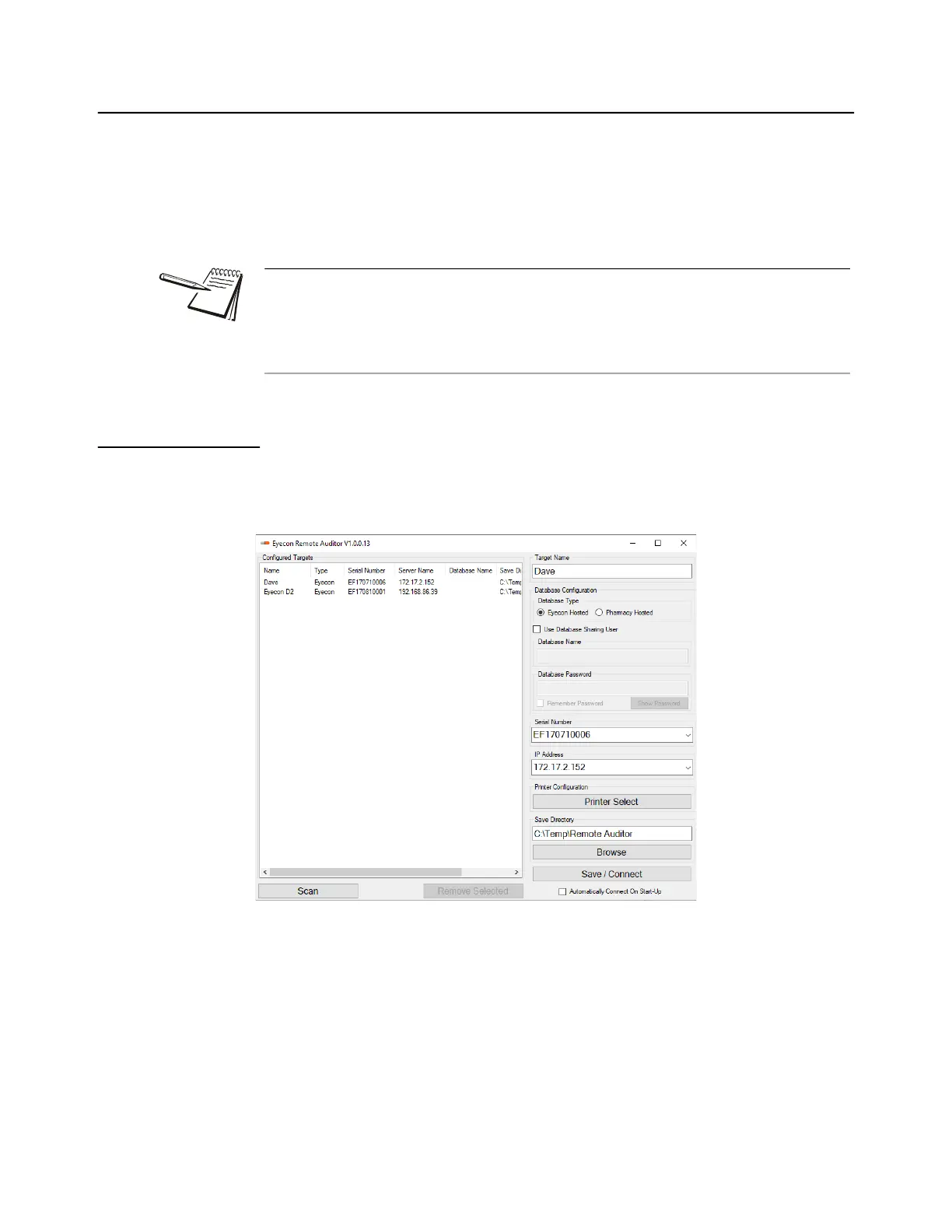
6.4.1 Configuring Remote Auditor
Once the Remote Auditor is installed, you will need to configure a few fields. This
example shows how to configure for Eyecon hosted database.
1. Choose Eyecon hosted database.
2. Click on Scan to see all available Eyecons in the network.
3. Double click on the Eyecon that is the server.
The fields on the right side of the screen populate with the Target Name,
Serial Number, and IP address of the selected Eyecon.
4. Click on Save / Connect after all settings are correct.
The Remote Auditor application must be installed on a PC that is on the same
network as the Eyecon and Allow Remote Access must be enabled on that Eyecon.
See Remote Server menu on page 53 for information on this setting. If using SQL DB
Sharing, the Remote Auditor should point to the Eyecon set as server or to the
pharmacy hosted SQL database, if required.



 To Next Page