Eyecon 9420 & 9430 Instruction Manual 103
4.5 Practices common to all modes
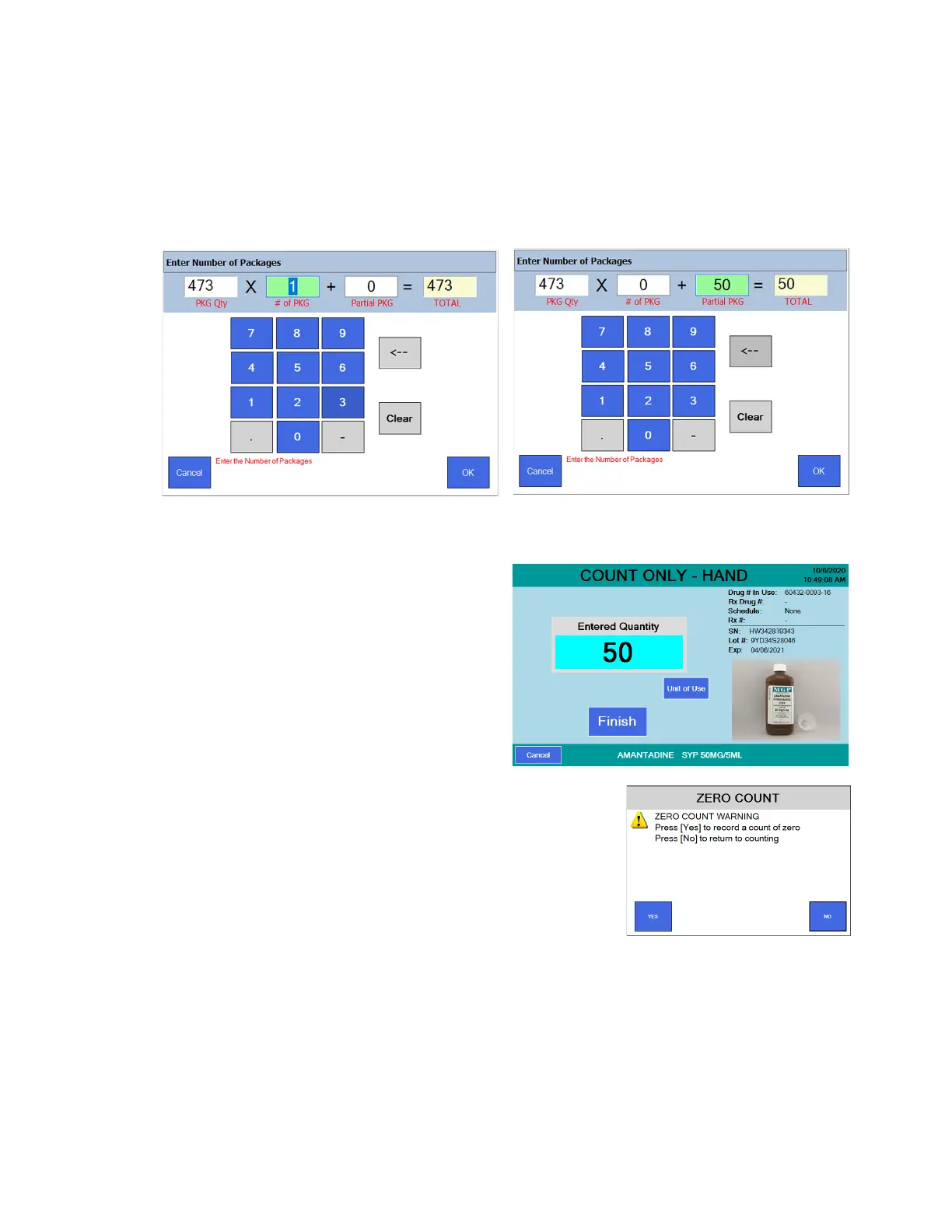
2. If you press the Unit of Use button, the PKG Qty window is pre-populated with
the full amount of the package. In this example, it is 473 ml. The # of PKG
window is also pre-populated with either 0 or 1, depending on if the target
quantity is above or below a full package.
For example, if the target amount to dispense is 50 ml of this fluid, enter 0 for
# of PKG and 50 in the Partial PKG window. See the example screens below.
If the value is acceptable, press OK or see step 2a below.
2a. If a change needs to be made, press the Clear button. The entry window will
be blank. Use the numeric keys to enter the correct value and press OK.
3. Press OK and the Hand
Count Only screen is
displayed with the entered
value.
4. Press the Finish button to
save the entry. The
Transaction Recorded
screen briefly appears and
then the SCAN STOCK
ITEM screen is displayed.
4a. If the Finish button was
pressed with a count of 0, a message
screen will be displayed. Press Yes to
record the zero count or press No to cancel
and return to the Hand Count Only screen.



 To Next Page