EasyManua.ls Logo

Fona XPan DG Plus - Mains Connection Module

Fona XPan DG Plus
148 pages
Print Icon
To Next Page IconTo Next Page
To Previous Page IconTo Previous Page
Loading...
FONA XPan DG Plus
55
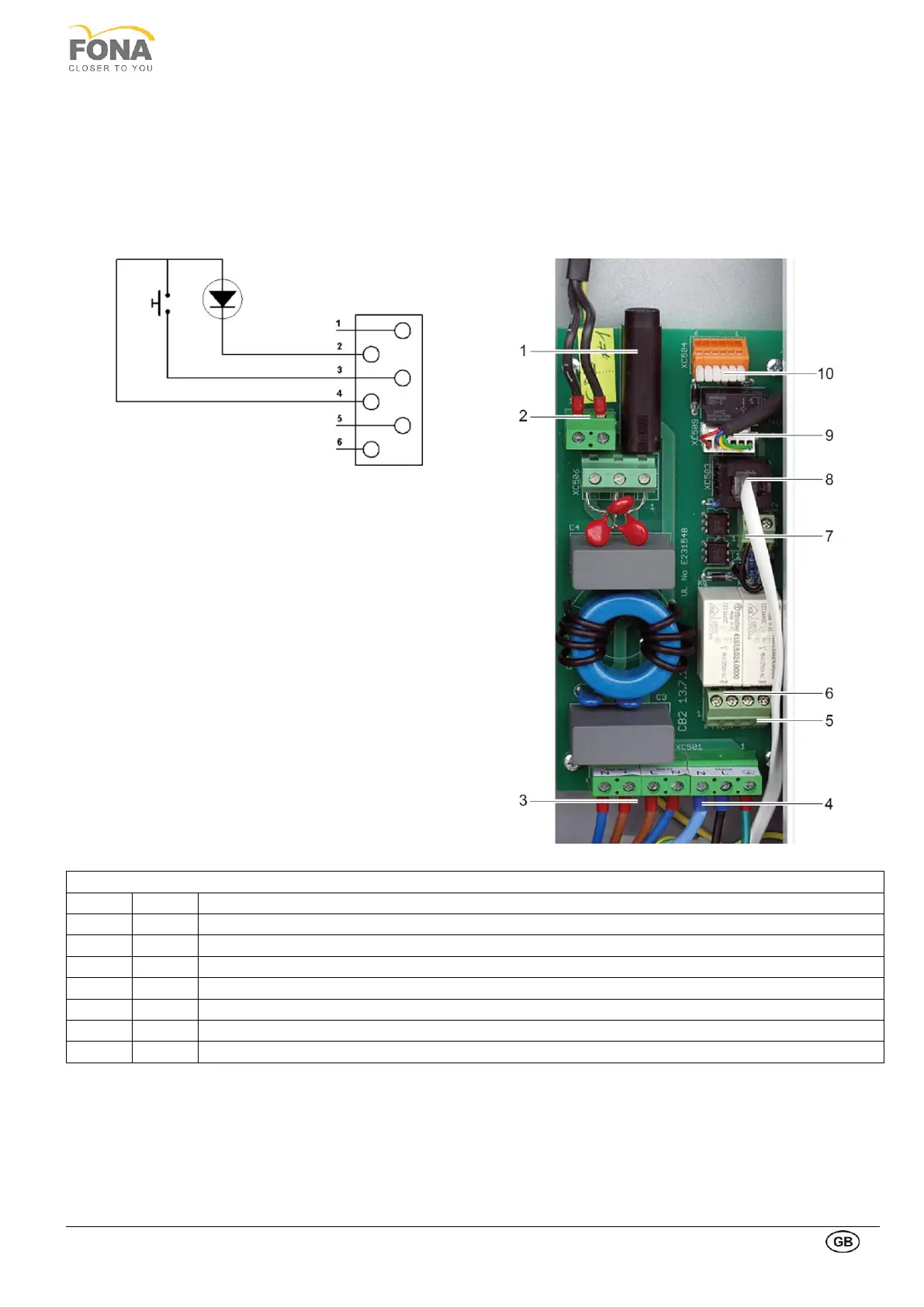
2.1.3. Mains connection module
The Mains Connection Module is placed on the right side of the unit, behind the Mirror Cover.
The mains input is on the connector XC501. The On/Off button under the hand holders, enables the mains voltage
passing through the filter, the varistors and the fuse F501. The output XC505 connects the Mains Connection Module
with the Dual Power Supply via the EMI filter.

DIAGRAM OF X-RAY
PUSHBUTTON
CONNECTORS
1
F 501
Mains Power Input
2
XC505
Output 230 VAC
3 - 4
XC501
Mains input and On/Off button connector
5 6
X1
External light X-ray on and system on
7
X2
Contacts for door switch, closed with a jumper if the door switch is not connected
8
XC503
X-ray pushbutton (X ray switch on wires 3 and 4, see the diagram of X-Ray pushbutton)
9
XC509
Internal X-ray button
10
XC504
Block for low voltage distribution

Table of Contents