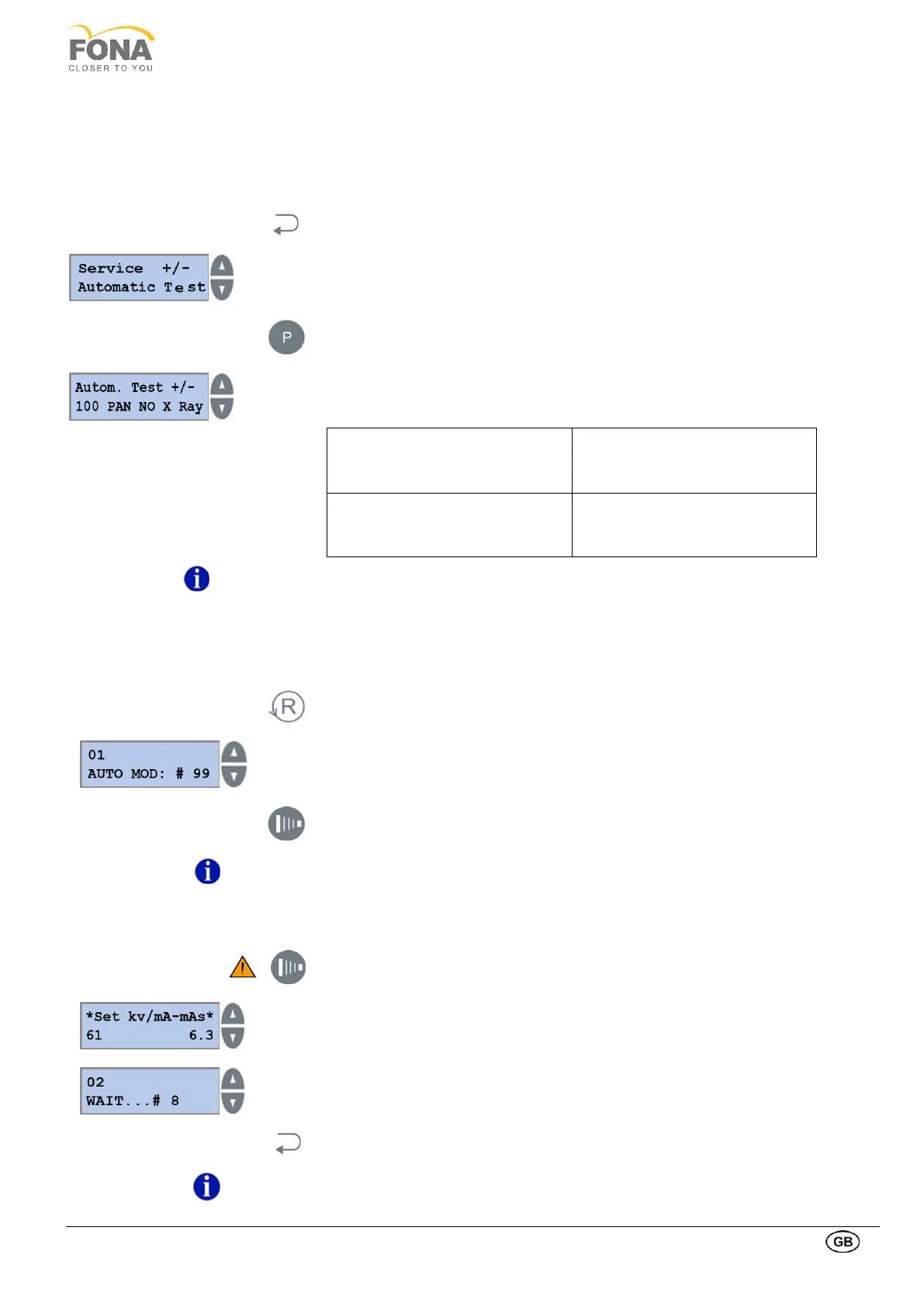
2.2.15. Automatic Test
This function is intended to perform a number of panoramic/cephalometric cycles with/without x-ray emission for the
program and technique factors as set before entering this function.
By installing the detachable sensor in PAN or CEPH position is possible to perform panoramic or cephalometric
movements accordingly.
By keeping pressed the BACK key for 5 s the system enters Service Mode.
Service function can be selected using
the INCREASE or DECREASE keys on the RIGHT side of the display.
Scroll the menu until Automatic Test is displayed.
Press the PROGRAM key to enter Automatic Test.
INCREASE or DECREASE keys on the RIGHT side of the display to select:
100 PAN NO X Ray
100 panoramic movements
without X-ray emission
100 CS NoRX
100 cephalometric movements
without X-ray emission
10 PAN + X ray
10 panoramic movements with X-
ray emission
10 CS + X ray
10 cephalometric movements with
X-ray emission
The PAN automatic tests are described below. The respective CEPH functions have the
same flow.
2.2.15.1. 100 PAN NO X-Ray
Press RETURN Arm Movement key to start 100 PAN NO X Ray.
• A Reset is done at the beginning
• Program number selected is reported on the first line
• Number of cycles missing on second line
Press the EXPOSURE key to exit Automatic Test 100 PAN NO X Ray.
EXIT from SERVICE MODE is done at the end of this function.
Press the EXPOSURE key to start 10 PAN + X ray.
Possibility to change technique factors
INCREASE or DECREASE keys on the LEFT to change kV, 61 to 85 kV
INCREASE or DECREASE keys on the RIGHT to change mA, 4 to 10 mA
• A Reset is done at the beginning
• Program number selected is reported on the first line
• Number of cycles missing on the second line
Press the BACK key to exit Automatic Test 10 PAN + X ray.
EXIT from SERVICE MODE is done at the end of this function.



 To Next Page