EasyManua.ls Logo

Fona XPan DG Plus - LEDS Test

Fona XPan DG Plus
148 pages
Print Icon
To Next Page IconTo Next Page
To Previous Page IconTo Previous Page
Loading...
Technical Manuals
86
2.2.14. LEDS Test
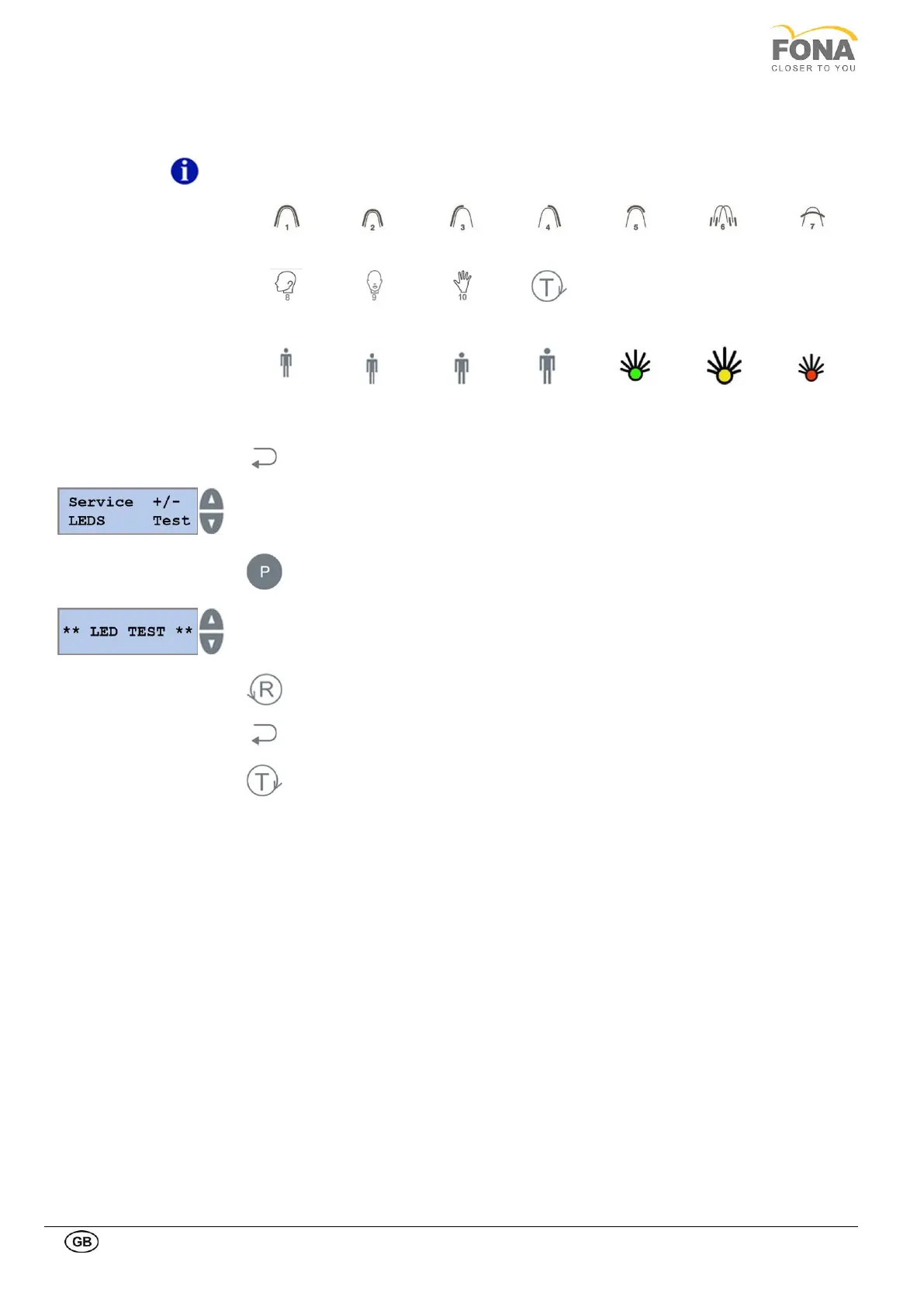
This function is intended to turn ON one by one all the lights on the control panel as listed in the table below.
NOTE
The yellow light on the X-Ray pushbutton is not included in this test.
P1
P2
P3
P4
P5
P6
P7
P8
P9
P10
TEST
S
M
L
XL
GREEN
YELLOW
RED
By keeping pressed the BACK key for 5 s the system enters Service Mode.
Service function can be selected using the INCREASE or DECREASE keys on the
RIGHT side of the display.
Scroll the menu until LEDS Test is displayed.
Press the PROGRAM key to enter LEDS Test.
Press RETURN Arm Movement key to start LEDS Test.
Keep pressed BACK key to exit LEDS Test.
Keep pressed TEST Mode key to exit SERVICE MODE.

Table of Contents

Related product manuals