Maintenance and care
107
Changing the print heads
PostBase One tells you when to change the
print heads.
• Confirm the message.
• Open the MENU.
• Choose PRINT SYSTEM.
• Choose C
HANGE CARTRIDGES.
The exchange procedure starts.
PostBase One moves the print heads to the
exchange position and opens the flap.
Removing the print heads
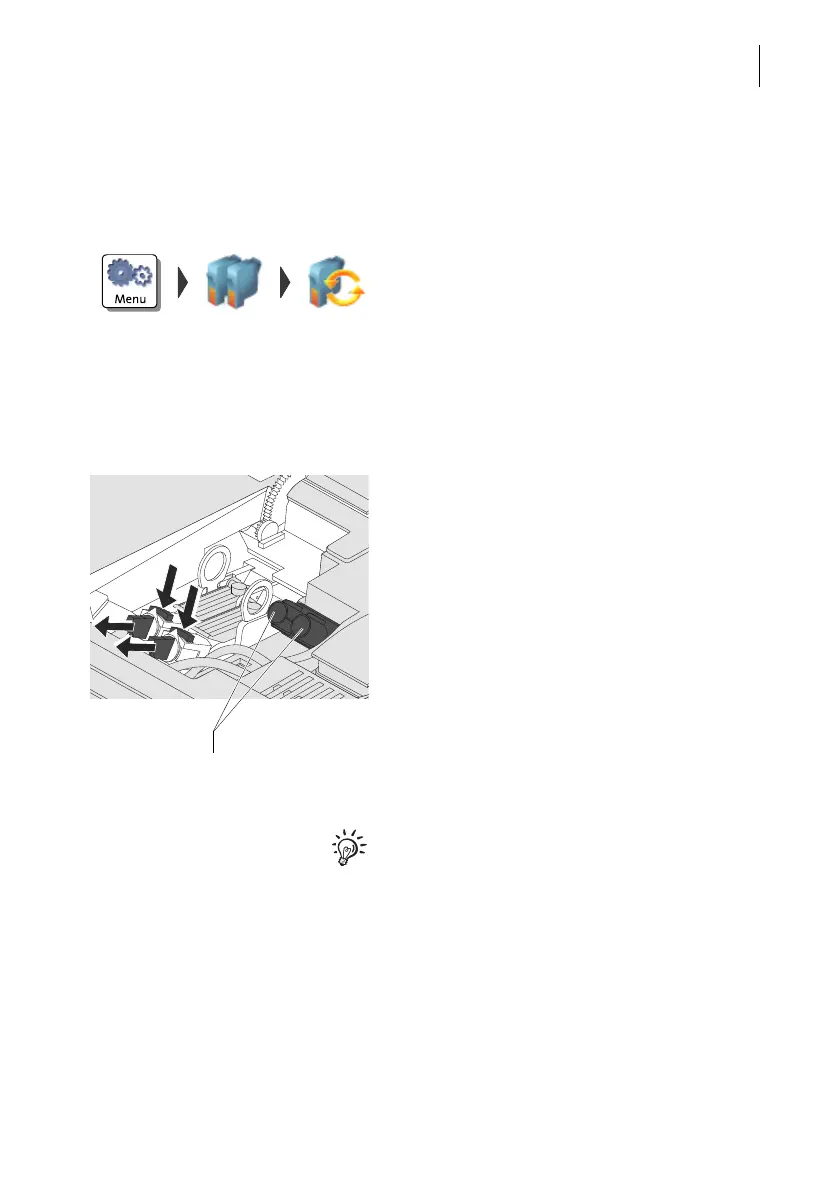
Disconnect hose couplings:
• Hold an absorbent cloth ready.
• Press to release and remove the coupling
to the front.
• Wipe the hose coupling with an absorbent
cloth.
• Put hose coupling in according
stand-by position (Left / Right).
• Disconnect the coupling of the second
hose in the same way.
Use the stand-by position for the hose cou-
plings also when using cartridges instead of
print heads. The hoses will be fixed and not
lay loosely.
Stand-by position for
hose coupling (L / R)



 To Next Page