Home
FP
Postal Equipment
PostBase One
Page 108
FP PostBase One - Page 108
204 pages
Manual
Save Page as PDF
To Next Page
To Next Page
To Previous Page
To Previous Page
Loading...
PostBase
One Franking System
108
•
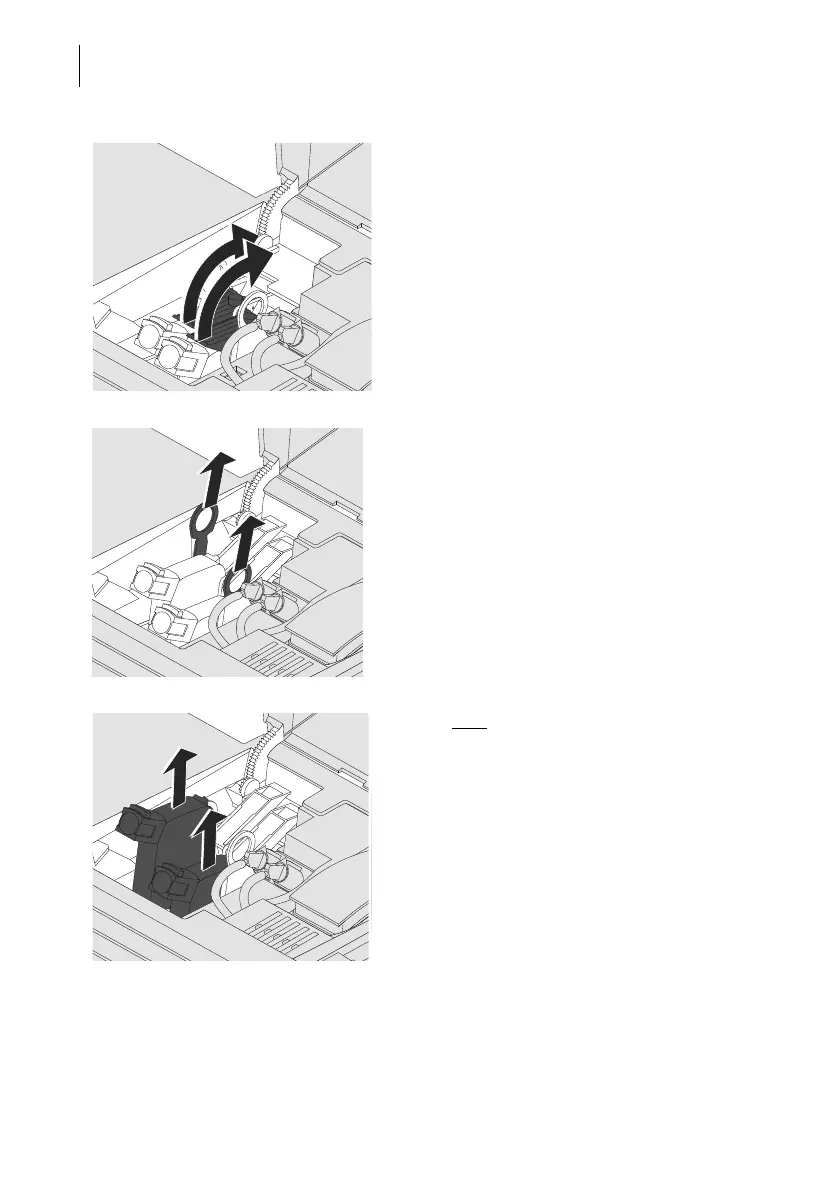
Relea
se the print heads:
Turn the two blue-green levers upwards.
•
Pull both lifters (blue-g
reen) upwards.
The print heads
are lifted from th
eir brackets.
•
Pu
ll both
print heads upward out of the
bracket.
107
109
Table of Contents
Main Page
Default Chapter
2
About this Manual
2
Table of Contents
3
1 Safety Tips
7
2 Short Description of the Postbase One
9
3 The Basics of Operation
13
Turning the Postbase One on / off
13
Standby
14
Adjusting the Display Inclination
15
Setting the Letter Catch Tray
15
Adjusting the Feeder (Optional)
16
Adjusting the Letter Path
16
Separation Function
17
Recommended Settings for Separation (Overview)
17
3.5.2.2 Adjusting the Pressure
18
3.5.2.3 Adjusting the Separation
19
Sealing Function (Optional)
21
Screen Elements and Operation Philosophy
22
The Touch Screen
22
The Home Screen
24
The Product Calculation Menu
25
The Menu
26
Lists
27
Adjustment Menus
27
Pop-Up Windows
28
Procedures (Wizards)
29
Zero Test Print
29
4 Setting the Franking Imprint
33
Postage / Royal Mail Product
34
Setting a Product Via Shortcut
35
Setting Mailing Data and Weighing
36
4.1.2.1 Postbase One with Static Scale - Normal Weighing
36
Postbase One with Static Scale - Differential Weighing (Optional)
38
Postbase One with Dynamic Scale (Optional)
41
Setting the Weight Manually
43
Date
44
Advertising Imprints
45
Special Features of Product Setting
46
Business Mail (Optional)
46
Pre-Pay Reply
47
5 Franking
48
Changing the User
48
Setting / Changing the Account
49
Positioning and Franking Letters
50
Hand Feed Tray
50
Feeder - Batch Processing (Optional)
51
5.3.2.1 Preparations
51
5.3.2.2 Positioning Letters in Stack
53
5.3.2.3 Using the Batch Counter
54
Franking Labels
56
Displaying and Clearing down the Item Counter
59
6 Displaying and Printing Registers
60
7 Download Postage
61
8 Postbase One with PC Connection
62
9 Printed Postage Impression - PPI (Optional)
65
10 Using the DX Feature (Optional)
67
Things Worth Knowing about the DX Feature
67
Franking DX Mail
68
Displaying DX Information
69
Displaying and Printing DX Information (Example Navigator)
70
11 Alternative Carrier Mode (Optional)
71
Start Alternative Carrier Mode
71
Features and Settings in Alternative Carrier Mode
72
Franking in the Alternative Carrier Mode
73
Exit Alternative Carrier Mode
73
12 Special Imprints and Functions
74
Stamping Incoming Mail (Optional)
74
Advert Only
76
Print Numbers
78
Feed Only / Count Mail Pieces
79
Seal Only (Optional)
80
13 Account Administration
81
Switch Account Administration on / off
81
Display Account Information
82
Set One Account to Zero
82
Set All Accounts to Zero
82
Print Account Report (Optional)
83
14 Advanced Settings & System Information
85
System Information
85
Display Brightness
85
Tone Signals
86
User Interface Language
87
Standby Time
87
Product after Standby
88
Auto off
88
Connection to Data Centre
89
View Contact Information
92
Access Control / PIN
92
Switch PC Software Mode on / off
93
Auto Postage Download
94
Uploading Product Data
96
Advert Counter
97
Adjusting Moistening (Postbase One with Sealer)
98
Remote Services
98
15 Maintenance and Care
99
Cleaning the Postbase One Franking System
99
Print System: Show Ink Level / Status
100
Changing the Ink Cartridges
101
Changing the Print Heads (Postbase One Bulk Ink)
106
Changing the Ink Tank (Postbase One Bulk Ink)
113
Aligning Ink Cartridges / Print Heads
116
Cleaning the Print System
118
15.7.1 Starting Automatic Print System Cleaning
118
15.7.2 Cleaning Ink Cartridges / Print Heads by Hand
119
Replacing the Ink Fleece
121
Topping up Sealing Liquid (Postbase One with Sealer)
123
Clean / Replace the Sponge (Postbase One with Sealer)
125
15.11 Calibrating the Touch Screen
127
15.12 Replacing the Battery
128
16 Tips for Troubleshooting
130
Error Messages
130
Possible Causes and Remedy
131
Clearing a Letter Jam in the Feeder
141
Clearing a Letter Jam in the Sealer
142
Safety Cap Has Been Released - Letter Transport Stops
143
17 Decommissioning and Disposing of the Franking System
144
Appendix
145
Graphical Symbols, Safety Signs and Product Safety Labels on the Postbase One Franking System
145
User Interface Symbols (Overview)
147
Moving the Postbase One to Another Location
153
Glossary
173
Technical Data
175
Postbase One - Components
175
Postbase One - System Configurations
177
Postbase One - Equipment
178
Ink Cartridges / Print Heads / Ink Tank
179
Mail Piece Specifications for Franking
180
Envelope Specifications for Automatic Feeding
181
Envelope Specifications for Sealing
182
Franking Machine Supplies
183
The Security Device
183
Declaration of Conformity
184
License
185
Security Declaration for Data Usage
187
Index
189
Postbase One Franking System (Overview)
198
Service
203
Related product manuals
FP Postbase Mini
108 pages
FP PostBase Fusion
209 pages



 To Next Page