page | 63
It should be noted that the term “audio return” does not always refer to a physical
connection (i.. a separate output from the display back to the receiver). It may also
refer to the Audio Return Channel (ARC) which is an HDMI 1.4 feature and supported
only on specic devices. In either case, this option selects the command on the
remote control that selects the display audio, not necessarily the connector that the
display is connected to. Selecting an ARC input will allow GAVA to route TV audio to
the A/V receiver when the TV is selected as a source.
8. Click the Next button on the lower-right corner of the screen to continue to the
Control tab.
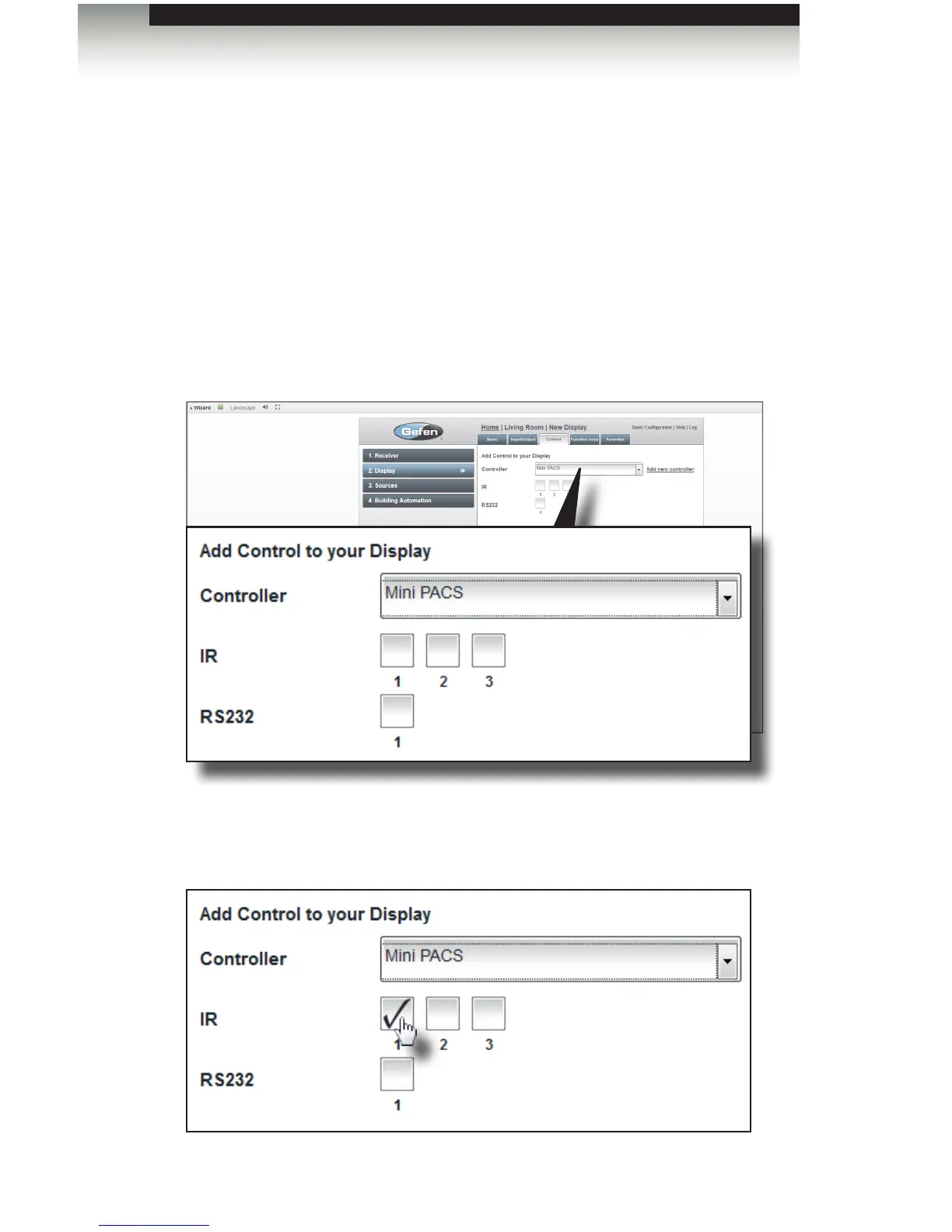
9. Select the controller (the device which will control the TV) from the Controller
drop-down list. Earlier in the set-up process, we added the Gefen Mini PACS as
the control device. Therefore, we will use the Mini PACS to control the IR on the TV.
10. Once the controller is selected, the type of controls which are available on the
controller will be displayed. In our setup, an IR emitter cable is connected from IR
port 1 of the Mini PACS to the IR sensor of the display. Therefore, we will select IR
port 1, as shown below.
Adding Rooms
Using the GAVA Wizard



 To Next Page