m908 User Manual, Rev. G
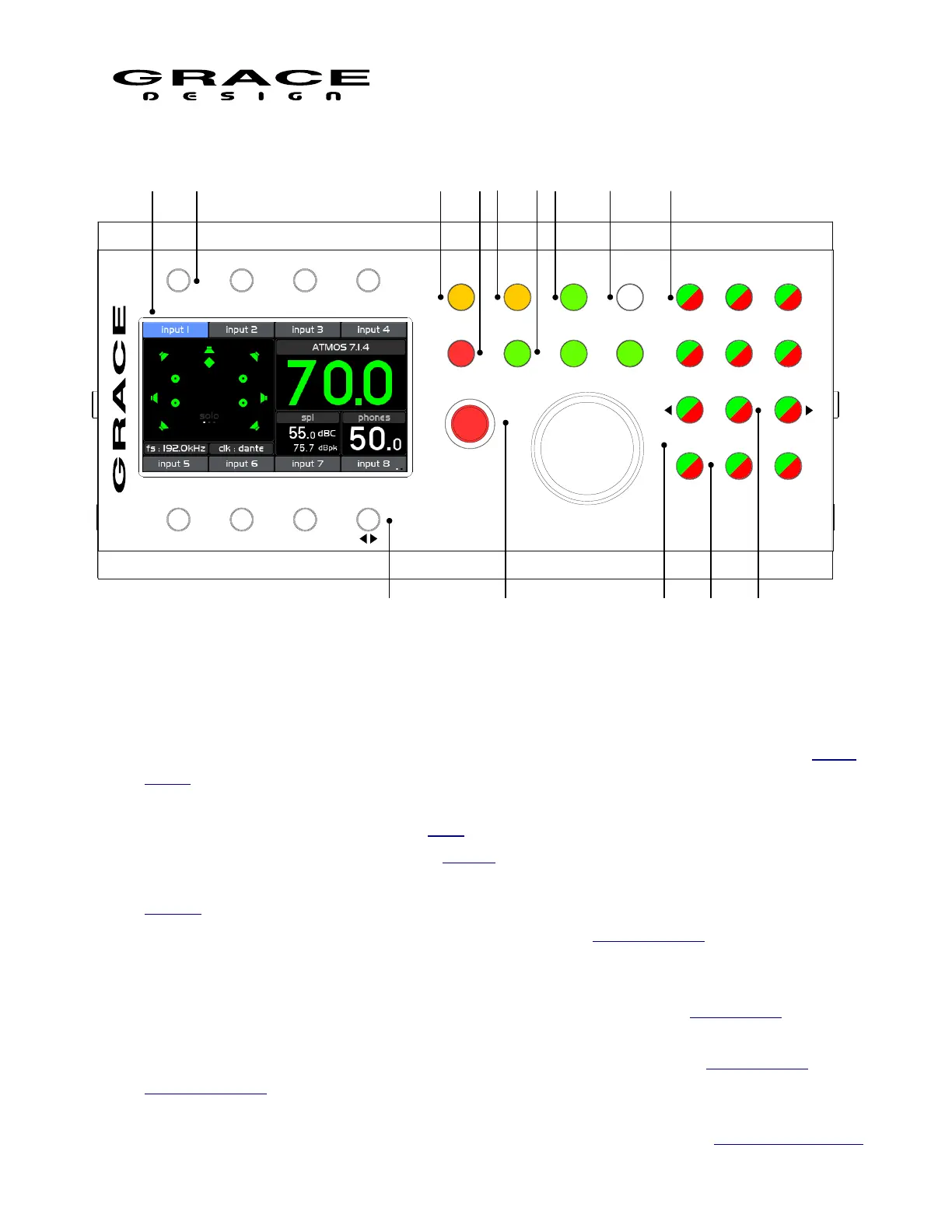
1. LCD Display screen: This color LCD displays all operating parameters and setup menus.
2. INPUT Select switches (8x): These switches select the input source to be monitored. See Input
Select operation for details.
3. DIM (x-feed): Dims the monitor system by a pre-programmed level. Push-hold enables/disables
the headphone cross-feed circuit. See DIM operation for details.
4. MUTE: Mutes the monitor system. See MUTE operation for details.
5. MONO (L-R): Sums the Left and Right channels (L+R). Push-hold for difference (L-R). See
MONO operation for details.
6. CR1, CR2, CR3: Control Room Speaker system select. See CR1 CR2 CR3 operation for
details.
7. MON > CUE (spl clear): Sends the current source being monitored to the CUE sends. Push-
hold clears the maximum spl field in the sound pressure level meter. See MON>CUE operation
for details.
8. SETUP: System Setup access. Push-Hold for System Workflow setup. See System Setup and
Workflow Setup for details.
Page 12 of 135 Table Of Contents



 To Next Page