Windsor 500 User Manual - Issue C
Operator Controls and Displays
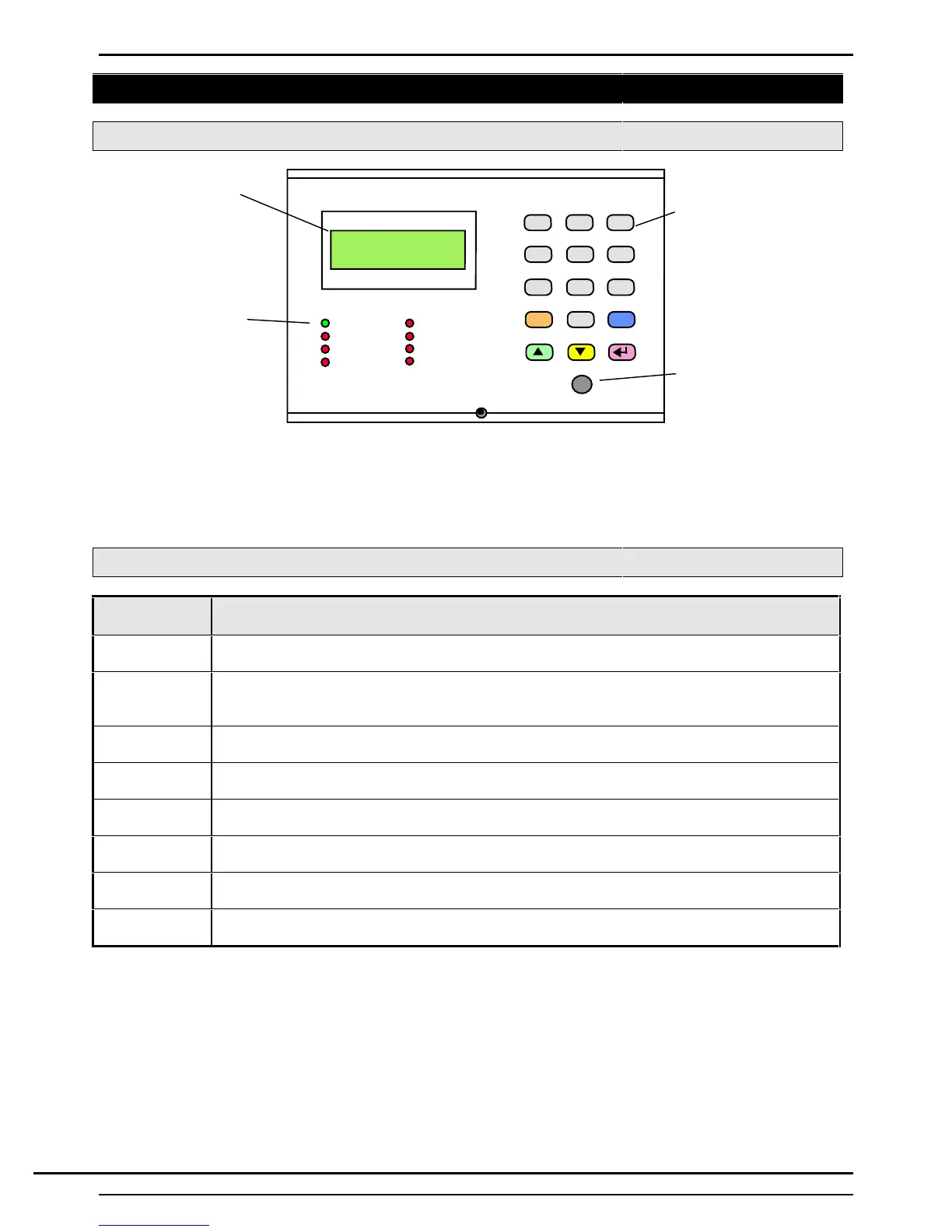
System Keypads
2 x 16 character
LCD backlit
display
Status LEDs
1 2 3
4 5 6
7 8 9
0
QUIT
GUARDALL
09:48
CALL ENGINEER
LINE FAULT
LATE WORKING
SET WARNING
HELP
MAINS
READY
DAY
MESSAGE
15 button backlit
keypad
Electronic Key
socket
The operator Keypad unit incorporates a back-lit liquid crystal display comprising 2 lines of 16 characters (32
characters), and a backlit Keypad used to gain access to the system and to perform all authorised user
functions. Keypads are fitted with an Electronic Key socket. Each Keypad unit incorporates eight LED warning
lights to alert the user to the following:
Keypad LEDs
LED
(Colour)
Description
Mains
(Green)
Illuminates at all times, providing the mains power is present. Flashing LED indicates
’Mains Fail’. LED extinguishes if the voltage level falls below an operational threshold.
Ready
(Green)
Illuminates after a user logs on if all areas authorised by the user PIN code are clear
(e.g., the area alarm log is empty, areas with a set response are clear, and all area alarm
circuits are clear).
Day
(Red)
Illuminates after a user logs on, if all authorised areas are unset. The ’Day’ LED will flash
during setting.
Message
(Red)
The ‘Message' LED is illuminated if an entry is contained in the area alarm log for the
Keypad authorised area(s) or the system log.
Call Engineer
(Red)
Illuminates it the system has been programmed for 'Engineer Reset' and a reset is
required by an authorised engineer.
Line Fault
(Red)
Illuminates after user logs on if a telephone line fault exists when the system is unset.
Set Warning
(Red)
Illuminated when a set warning condition exists (described later). A warning tone is also
emitted from the Keypad.
Late Working
(Red)
Illuminates when 'Late Working' is selected for the current day.
Technical Manuals Online! - http://www.tech-man.comTechnical Manuals Online! - http://www.tech-man.com


 To Next Page