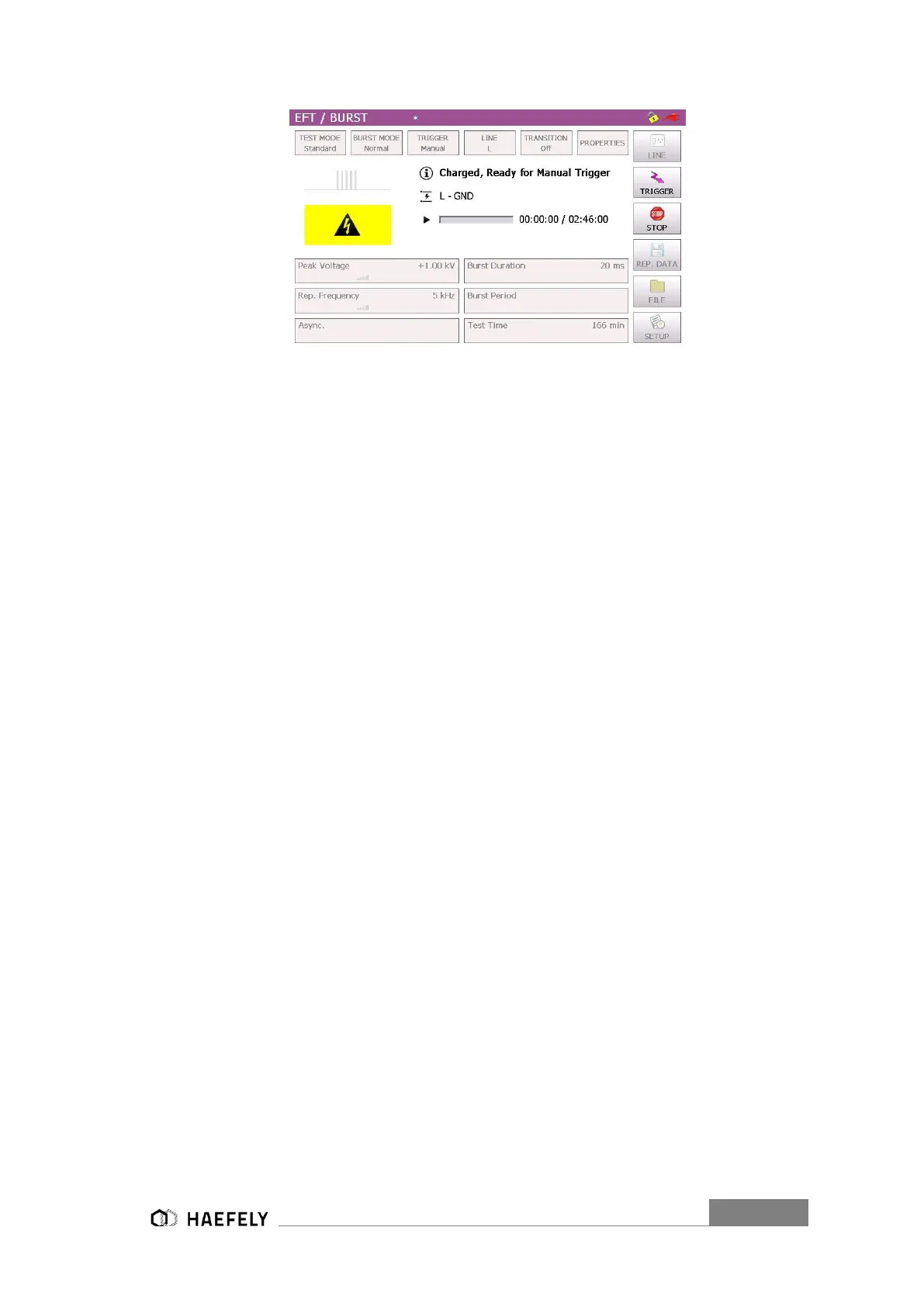
Figure 11-7: BURST mode Trigger normal
Furthermore, it shows between which line and GND the burst package gets applied. After
finalizing the process, it will be stopped when pushing the “Stop” button. A manual report gets
saved on the USB device, after selecting “Rep.Data” and “manual” selection in the “Setup” menu.
When selected automatic (Figure 6-3 Setup Menu) it gets saved automatically on the internal SD
card.
11.2.5 Synchronization
To synchronize the burst signal with the main supply source it is necessary to select in the menu
“Synchronization” and then “Line Sync.”. Adjustments of the angle can be done in a range from
0°to 359°. However, if no power supply is connected to the EUT supply input at the rear view, it
has to be entered “Async.”, otherwise it is impossible to get a Burst waveform in the output.
In external synchronization, the output with the position 8 Figure 6-2 Axos
8
back pannel in the
rear view is in use. An external source could be for instance a manual CDN. Finally, normal
operation through the touch screen is possible.
11.2.6 Burst mode
The Burst mode gives the user the option to select between “Normal”, “Continuous”, “Real” and
“Random BURST” signals. Afterwards the function gets automatically displayed on the screen
and can be applied to the EUT after pushing the “Start” button.


 To Next Page